Gemini · Gemini Essentials
Solve Technical Tasks Easily
Support technical tasks without deep coding skills
Create Without Knowing Code
Hey! Today, you'll learn how to build simple, visual things with Gemini — even if you've never written code before.
Gemini can turn plain descriptions or rough sketches into clean code, explain what it does, and help you improve it using everyday language. And you can use it as a starting point to build a website — no coding background needed!

Tech Tasks Made Simple
Let's put it this way: code is simply instructions written for a computer. Gemini's job here is to translate your words into a language the computer understands — and back: from machine instructions into human words you get.
Beginner-Friendly HTML/CSS
HTML and CSS are the simplest parts of coding because you can see what each part does.
- HTML describes what shows up on a page
- CSS describes how it looks — colors, layouts, spacing
You don't need to write these languages yourself. Gemini does the technical part; you guide the design.
Describe What You Want
To create something, you don't need technical instructions. You can simply say:
- "Make a centered title with a short paragraph below it."
- "Add a friendly button at the bottom."
- "Create a section with three cards in a row."
Gemini turns these plain descriptions into working code.

practice preview
Interactive practice
Fill in the blank
Complete a prompt that turns a description into code.
Describe a Simple Page
As you see, you can create a webpage without knowing any code. Just describe what you want to see. For example: "Create a simple page with a big title, a short paragraph, and a button centered underneath."
Gemini reads this as a layout:
- Title at the top
- Paragraph below it
- Button centered
- Clean spacing and alignment
Then it generates HTML/CSS that builds the page exactly as described.
What You Can Do With the Code
Once Gemini generates the code, you can immediately create something real:
- Preview it online by pasting it into any HTML/CSS editor
- Save it as an .html file and open it in your browser
- Use it as a prototype for a landing page or concept
- Share it with teammates or friends to gather feedback
- Add more elements by asking Gemini to update the snippet
This way, you're learning to build things with code, using Gemini as your builder!

Example: Making a Simple Web Card
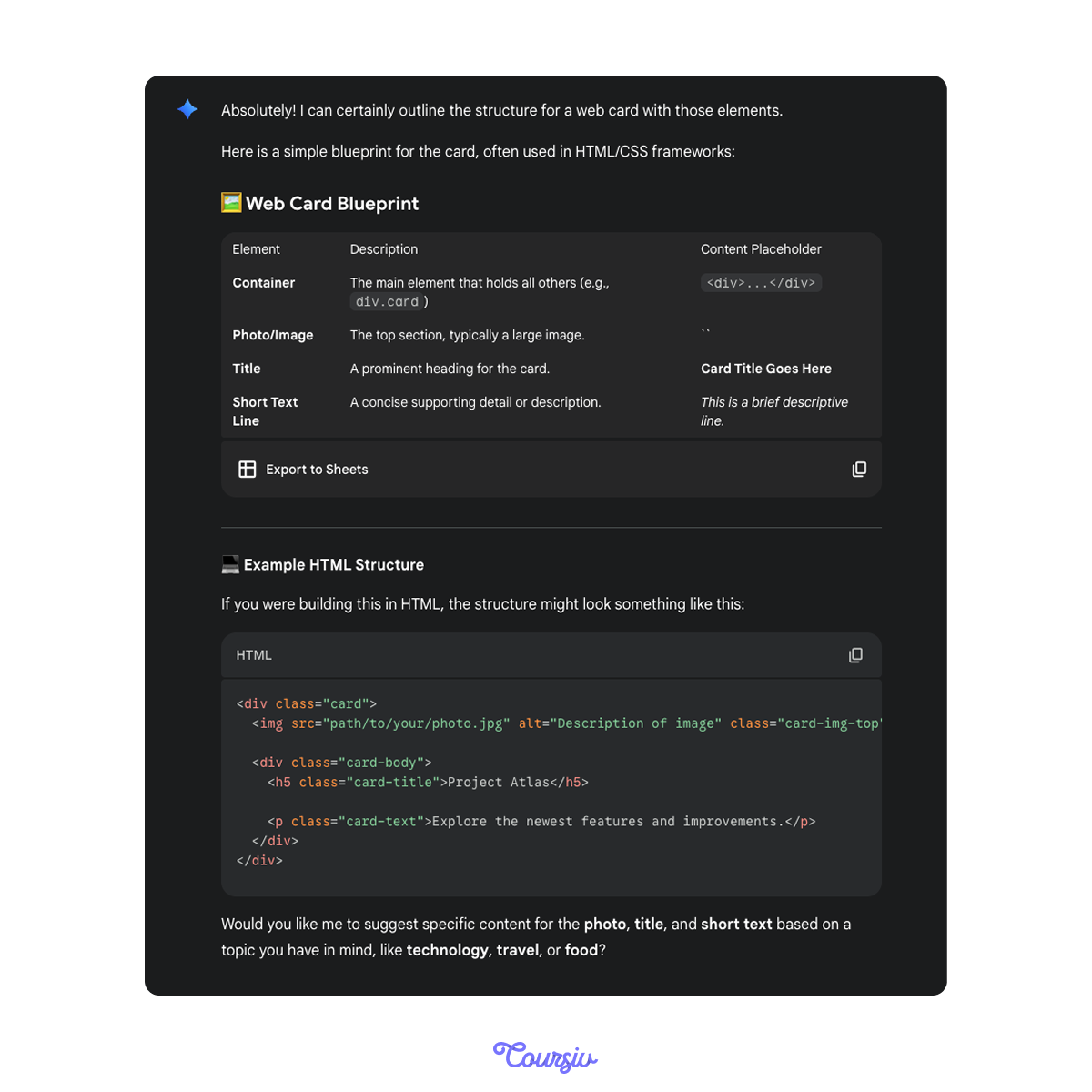
If you say: "Make a web card with a photo on top, a title, and a short line of text." Gemini gives you: a small box, a top image, text underneath, and balanced spacing.
You can update it easily by saying: "Make the corners rounder." or "Add a shadow." or "Use softer colors." Gemini updates the code automatically.
Choose one
Choose the prompt that gives Gemini clearer guidance.
Multimodal Inputs for Website Building
You can upload a screenshot, sketch, or photo of a layout. Gemini can detect sections and buttons, spacing and alignment, color patterns, and relative sizing.
This means your rough drawing can become a real webpage!
"Here's My Sketch"
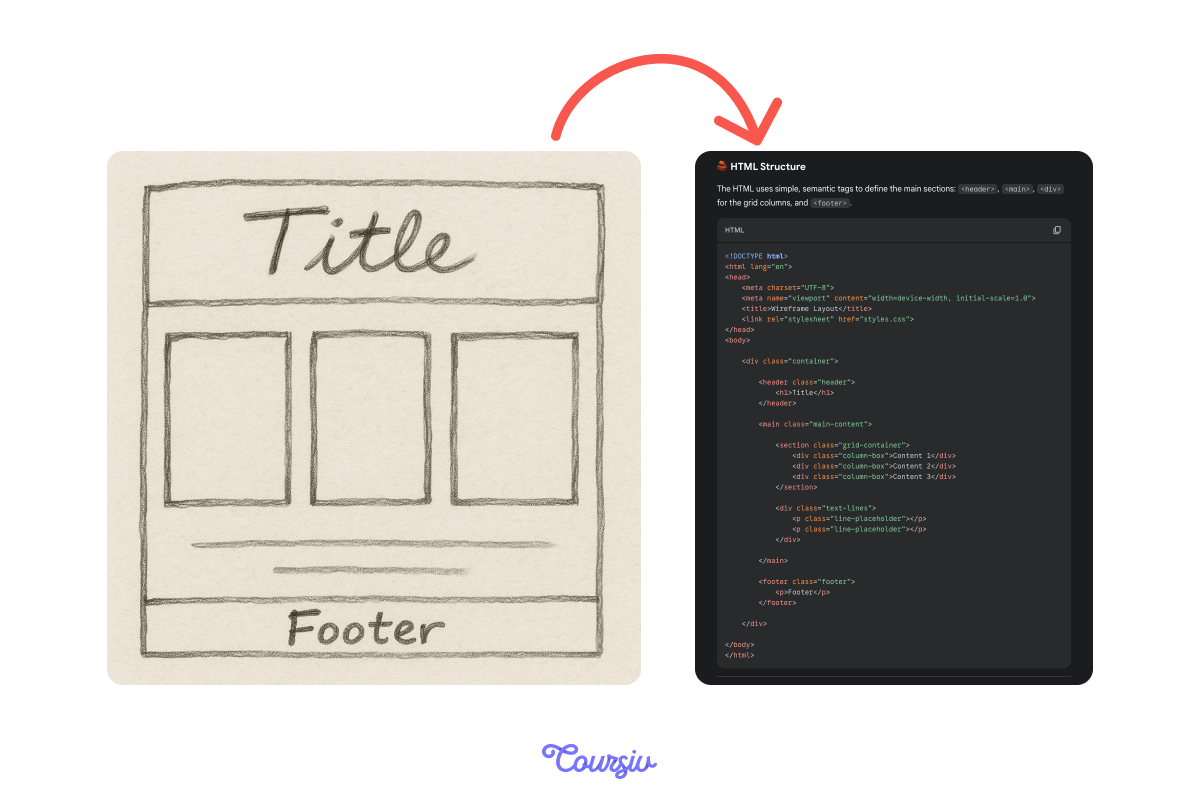
Imagine you draw a sketch on paper with:
- A large title
- Three equal boxes below it
- A small footer at the bottom
Gemini can turn that drawing into clean HTML/CSS. You don't need labels or measurements — it understands the layout at a glance!
practice preview
Interactive practice
Match pairs
Tap a left item, then a right item to match.
"Make It Mobile-Friendly"
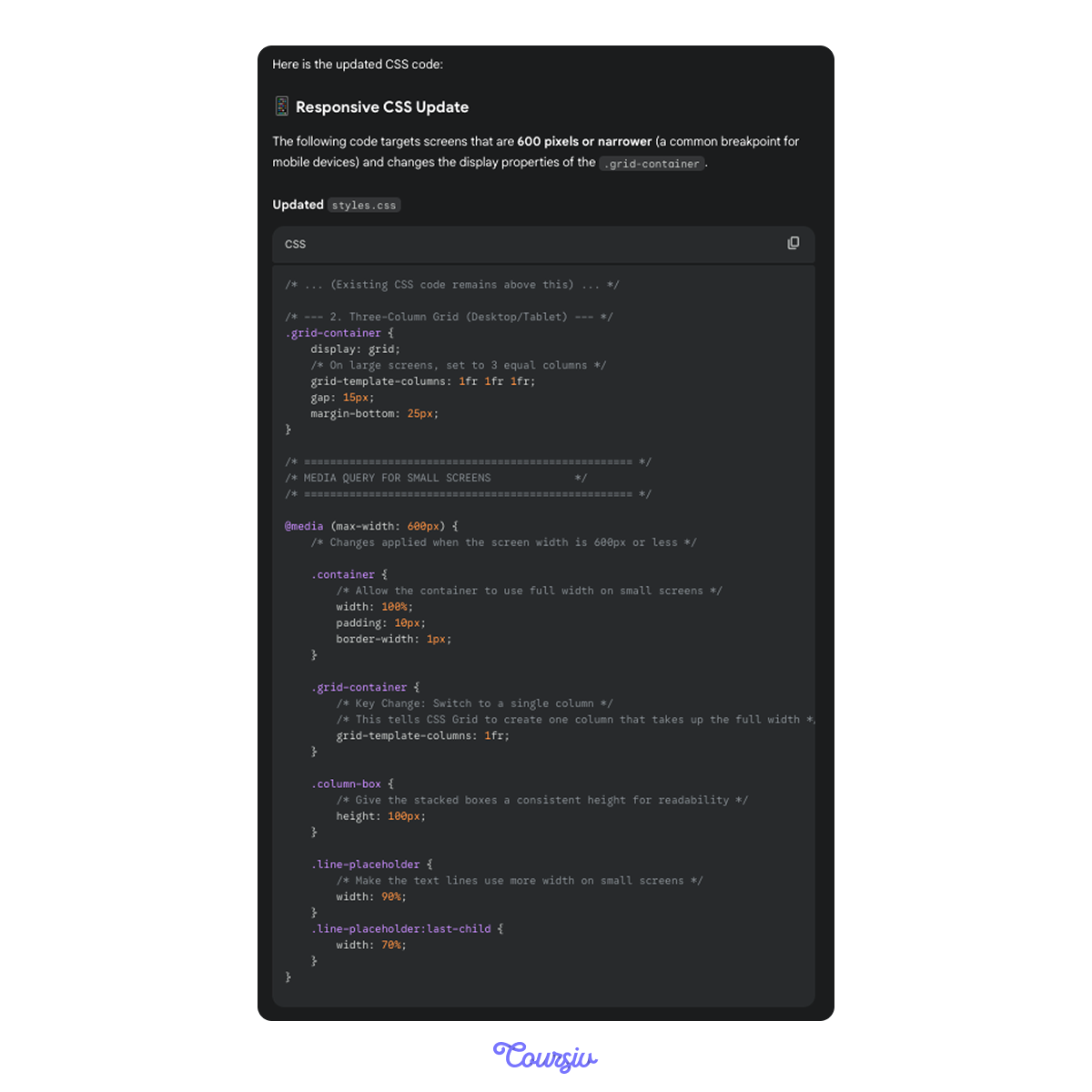
If your layout should also look good on a phone, just say: "Make this layout stack vertically on small screens."
Gemini adds the responsive CSS automatically. No technical knowledge required, again!
Use Plain Language to Improve Code
You can change anything with simple instructions:
- "Make the text larger."
- "Use a darker color."
- "Add space around the card."
- "Center everything."
Gemini updates the code each time.
practice preview
Interactive practice
Put in order
Put the steps in order to change a web layout with Gemini.
Debugging Without Stress
If something looks wrong — misaligned text, uneven spacing, odd colors — Gemini can identify the issue, explain it in simple words, fix it, and show what changed.
You don't troubleshoot — Gemini does.
Use Natural Speech, Not Technical Jargon
Instead of trying to diagnose code error messages, try asking things like:
- "Why doesn't the image show up?"
- "Why is this button off-center?"
- "Can you fix the spacing?"
Gemini interprets the problem and updates the code.
practice preview
Interactive practice
Fill in the blank
Imagine you just sent some layout to Gemini. Complete a prompt to debug a page.
Way to Go!
You learned how to create simple, clean web layouts without knowing code. You practiced:
- Describing visual ideas Gemini turns into HTML/CSS
- Using sketches or screenshots as references
- Updating layouts with plain language
- Fixing small issues confidently
You now have the tools to create pages, components, and simple interfaces — all with creativity and clarity.

See You Soon!
Get ready to level up! Your next lesson takes you from words on a page to visuals that stand out.
You'll turn simple prompts into eye-catching images, reshape existing visuals with smart edits, and design polished, professional assets. Let's go!