ChatGPT: Deep Dive · Build and Create
Vibe Coding With ChatGPT
Build working apps without code
Build an App Just by Describing It
Imagine describing an app in plain words — what it does, how it looks — and watching a working version appear a few seconds later without writing a single line of code on your side. That's vibe coding, and in this lesson, you'll use it to build something for a friend that no store could sell.
Let's get started!
A Gift You Can't Buy
Imagine this: your best friend Marta has a birthday coming up. Instead of buying another gift, you decide to make something personal — a small game filled with your shared memories, inside jokes, and moments only the two of you would recognize.
The catch? You've never built an app before. That's where vibe coding comes in.

What Vibe Coding Is
Vibe coding means describing what you want in plain language and letting AI write the code behind it. You type a description, ChatGPT builds the app, shows it running, and you refine it through plain-language iterations.
The real skill here isn't coding but precisely describing and judging what comes back.
Where the App Appears
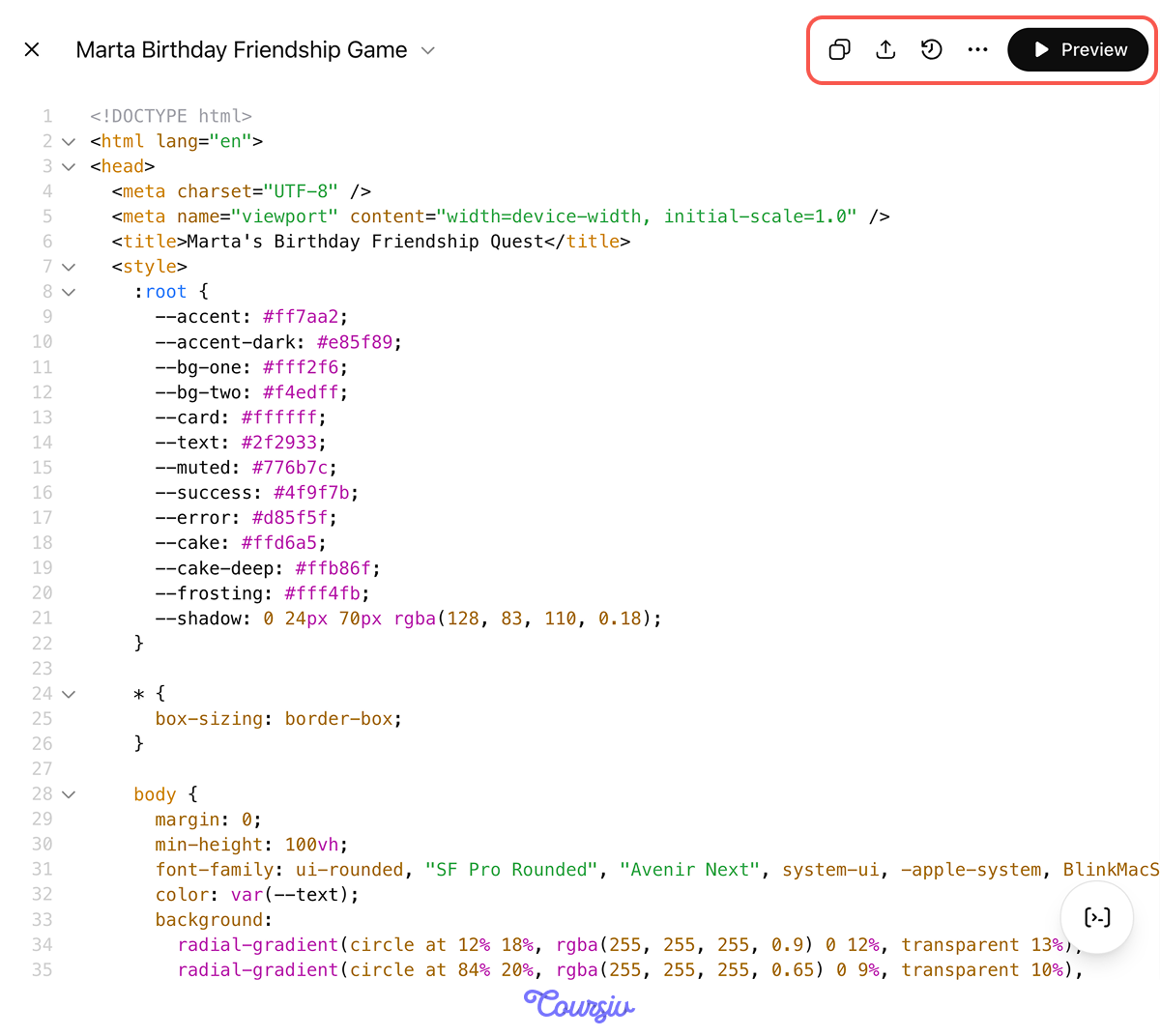
You don't need a special mode for this. In a regular chat, ChatGPT writes the app as a code block — titled with its name and marked HTML, with Copy, Edit, Download, and Preview controls along the top.
Click Preview to see the game running, and play through it exactly as Marta would.
Brief It Before You Build
Building an app starts the way briefing an agent did: you define what you want before it runs. A solid app brief names four things:
- The user of the app
- The core function the app performs
- The key interactions the user has with it
- The scope cutoff: what you leave out on purpose
The clearer you get, the closer the first build comes back. Let's practice briefing the game!
practice preview
Interactive practice
Match pairs
Tap a left item, then a right item to match.
The Game's Flow
After the briefing, you start outlining the game structure and thinking of the screens you want to add. Let's arrange the game's screen in the correct sequence.
practice preview
Interactive practice
Put in order
Arrange the steps the game runs through, from the moment Marta opens it to the end.
When proceeding to building, don't ask for the whole game at once. Build the smallest version that runs end-to-end — the core loop — and confirm it works before adding anything.
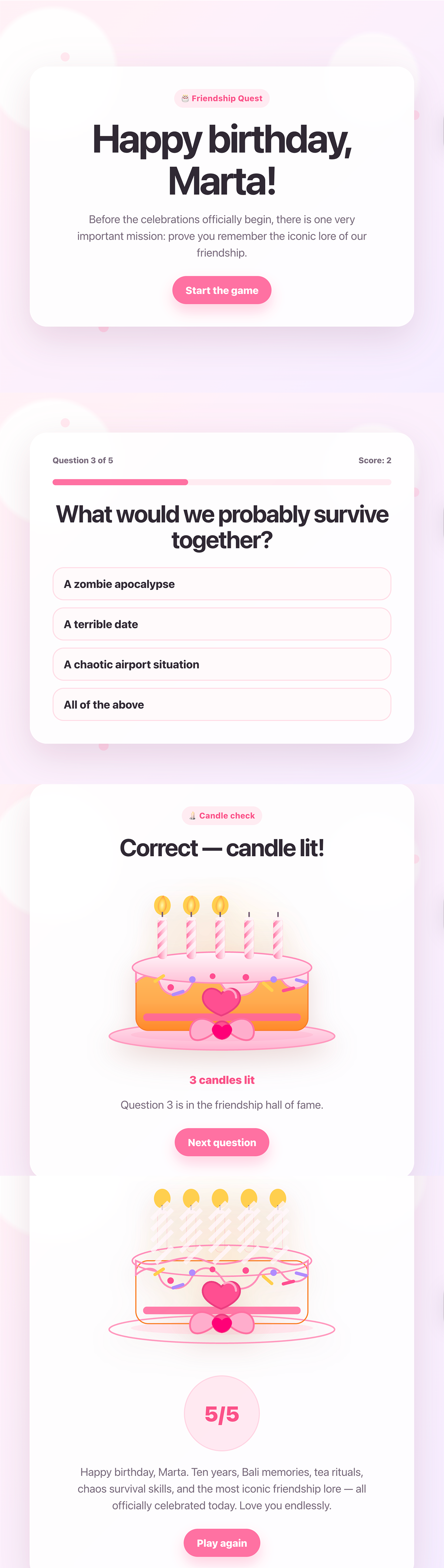
For Marta, the core loop is plain: a welcome screen with her name, five multiple-choice questions about your friendship, a running score, and a final tally. No cake, no confetti yet — just the loop, working. Let's build it!
practice preview
Interactive practice
Fill in the blank
Complete the prompt that builds the first working version of Marta's game.
It Runs — Now Make It a Game
Great job! The loop works: welcome screen, five questions, a score at the end. But it doesn't feel like a game yet. Once the core loop works, that's the next step.
Quiz Versus Game
Three things separate a quiz from a game:
- Stakes the player can see.
- Variety in how rounds play.
- A payoff for finishing.
For Marta, that's a birthday cake whose candles light as she scores, one round that swaps buttons for a number slider, and a personal message that appears at the end.
How to Iterate Without Breaking It
From here, you grow the game by talking, and a few habits keep that from going sideways:
- Change one thing per prompt, so when something breaks, you know the cause.
- Test each change before asking for the next.
- When a version works well, tell ChatGPT to keep it as a fixed point you can return to if a later change makes things worse.
practice preview
Interactive practice
Fill in the blank
Complete the prompt that adds stakes, variety, and a payoff in one batch of related changes.
Now Test It
Good job! You applied the iteration rules, and the app looks polished. Now it's time for testing. Play it through, and it feels finished — cake, slider, confetti, a message at the end. But running without errors isn't the same as working correctly.
Before this becomes a gift, make sure everything works correctly and check it the way a developer would.
What QA Means
QA, or quality assurance, is the deliberate practice of checking that software does what it's meant to — not just that it opens. Developers never ship without it.

The first check: try something you know the answer to. Answer one question wrong on purpose, then watch the results screen. If the cake still lights every candle and the message still appears, the logic is wrong — the app is rewarding answers it shouldn't.
The second check: after each change, retest what worked before. Adding the slider round may have changed how the score is counted, so the cake no longer fills even on a perfect game. A new change breaking old behavior is the most common — and most missed — failure in vibe coding.
The third check: open it as someone who's never seen it. You built it, so every button is obvious to you — but Marta doesn't know the game's logic you thought of. What's clear to the builder may not be that clear to the player.
practice preview
Interactive practice
Match pairs
Tap a left item, then a right item to match.
Describe What's Wrong, Precisely
When a check turns up a problem, the fix depends on how well you describe it. Give ChatGPT three things:
- What you did
- What happened
- What should have happened instead
practice preview
Interactive practice
Fill in the blank
Complete the message that tells ChatGPT exactly what to fix.
A preview that looks right isn't proof that it works. Run these three checks, then report precisely on anything you vibe code:
- Test a standard flow to catch logic that's quietly wrong.
- Re-test after each change to catch new edits breaking old behavior.
- Watch a first-timer to catch what's clear to you but not to them.
- Report precisely what you did, what happened, and what should have happened.
Getting It to Marta
The game works and has been thoroughly tested. Right now, though, it exists only inside your ChatGPT window, where Marta can't reach it.
Because you built it as one self-contained file, getting it to her is easy — there are two ways, depending on how polished you want it to feel.
The Quick Way: Send the File
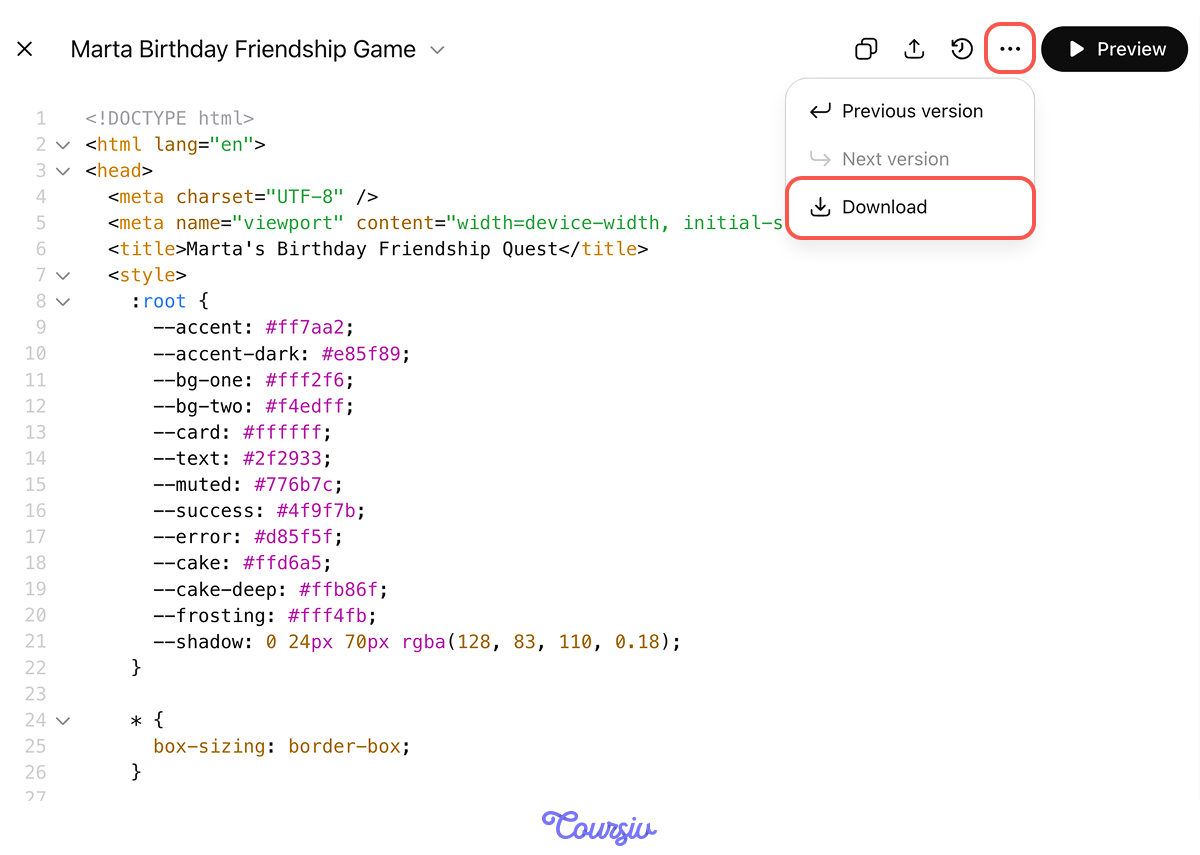
Click Download on the code block to save the game as an HTML file. Open it in your browser to test it one last time, then attach it to an email or message to Marta. Because the file is self-contained, she downloads the attachment, opens it on her own device, and it runs in her browser — nothing to install.
One catch: some email and messaging apps can block HTML attachments. If that happens, the method below sidesteps it entirely.
The Different Way: A Tappable Link
A link Marta taps on her phone might feel more like a gift. To make one, you upload that single HTML file to any free static-hosting service. Options like Netlify Drop, Cloudflare Pages, or GitHub Pages all do this.
With a drag-and-drop one like Netlify Drop, you drop the file in, wait a few seconds, and get a public address ending in netlify.app. Open it once to confirm it works, then paste it into Marta's birthday message.
Marta Plays It
Marta taps the link on her birthday. Her name and a burst of confetti, then your five questions, the candles lighting one by one, and the message you wrote waiting at the end. You built it in an afternoon, from a handful of sentences.
- Vibe coding turns a plain-English description into a working app: The skill is describing precisely and judging the result, not writing code.
- Brief it in four parts — user, core function, key interactions, scope cutoff — then build the core loop before anything else.
- Iterate in control: One change per prompt, test each before the next, and keep a known-good version to fall back to.
- QA before you ship: Test a known case, re-test after each change, watch a first-timer, and report bugs precisely.
- One self-contained file ships two ways: Send the HTML file directly, or drop it on Netlify for a tappable link.
What's Next?
You turned a sentence into a working app — one kind of creative project you can make in ChatGPT. Next, you'll meet Codex — an AI agent that lives in the files on your computer — and complete the tasks that were too overwhelming to even think about.
Let's keep going!