ChatGPT: Deep Dive · Build and Create
Creating Sites
Turn requests into web apps
From Prompt to Live Site
A website usually means a stack of tools — a builder, a hosting service, a domain panel — before anyone sees your work. Sites collapses that into one conversation: you describe what you want, and ChatGPT builds it, hosts it, and hands you a link. Let's turn that into something real.

What's a Site?
A Site is a hosted website, web app, or game that ChatGPT creates and runs for you. There's no deployment workflow to set up — you describe the experience, ChatGPT builds and hosts it, and you can reopen, refine, and share it any time from the Sites view.
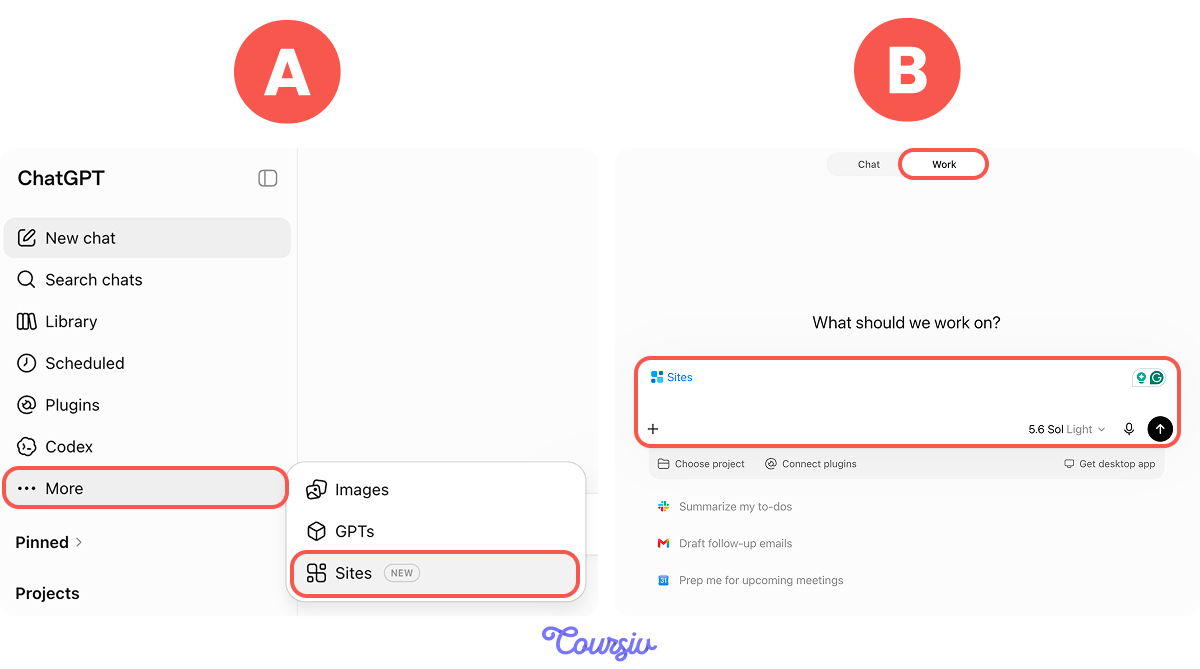
Sites is available on paid plans through More → Sites. You can also access it anytime by adding @Sites to your request in Work mode.
Scenario: The Studio Without a Website
Imagine you run a small photography studio. Booking inquiries arrive through direct messages, comments, and a notebook — and details keep slipping: which Saturday, which package, indoor or outdoor? You've wanted a real website for years, but the tool stack always stopped you.
What you need is one page that shows your work and one form that takes booking requests — with every request saved. Before Sites, this meant hiring a developer or learning a builder tool. Now it comes down to writing one clear request.

Writing the Request
A working Sites request names three things: who the site is for, what those people do on it, and what information it works with.
practice preview
Interactive practice
Fill in the blank
Complete the prompt that asks Sites to build your studio's website.
A Question Before the Build
Sites doesn't always start building right away — it comes back with a question and a few named styles, each rendered as a live preview. Look at what just happened: your brief named the audience, the experience, and the information, and the look was the one thing it left open. Sites asks about that gap instead of guessing.
Suppose you pick Editorial Light — the minimal, light layout keeps all the attention on the photographs and reads as premium, which supports your package prices. ChatGPT builds the site and returns a private preview where you can edit right away if something feels off.
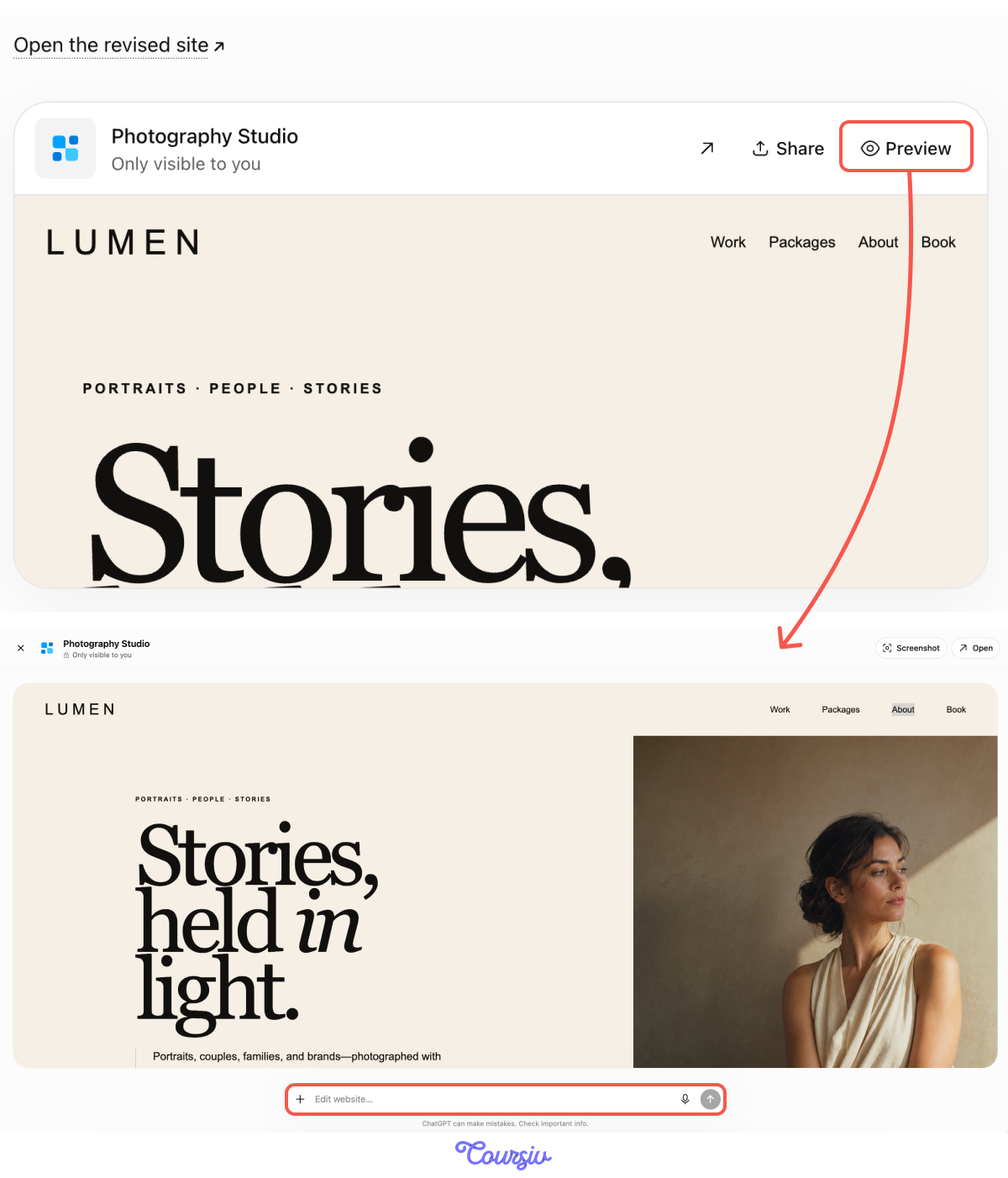
This way, you eventually get your perfect website, almost effortlessly!

Choose one
Why do you think the prompt needs to say the booking data should stay saved between visits?
If people expect the site to keep something — bookings, statuses, uploaded photos — say it in the request: "keep the booking data and uploaded photos saved between visits." Skip it for looks and preferences; storage is for the data your site exists to collect.
One Step Before It Goes Live
The version in front of you isn't live — no client can open it yet. And before anyone can, you want one careful look at the real build, not just the preview.
Sites publishing has two separate stages. Save a version builds a reviewable candidate; deploy a version publishes it and reports the production URL. You deploy only when clients should actually reach the site.
There's no such thing as a quietly deployed Site — once deployed, the URL is live for its audience. Save first, review, then deploy on purpose.
Who Can Open It
Hosting a Site doesn't automatically make it public. Depending on your account and workspace settings, you choose the audience: only you and people you invite, everyone in your workspace, or anyone with the link.
To share the website, click "Share" and choose "Anyone with the link."
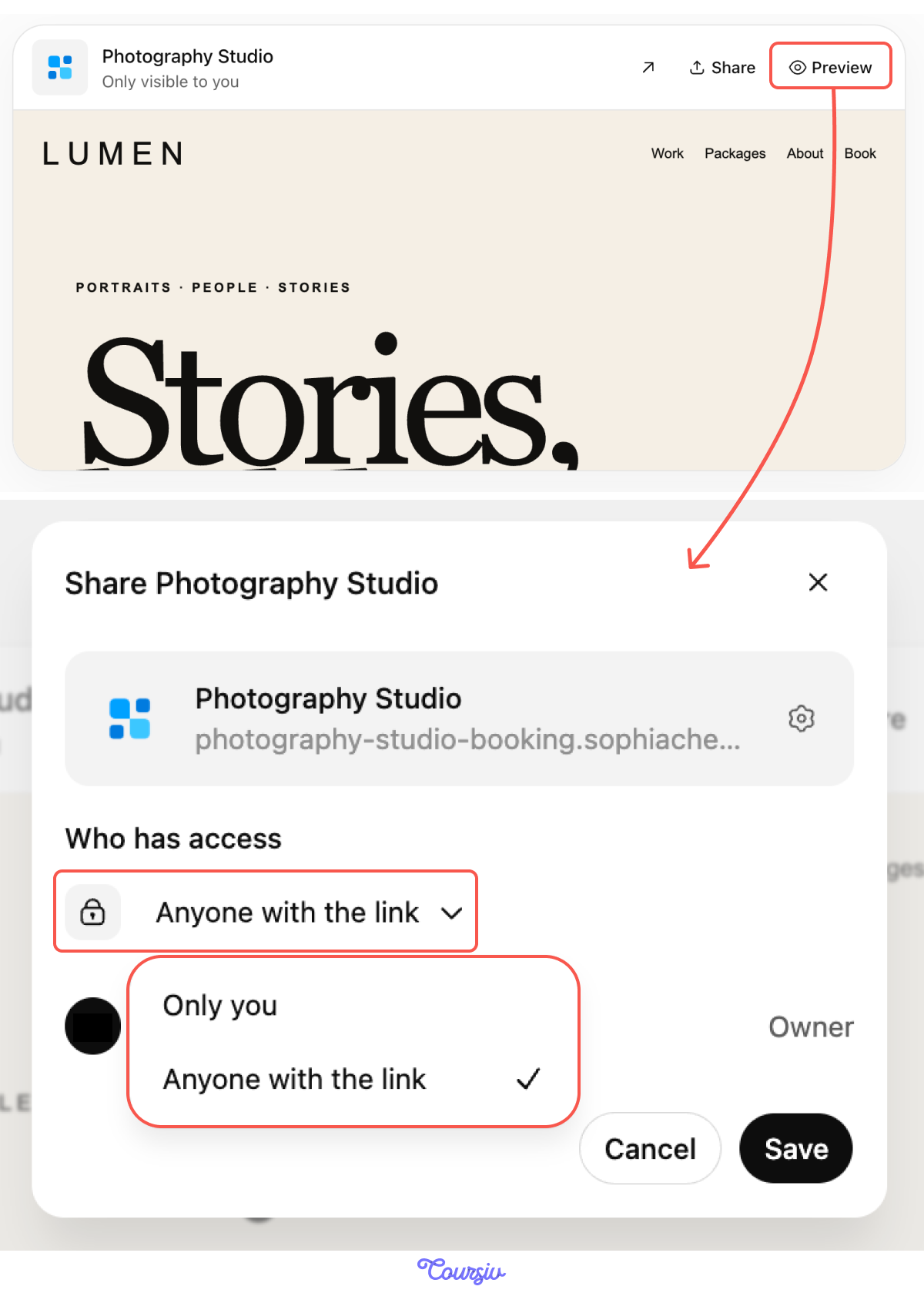
Sharing lets people visit the Site — it doesn't let them edit it. Keep passwords and secret keys out of prompts and page content, and remember that Sites must not handle payment card details or health data — your form takes booking requests, and deposits stay in the channel you already use.
Select all that apply
Say you deploy the studio site to "anyone with the link." Which checks belong in your review before you put the link in your bio?
That's the full loop: describe, answer the follow-up, check what the site remembers, review the build, choose who can open it. Let's lock the order in.
practice preview
Interactive practice
Put in order
Arrange the workflow from first step to last.
- Sites builds and hosts in one conversation — describe the audience, the experience, and the information, and ChatGPT returns a working, hosted result.
- Leave a gap, get a question — what your brief doesn't specify, like visual direction, Sites asks about; pick by function, not just taste.
- Say what the site must remember — bookings, statuses, uploads; if it's not in the request, don't expect the site to keep it.
- Every deployment URL is production — save a version to review; deploy only when clients should see it.
- Choose the narrowest audience that fits — sharing lets people visit, not edit, and you can widen access later.
What's Next?
You've turned one prompt into a whole website! In the next lesson, you'll see how you can vibecode and build even more cool things with ChatGPT. Let's keep going!