ChatGPT: Deep Dive · Automate and Delegate With ChatGPT
Custom GPT: Building for Multi-Step Workflows
Turn repetitive work into reliable systems
Level Up Your ChatGPT Skills
Most people who reach this course use ChatGPT every day — for drafts, research, summaries, and quick answers.
The basics aren't the problem. The gap is between daily use and real leverage. That's what this course covers — the moves that turn a capable user into one who consistently gets better results on complex, professional work.
Ready? Let's start!

Custom GPTs Built for Multi-Step Workflows
You've likely seen Custom GPTs in ChatGPT before — a version of ChatGPT you set up with specific instructions so it can work like a specialized assistant — or even built one yourself. The next move is to push this knowledge forward.
This lesson guides you through the cases when the input is missing, contradictory, or wildly off-scope. You'll see what already exists in the GPT Store, learn when it fits and when it doesn't, and then build a GPT that holds up under messy inputs and multi-step workflows.

Where Custom GPTs Earn Their Keep
Custom GPTs are worth building when you repeat the same type of task every month, week, or even more often — like meal planning, budget reviews, client onboarding, or preparing lessons for the same students.
You have two paths:
- Discover a Custom GPT someone else built
- Build one for your specific case
This lesson does both.
Scenario: Managing Multiple Students
Mira is a chess coach with 12 students. She teaches in person on weekday afternoons and online through Chess.com in the evenings. All 12 are spread across the week, all at different ratings, all working on different parts of their game.
Every Sunday, she prepares for the week ahead, which requires a lot of manual work: scheduling, planning, and lesson prep.
Four Students, Four Profiles
Mira's 12 students are a mixed group. Some of them are:
- Emma — beginner, learning basic tactics
- Jane — intermediate, working on tactical patterns
- Daniel — intermediate, focusing on middlegame play
- Elias — advanced, refining endgame technique
Every student has a different focus area, a different next lesson, a different stack of progress notes.

What Mira Needs Out
For each student, she produces three things every week:
- Schedule — who's on for the week, in person or online, what time
- Progress notes — what they worked on last session, what stuck, what didn't
- Lesson plans — warm-up, main concept, practice puzzles, a game position to analyze
12 students and three outputs per student = 36 artifacts per week. A standard ChatGPT session won't be the most convenient environment to keep everything organized. That's where a Custom GPT comes in.
Select all that apply
What would a Custom GPT need to handle for Mira's setup to save her time?
Discover Before You Build
Now that we've identified the capabilities a Custom GPT should have to best suit Mira's needs, let's find one for her. Before building anything, browse the GPT Store. Someone may have already shipped a tool that handles part of this work.
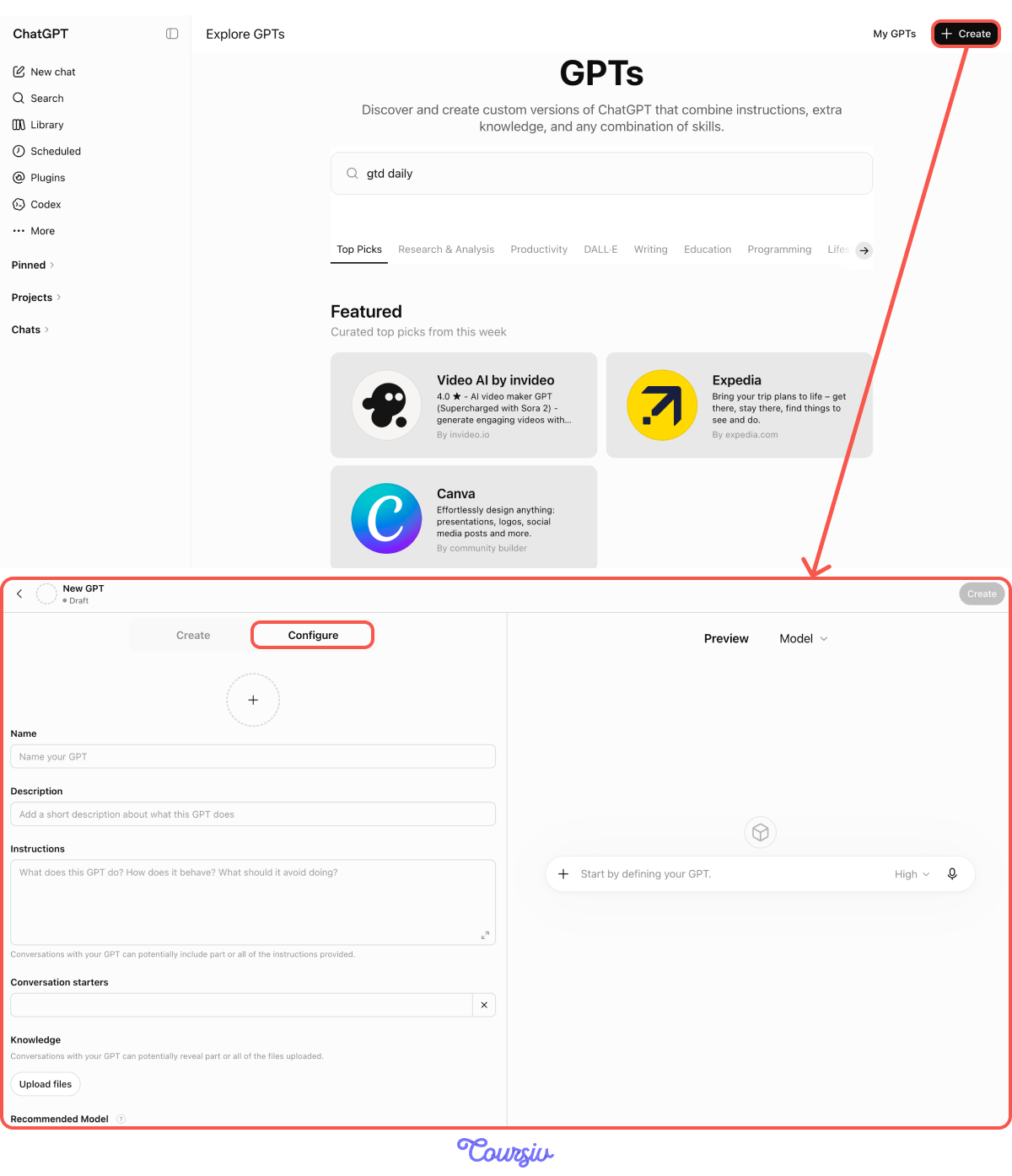
Open Explore GPTs in the sidebar and look for one that matches the case.
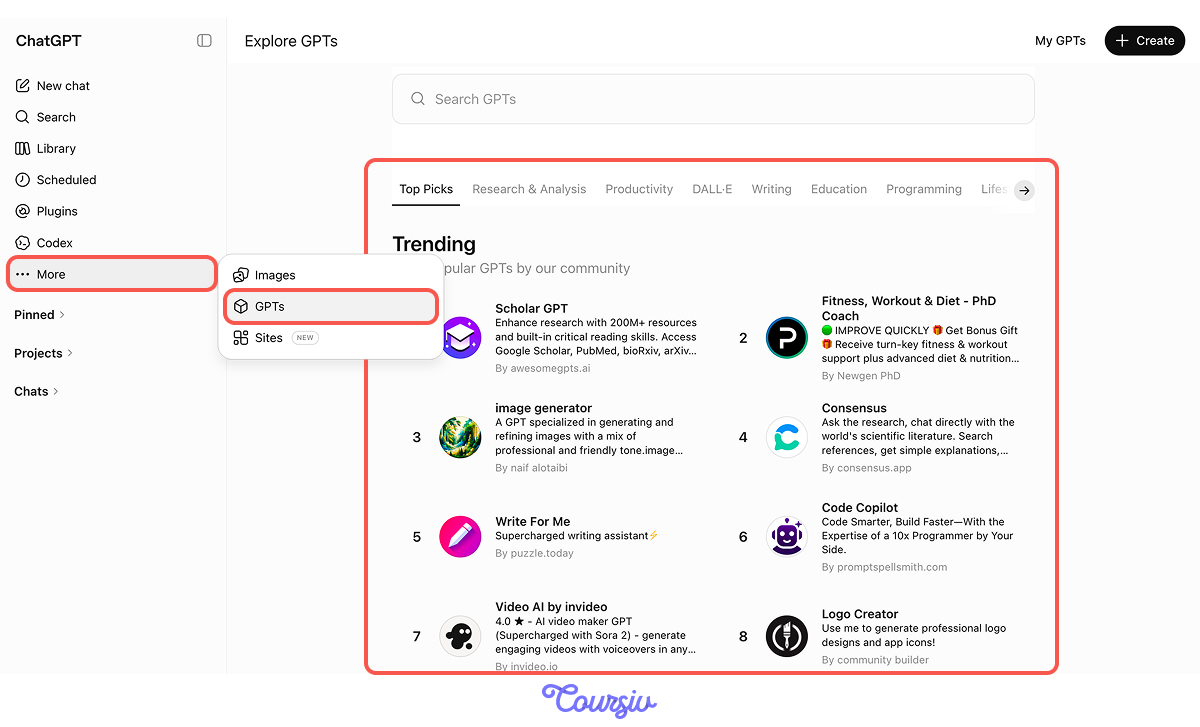
Auditing the GPT Store
Mira first checks the GPT Store for something she can reuse:
- Lesson Planner can generate ready-made lessons, but only one at a time from a fresh prompt. It doesn't remember students or track progress.
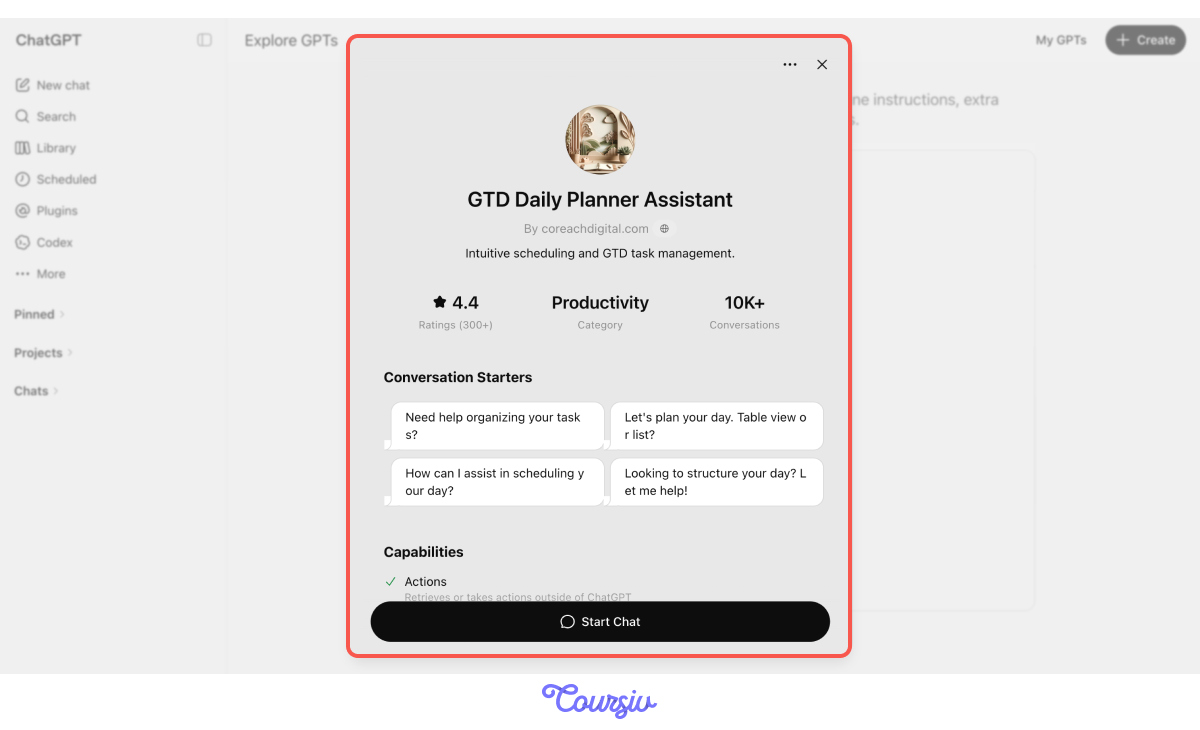
- GTD Daily Planner Assistant helps organize schedules and weekly tasks, but it's designed for one person's productivity system — not 12 chess students with different skill levels and goals.
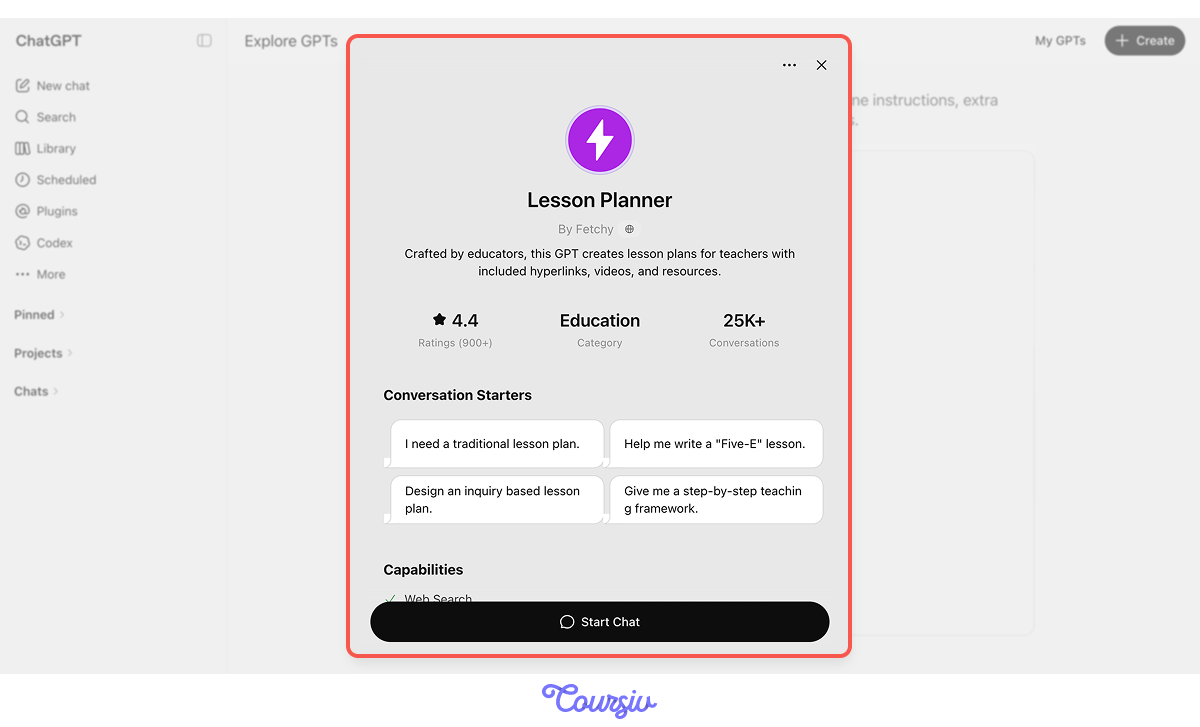
Both GPTs are useful, but neither can manage Mira's full workflow across weeks. Her use case is too specific for a general Store GPT, so it's time to build a Custom GPT.
One heads-up: building works on the web version of ChatGPT, and requires a paid plan. The mobile app can run GPTs but not build them.
Building Mira's Coaching Assistant
In Explore GPTs, tap + Create to open the GPT builder. Open the Configure tab and fill the following fields:
- Name and Description label the GPT so Mira recognizes it later.
- Instructions are the core, where the role and routing rules live.
- Conversation starters are optional shortcut prompts for launching a session.
- Knowledge is where she uploads files to add to the student list and progress logs that the GPT can draw on.
- Recommended Model sets which model it runs on. The preview panel on the right shows the GPT taking shape as she fills each field.
practice preview
Interactive practice
Fill in the blank
Complete the Instructions field to set the foundation for Mira's Custom GPT.
The prompt from the previous task is exactly how you write the instructions for Custom GPT: structured and detailed enough. These techniques work with any Custom GPT:
- Rules instead of suggestions: "Pause and ask" beats "Try to clarify when possible."
- Specific fields instead of vague wording: "If focus area is missing" beats "If the request is vague."
- One action per sentence: split "surface the contradiction and ask which wins" into two sentences. The GPT follows compound rules inconsistently.
It Works — Until It Doesn't
After setting up the instructions, Mira started using her Custom GPT. With a clean request like "Prep Daniel's Wednesday session, he's working on middlegame attacks," the GPT performs well and generates a solid lesson plan.
But Mira's real Sunday-evening inputs are rarely that clean. They're often rushed, incomplete, and messy — and that's where Custom GPTs tend to break in four predictable ways.
Four Failure Modes
- Missing input: Required information isn't there.
- Contradictory input: Two parts of the request fight each other.
- Scope creep: Extra tasks slip in alongside the main one.
- Scope underflow: Request is too vague to act on.
Without explicit routing for each, the GPT improvises. Silent improvisation is worse than failing visibly, as you don't know what went wrong until it's too late.
practice preview
Interactive practice
Match pairs
Tap a left item, then a right item to match.
Routing for Missing Input
When a required field is missing, the GPT should ask for it. For Mira, "Prep something for Jane" leaves out focus area, session length, and format (in-person vs. online).
The instruction needs to name the required fields and what to do when they're absent.
practice preview
Interactive practice
Fill in the blank
Complete the routing rule for missing required information.
Routing for Contradictory Input
Great job! Now the GPT will ask for clarification when the input is incomplete.
The next thing to consider is what to do when two parts of a request contradict each other, as you've seen in Daniel's case: "Make him more aggressive in chess but more careful." The GPT should surface the contradiction, not synthesize it away.
Let's set up the rule for cases like this.
practice preview
Interactive practice
Fill in the blank
Complete the routing rule for contradictions inside the request.
Routing for Scope Creep and Underflow
Nicely done! The last two modes are opposites:
- Scope creep is when a side request smuggles itself into the main task — Emma's lesson plan with a tacked-on analysis of her brother's game. To fix it, prompt GPT to split the work and ask which to prioritize.
- Scope underflow is when the request is too vague to act on — "same as last week for Elias" when last week covered three different things. To fix this one, prompt GPT to name what's missing and ask for one clarification.
The four-mode pattern is reusable for any Custom GPT, not just Mira's:
- Missing input → name required fields, ask one question
- Contradictory input → surface the conflict, ask which wins
- Scope creep → split the work, confirm priority
- Scope underflow → identify the missing specificity, narrow once
Choose one
Mira sends "Prep something for Jane tomorrow." With the missing-input clause in place, what does the adjusted Custom GPT do?
The Full Sunday Run
Great job! With all the settings in place, Mira asks the GPT for a full-cycle next-week student prep. Her Custom GPT can now do that. Let's see how it handles the task.
With the well-thought-out instructions, Mira's prompts can stay short. The GPT already knows everything it needs.
practice preview
Interactive practice
Fill in the blank
Mira asks her Custom GPT to prep the week. Complete the prompt that triggers a full weekly summary.
The GPT That Holds
Mira's Custom GPT now does three things a Store GPT couldn't:
- Holds 12 students' states.
- Produces three artifact types per student.
- Routes around the four input failures that wreck a Sunday-evening prep session.
From now on, the same GPT handles all 36 artifacts.
- Custom GPTs earn their build cost when the task is structurally repetitive: Same shape, different input, every week.
- Browse the GPT Store first: A general tool may already cover part of the work better than anything you'd build solo.
- Build your own when the case is too specific for a general tool: Persistent state, multiple output types, custom rules.
- Strong instructions are imperative: They name fields and contain one behavior per clause.
- Four failure modes wreck most Custom GPTs: Missing input, contradictory input, scope creep, and scope underflow. Route around all four so the GPT doesn't improvise silently.
What's Next?
You've built a Custom GPT that holds against messy inputs. The next lesson connects Custom GPTs to live data through Actions: the GPT can now read your calendar, write to your project tracker, and fetch from any API.
Let's keep going!