ChatGPT: Deep Dive · Automate and Delegate With ChatGPT
Creating Skills
Create reusable skills for recurring work
Build a Skill That Makes Your Work Count
Imagine this: a promotion review is approaching. You know you've done strong work — but the proof is scattered across reports, experiment notes, dashboards, and stakeholder feedback.
In this lesson, you'll build a personal ChatGPT Skill that provides real proof of work and turns your strongest achievements into a promotion-ready evidence table.
Let's get started!

The Promotion Case Hidden in Your Files
Imagine you're a marketing analyst preparing for promotion to a senior position. You have four files:
- A campaign performance report
- An experiment summary
- Stakeholder feedback
- The company's promotion framework
The results are there. The hard part is proving exactly what you contributed.
The First Attempt
You upload the files and ask: “Review my work and write the strongest achievements for my promotion case.”
ChatGPT returns: “Analyzed campaign performance and contributed to an 18% increase in conversion.”
The statement captures the result, but not the full contribution. The files also show that you identified the underperforming audience segment.
Choose one
What's wrong with the first achievement statement?
The Real Task Isn't Better Writing
A useful promotion case needs the same judgment applied to every achievement:
- Separate personal contribution from team results
- Preserve supported metrics
- Map the work to a relevant competency
- Rate the strength of the evidence
- Flag missing proof instead of filling the gap
- Turn only supported claims into review-ready statements
You could paste these rules into every new chat, or teach ChatGPT the process once.
Meet Skills
A Skill is a reusable workflow that tells ChatGPT how to handle a focused task. It can keep:
- A name and description
- The steps ChatGPT should follow
- The required output format
- Examples, templates, and reference materials
- Rules about what to include or avoid
Once installed, ChatGPT can automatically select a relevant Skill, or you can choose it yourself with an @ mention on the website or a $ mention in the desktop app.
A Skill or a Plugin?
In the previous lessons, you used Plugins for workflows that imply connections to external services.
A Skill is more focused: it captures a particular method you want ChatGPT to reuse.
For the promotion task, you don't need a new service. You need ChatGPT to apply the same evidence rules every time, so you'll create a Skill. Note that Plugins can also include Skills specific to external tools connections.
Where Skills Live
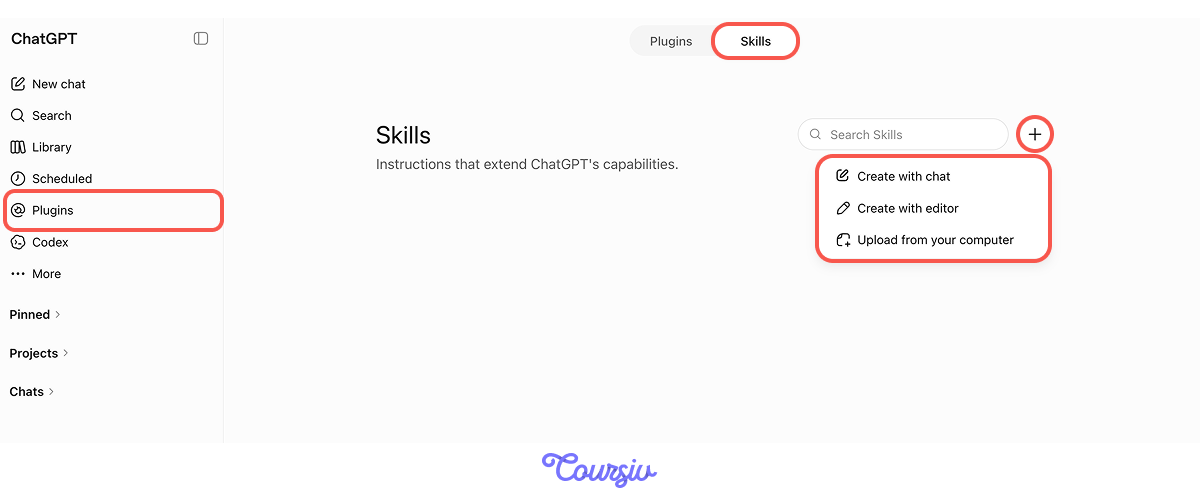
In the ChatGPT web interface, open Plugins on the left tab and select Skills.
You'll create a personal Skill. To do so, click "+" and choose one of the three options.
Three Ways to Create a Skill
On the web, you can:
- Create with chat: describe the Skill in plain language and let ChatGPT guide you
- Create with editor:
- Upload from your computer: upload an existing Skill
You'll use the first route. It requires no technical setup and lets you develop the Skill through conversation.
Start Skill Creator
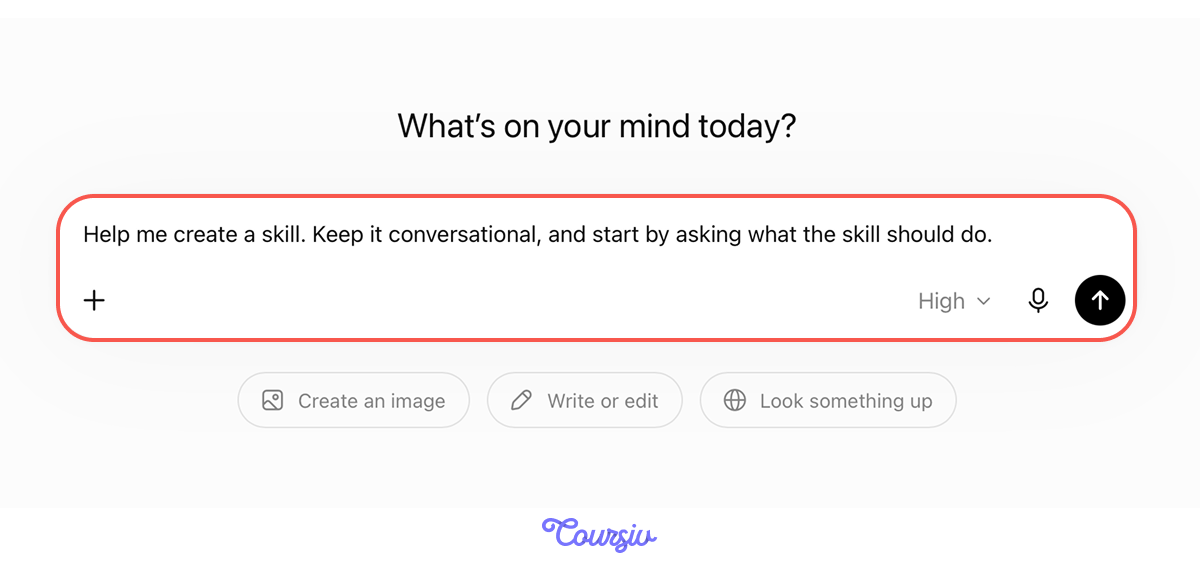
Choose "Create with chat". ChatGPT will redirect you to a conversation with the preset prompt. You send it, and it will ask you the clarifying questions
Upload an Evidence Pack
After explaining your Skill and desired output, upload the four practice files into the same conversation.
practice preview
Interactive practice
Fill in the blank
Complete the instructions for the Promotion Evidence Curator.
Answer the Builder's Questions
Skill Creator may ask you to clarify:
- When should the Skill be used?
- What files or information does it need?
- Which steps must it follow?
- What should the final result contain?
- What it must never claim or invent?
For this Skill, make the central rule explicit: Surface the user's full documented contribution. Do not reduce specific analytical work to vague phrases.
Review Before You Install
Skill Creator prepares a draft and gives you the option to install it.
Before selecting Install, check:
- Is the trigger specific?
- Does it use only supplied evidence?
- Does it separate individual work from team outcomes?
- Does it include the evidence table and achievement statements?
- Is the promotion framework included as a reference?
- Are the practice campaign files excluded from the reusable Skill?
Ask ChatGPT to revise anything that is unclear before installing it.

Use the Skill in a New Chat
Start a new chat and upload a fresh evidence pack. Type @ in the prompt bar and select Promotion Evidence Curator, then ask:
"Review these files and build my promotion evidence table. Use only claims the files support."
Selecting the Skill explicitly makes it easier to test. Later, ChatGPT may also choose it automatically when your request clearly matches its description.
The Strong Evidence Holds Up
The campaign report supports a clear achievement. The Skill writes:
"Identified an underperforming audience segment and recommended a targeting change that contributed to an 18% increase in conversion."
It surfaces the specific analytical work behind the result instead of reducing it to a generic contribution.
When a Skill Is Worth Building
Build a Skill when:
- The task comes back repeatedly
- Good results depend on the same method
- The input changes, but the process stays stable
- Missing one step creates a meaningful problem
A one-time question or a task that changes completely every time usually needs a good prompt, but not a new Skill.
- A Skill preserves a focused workflow, its rules, references, and output structure.
- Create a Skill in conversation by asking ChatGPT to build one; the skill creator guides the process automatically.
- Keep the method and reusable references in the Skill, while supplying fresh evidence each time you use it.
- Write a narrow trigger so ChatGPT knows when the Skill should—and shouldn't—apply.
- Test the Skill on strong, partial, and ambiguous evidence, then update the reusable rule when it fails.
What's Next
First Unit Complete!
The next stretch is about building. You'll start creating your own things in ChatGPT — generate consistent visual assets and campaigns, build vibe-coded projects that go from a plain-language description to a working tool. And you'll use ChatGPT Work and Codex — AI agents to set up even more automated routines, so the repetitive parts of your week start running on their own.
Let's keep going!