Midjourney · Midjourney Essentials
Image Size
Enhance composition by changing aspect ratio
Small Settings, Big Creative Impact
Greetings! Today, you'll continue enhancing your Midjourney prompting skills!
In this lesson, you'll uncover how to create images with different image sizes — and how choosing the right aspect ratio can instantly change the composition, mood, and purpose of your visuals. Let's go!
Why Image Size Matters
Image size in Midjourney isn't just a technical detail — it's the foundation of your entire scene.
When you choose an image size in Midjourney, you're actually choosing the aspect ratio — the relationship between width and height.
It shapes how much of a scene fits into the frame, how your composition flows, and even how the viewer reads the image.
How Aspect Ratios Work in Midjourney
Midjourney lets you define aspect ratios in two ways:
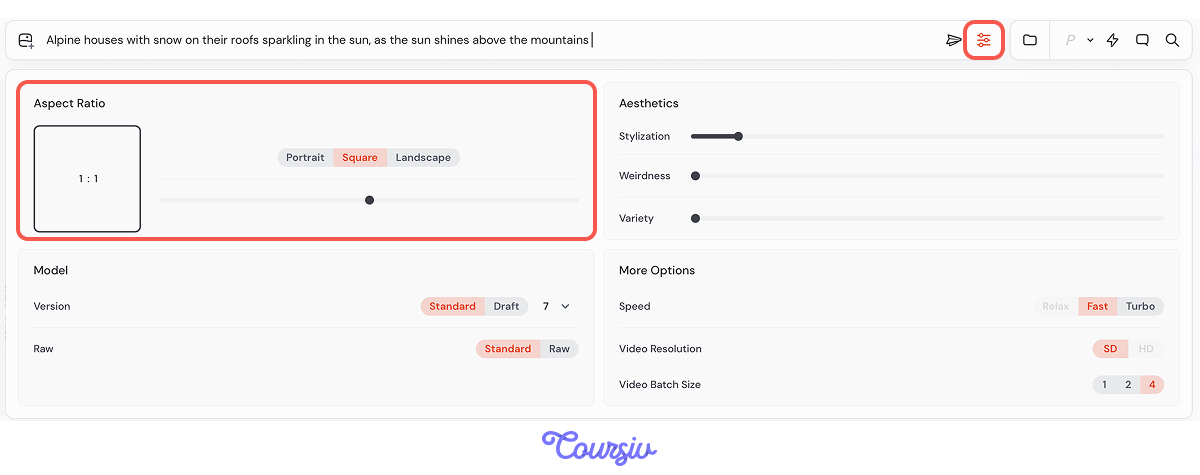
- Through the "Image Size" setting in the interface (which adjusts the aspect ratio automatically).
- By adding the "--ar" parameter at the end of your prompt — for example: --ar 3:2.
Both methods tell Midjourney exactly how the frame should be shaped before anything else is generated.
Practicing with Aspect Ratios
Imagine a client reaches out asking for visuals for a winter mountain resort. Their first request: beautiful images for social media posts — something flexible that you can reuse on various platforms.
For this kind of universal post, a default 1:1 image works perfectly — clean, centered, and platform-friendly across almost every feed.
practice preview
Interactive practice
Fill in the blank
Use the default 1:1 aspect ratio to create an image.
The images look great! But you know how social media works — short Stories are just as important as feed posts. Your client now wants a few visuals they can use for Instagram Stories.
practice preview
Interactive practice
Your client loves how the images turned out — now they also want visuals for their website, something they can showcase in a photo gallery to inspire guests to book their cozy mountain houses.
Let's change the aspect ratio accordingly!
practice preview
Interactive practice
Choose one
What effect did you notice from using the same prompt with different aspect ratios?
Why Aspect Ratio Matters
The aspect ratio is the first constraint Midjourney uses to imagine your scene.
- A tight, tall frame forces focus
- A wide, panoramic frame creates room for atmosphere
- A square frame keeps everything centered and balanced
Once you set the ratio, details adapt to that shape — which is why selecting it intentionally leads to cleaner, more purposeful images.
Square & balanced:
- 1:1 — clean, centered, ideal for products, avatars, clean grid posts
- 3:2 — classic camera format for landscapes, postcards, web galleries
- 2:3 — great for portraits, posters, book covers
- 4:3 — traditional photo and screen ratio; good for blogs and emails
- 3:4 — a taller version for editorial portraits or mobile visuals
Wide formats:
- 16:9 — cinematic widescreen for banners and YouTube thumbnails
- 2:1 — panoramic storytelling; perfect for landscapes
- 6:5 — slightly wide; great for lifestyle shots and creative thumbnails
- 5:6 — slightly tall; often used for print, art previews, or editorial design
- 9:16 — mobile-first visuals (Reels, TikTok, Shorts, vertical ads)
- 1:2 — extremely tall; ideal for fashion, abstract art, or scroll-stopping posters
Size Shapes the Frame
Now that you understand how aspect ratios control the shape and flow of your scene, you've unlocked the first layer of image composition.
Image size defines the boundaries of your world — what fits inside, what gets cropped, and how the viewer begins reading the scene.
- Aspect ratio is Midjourney's first constraint. The frame shape you choose defines how the whole scene is composed inside it, not just how the image is cropped.
- Two ways to set it: Use the "Image Size" setting in the interface, or add the "--ar" parameter at the end of your prompt (for example, --ar 3:2).
- Match the ratio to the platform. 1:1 for feed posts, 9:16 for Stories and Reels, 3:2 for websites and postcards, 16:9 for banners and thumbnails.
- Frame shape guides emotion. Tall frames focus attention, wide frames build atmosphere, square frames feel balanced and centered.
From Shape to Perspective
In the next lesson, you'll learn how to guide where the viewer stands inside that frame using different viewpoints.
Stay tuned for more tips on enhancing your visual storytelling skills!