ChatGPT · ChatGPT for Real Life
Organizing Personal Finances
Build a Custom GPT for spending analysis
The Financial Blind Spot Problem
Have you ever thought that you're spending too much on "stuff" but don't know where exactly?
Well, ChatGPT could actually be used to analyze your spending patterns, spot what you don't notice, and help you make smarter money decisions!
Let's build a Custom GPT that does exactly that.

Before You Start
Building a Custom GPT requires a paid ChatGPT plan. If you're on a free plan, use Projects instead — set a custom instruction, upload your files, and follow the same steps. The analysis works the same way, just without the reusable Custom GPT at the end.
The Personal Spending Mystery
Often, money feels like it's disappearing. You're not reckless with spending, but every month you wonder: where did it all go?
You have three months of bank statements downloaded as CSV files. But staring at hundreds of transactions reveals no patterns.

You need answers:
- Which categories are eating your budget?
- Why does it feel like you're spending more lately?
- What could you realistically cut without feeling deprived?
But finding answers manually? That would take hours.
To help you with that, a Custom GPT can process your transaction data, categorize spending automatically, identify patterns you'd never spot manually, and help you make informed financial decisions.
Let's build one today!

Building Your Finance Analyzer
First, you need to create a new Custom GPT specifically for personal finance analysis.
This will become your reusable assistant that processes transaction data and provides spending insights whenever you need them.
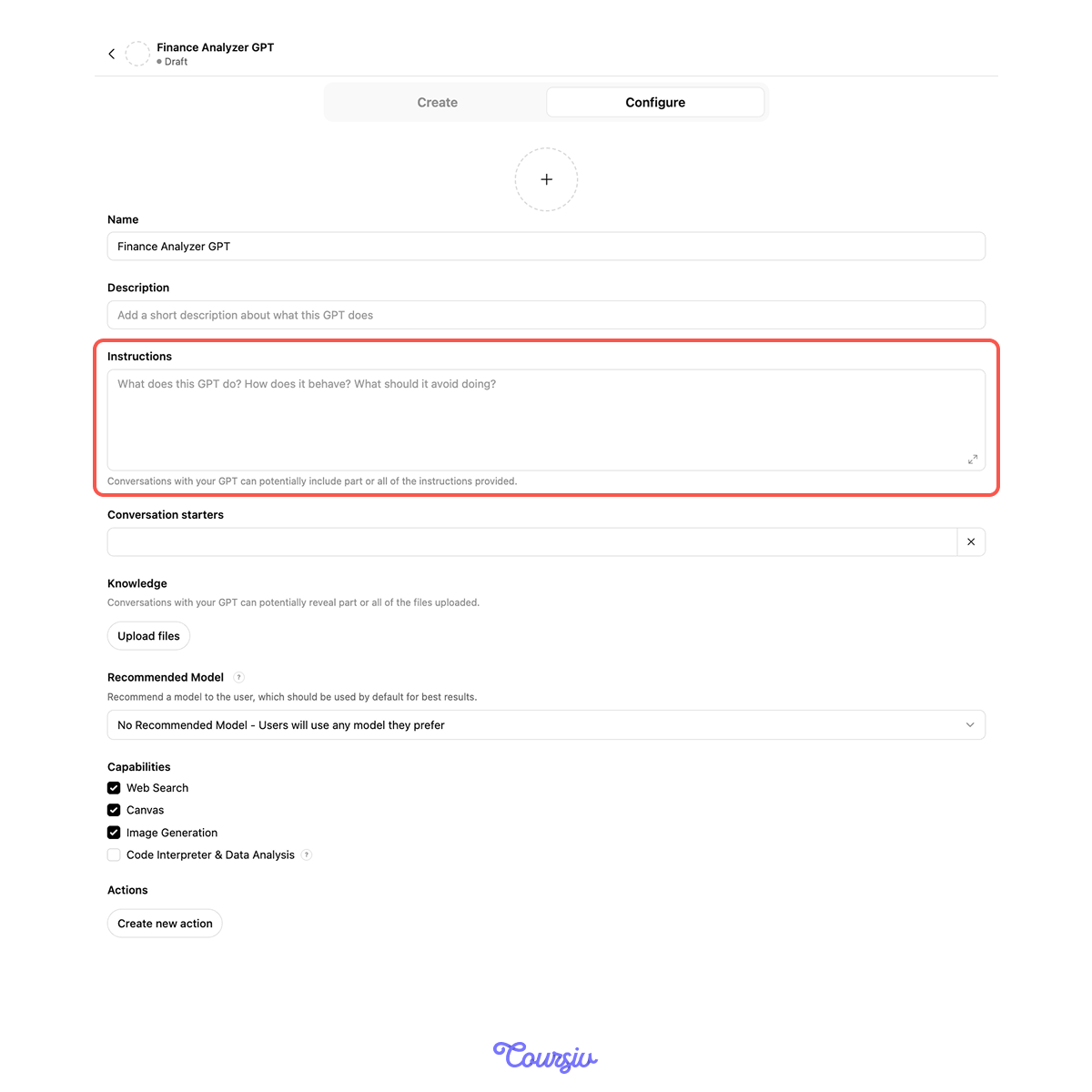
Next, you need to give your Finance Analyzer initial instructions in the Configure section.
This will set the foundation for how it processes your data and communicates insights.
practice preview
Interactive practice
Fill in the blank
Define your Custom GPT's role and behavior for analyzing personal finances.
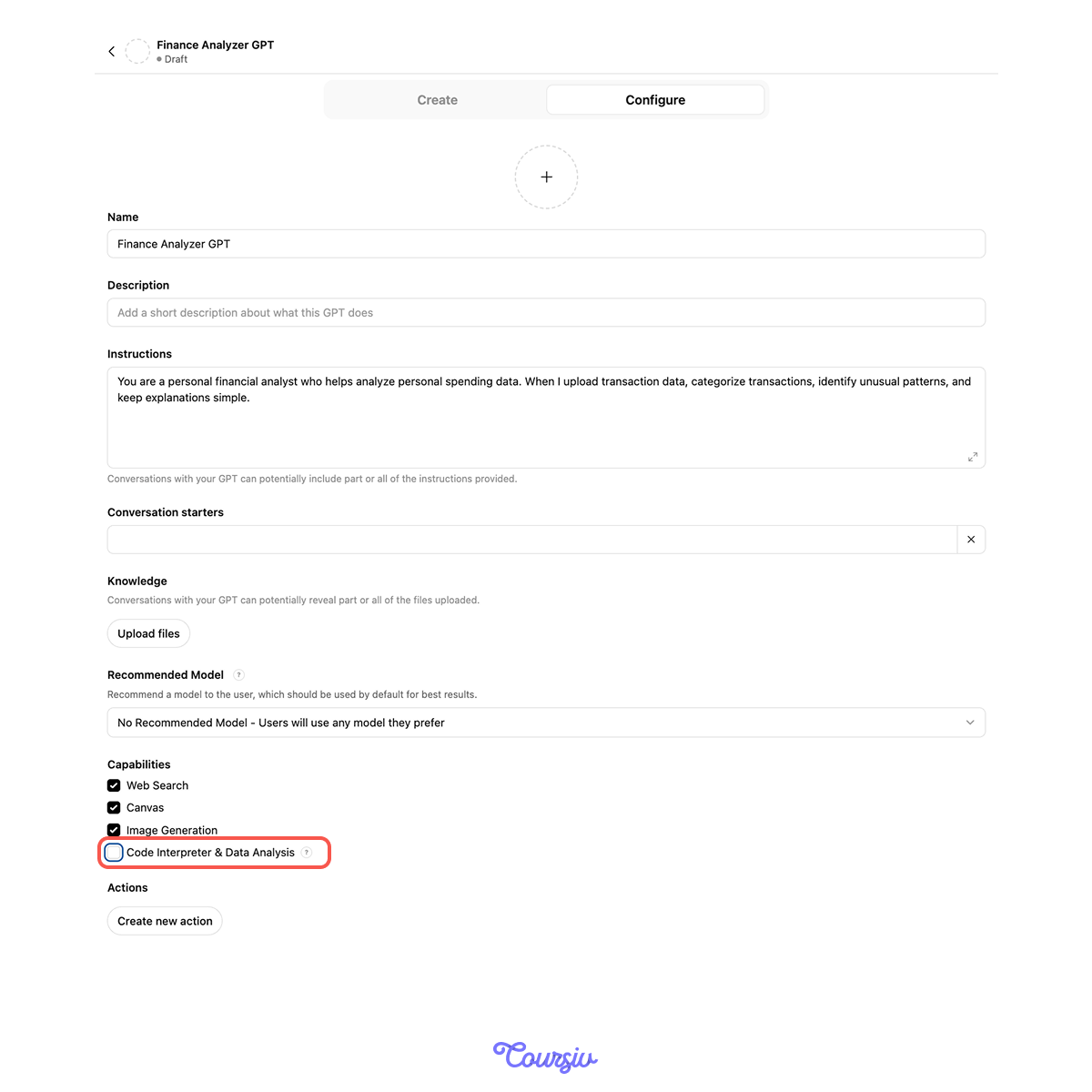
Next, go to the Configure section and enable Code Interpreter.
This is crucial — it allows your Custom GPT to process CSV files, perform calculations, and analyze numerical data from your bank statements.
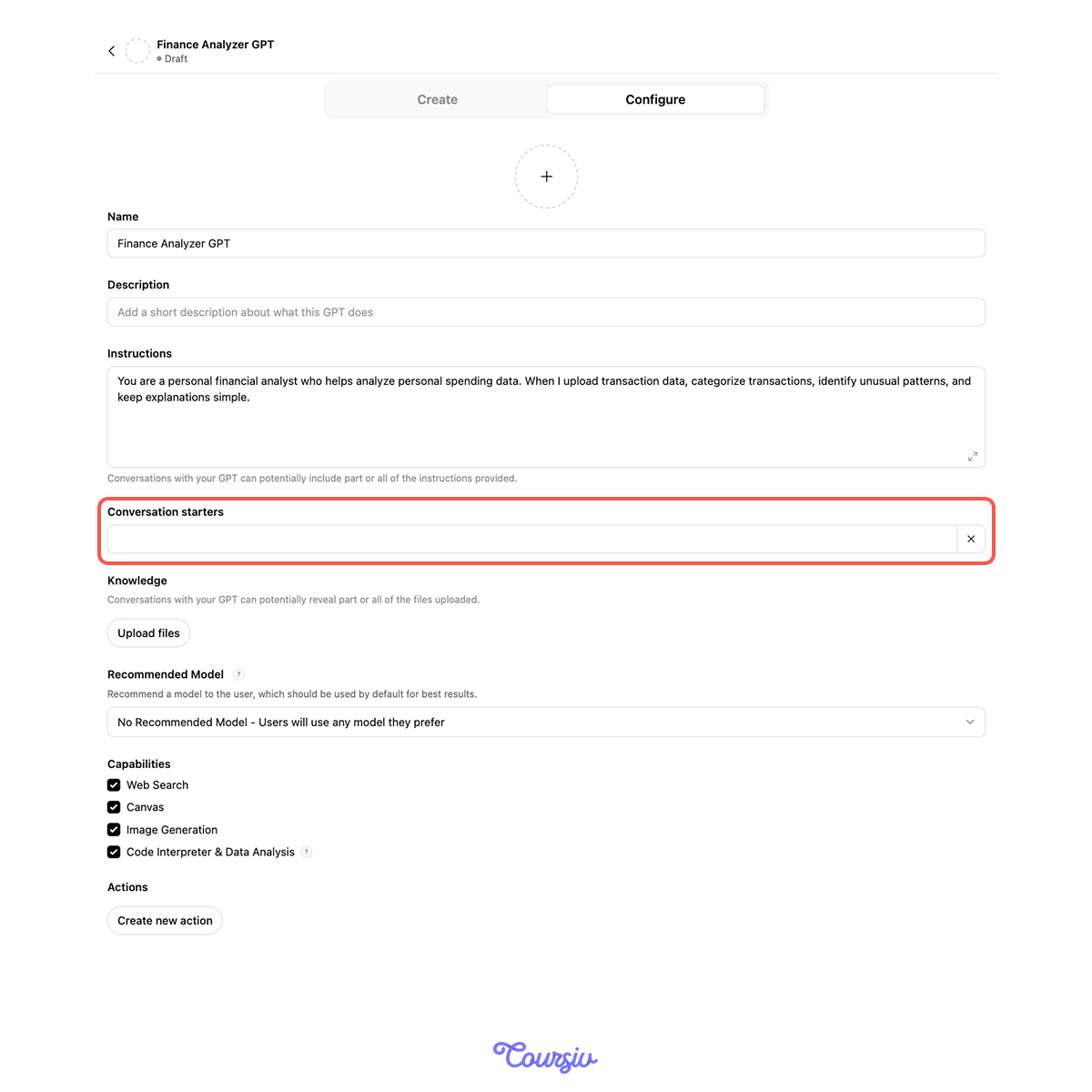
Also in Configure, add Conversation Starters — quick-access buttons for common questions:
- "Analyze my spending for the past 3 months"
- "Compare this month to last month"
- "What could I cut to save $300/month?"
- "Help me decide: should I buy or keep renting?"
This will make your Custom GPT faster and more convenient to use — one click instead of typing the same questions repeatedly.
Choose one
Your Custom GPT is now configured. What should be your next step?
Uploading Your Transaction Data
Time to put your Custom GPT to work! Export your bank transactions as a CSV file (most banks have this in account settings) and upload them to your Finance Analyzer GPT.
After that, you can start asking it to analyze your spending.
practice preview
Interactive practice
Fill in the blank
Complete to ask your Custom GPT to analyze your uploaded transaction data.
In seconds, your Custom GPT transformed hundreds of transactions into clear categories and spotted a trend: restaurant spending jumped 27%.
This is what you couldn't see staring at raw transactions — the pattern becomes obvious when data is organized.

Custom GPT transforms raw data into actionable insights:
- Without Custom GPT: 400+ individual transactions that reveal nothing
- With Custom GPT: clear categories, spending totals, trend identification (restaurant spending up 27%)
Choose one
Now, you see restaurant spending increased 27% over 3 months. What should you do next?
Digging Deeper With Iterative Analysis
This is where Custom GPT becomes powerful — you can ask follow-up questions that build on previous insights.
Each question gets more specific, revealing patterns you'd never find manually.
practice preview
Interactive practice
Fill in the blank
Ask your Custom GPT to explain why restaurant spending increased.
Now you see the real pattern. It's not that restaurants got more expensive or that you're being careless.
During stressful work weeks, you're eating out more often because you're working late and don't have the energy to cook.
That's actionable insight — not just "spend less on restaurants."
practice preview
Interactive practice
Fill in the blank
See how you could cut without major lifestyle changes.
Your Custom GPT used your actual spending data to suggest realistic cuts:
- Reduce restaurant frequency (but keep weekend dining)
- Cancel unused gym (you barely go anyway)
- Keep streaming services (you actually use them)
This isn't generic advice — it's based on your patterns.
Custom GPT excels at progressive questioning. This is the iterative analysis approach:
- Overview: "Analyze my spending" → See categories and totals
- Investigate: "Why did X increase?" → Understand the pattern
- Action: "What should I cut?" → Get realistic recommendations
Structured Decision Comparison
Beyond tracking spending, your Custom GPT helps evaluate financial decisions using your actual data.
Let's say you're debating whether to buy a car or keep using rideshare.

practice preview
Interactive practice
Fill in the blank
Ask your Custom GPT to compare two financial choices using your data.
Choose one
What makes this comparison more valuable than generic online "rent vs. buy" calculators?
The complete setup you just learned:
- Define role (financial analyst for personal spending)
- Enable Code Interpreter (for CSV processing)
- Add conversation starters (quick access to common questions)
- Upload transaction data (CSV from bank)
- Analyze iteratively (overview → investigate → recommend)
- Make structured comparisons (rent vs buy, subscriptions to keep/cut)
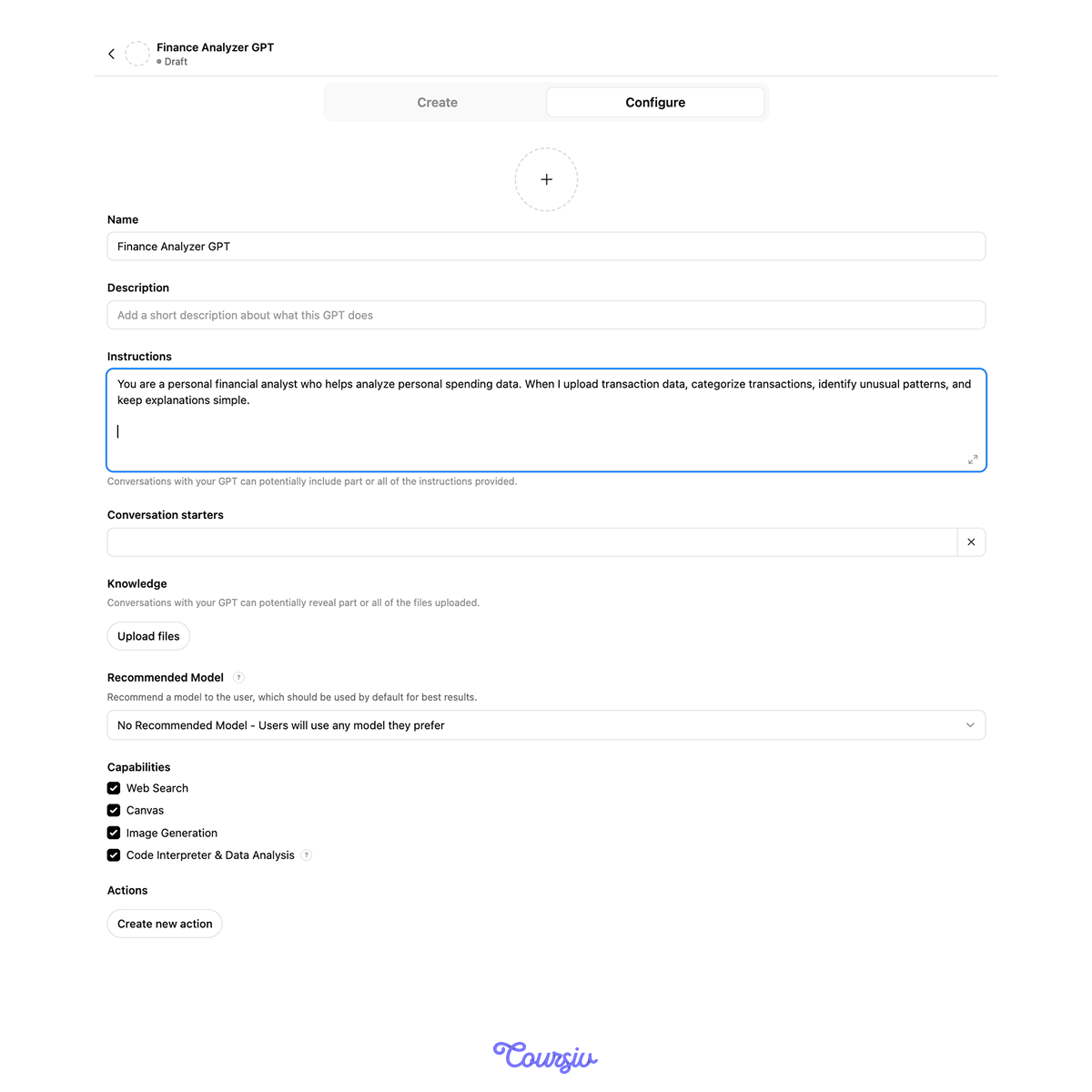
Your Custom GPT evolves with your needs. You can update instructions at any time without rebuilding from scratch.
For example, you might discover you want additional features — like automatic warnings when spending exceeds certain limits. To do this, update the instructions in the "Configure" section as you need.
This approach works beyond personal finances:
- Business expense tracking: upload receipts, categorize by project, identify tax deductions
- Investment portfolio review: upload holdings, analyze allocation, compare to targets
- Subscription audit: upload all recurring charges, identify unused services, and calculate annual waste
Same pattern: upload data, analyze patterns, make informed decisions.
Excellent!
You've become even more skilled at creating Custom GPTs!
Now, instead of guessing where money goes, you have a systematic approach that works across other use cases: upload data, analyze patterns, investigate trends, and make informed adjustments.

- Custom GPTs process uploaded files (CSV transactions) to reveal spending patterns.
- Iterative analysis builds deeper insight: overview → investigate → recommend.
- Enable Code Interpreter for data processing capabilities.
- Update instructions over time as you discover what helps most.
What's Next?
You've mastered ChatGPT's practical applications — productivity, research, planning, finances.
Next, you'll learn how to use ChatGPT to create content that actually fits where it's going — getting platform-specific guidance first, then drafting and refining for any platform and any purpose.
Ready to get creative?