ChatGPT · ChatGPT for Real Life
ChatGPT for Effective Communication
Write difficult messages with the right tone
The Difficult Message Problem
We all have messages we keep putting off — the team update nobody wants to deliver, the "no" to a friend's favor, or the awkward email to a landlord. Whatever the situation, finding the right tone is hard.
Let's learn how ChatGPT can help you get it right.

The Tone Challenge
Here are the first drafts for each situation:
Work: Subject: Project Timeline Change
"Team — due to budget constraints, we're pushing the feature launch back 6 weeks. I know this isn't ideal, but we need to adjust. The new target date is May 15. Let me know if you have questions."
Personal: "Hey — I can't help you move this weekend. I have other plans. Good luck with it."
Every day: "Hi, the heating still isn't working. This is the third time I'm asking. Please fix it."

Choose one
What's the biggest problem with all three drafts?
This is where many difficult messages fail: the content is fine, but the tone is wrong.
However, ChatGPT can help you rewrite for the right tone while keeping your message clear!
Basic Tone Adjustment
First, let's ask ChatGPT to rewrite your work email draft with a more empathetic, professional tone.
Subject: Project Timeline Change
"Team — due to budget constraints, we're pushing the feature launch back 6 weeks. I know this isn't ideal, but we need to adjust. The new target date is May 15. Let me know if you have questions."
practice preview
Interactive practice
Fill in the blank
Ask ChatGPT to adjust the tone of your email.
Choose one
Is this rewritten version better than the original draft?
This is a common issue when using AI to rewrite: it improves one thing (tone) but loses something important (your voice). The solution? Show ChatGPT examples of how you write, then have it match your style while improving clarity.
Now let's try matching style through this personal scenario: "Hey — I can't help you move this weekend. I have other plans. Good luck with it."

Style Matching With Examples
ChatGPT can match your writing style if you give it examples to learn from:
- Example 1: "Hey, just saw your message — sorry for the slow reply! Would love to help, but my weekend is completely gone with family stuff. Can we figure out another way I can help you out?"
- Example 2: "Ugh, I feel terrible about this, but I genuinely can't make Saturday work — already committed to something I can't move. Let's catch up properly next week though, I miss you!"
- Example 3: "So sorry, I'm the worst — completely forgot to reply. I can't do this weekend, but I'm free the one after if that helps at all?"
practice preview
Interactive practice
Fill in the blank
Complete the prompt to see how shared examples of your typical writing style can affect the result.
See the difference? Now it sounds like you:
- Conversational ("won't be welcome news," "I'm around if anyone wants to talk")
- Direct without being cold ("this is frustrating")
- Empathetic but not overly apologetic ("budget reality")
- Maintains your casual style ("rolling with this")
ChatGPT matched your voice while improving the structure and clarity.
Examples teach ChatGPT your voice:
- Without examples → Generic professional language
- With examples → Your natural style, but polished
Iterative Phrase Refinement
Same pattern — your voice, your warmth, the message still lands. Now, let's take it one step further with an everyday situation.

Phrase Refinement — Everyday
Your heating has been broken for weeks, and your landlord keeps ignoring you. Your draft is frustrated and blunt:
"Hi, the heating still isn't working. This is the third time I'm asking. Please fix it."
Choose one
What do you think you should do when one specific phrase needs adjustment?
practice preview
Interactive practice
Fill in the blank
Ask ChatGPT to rewrite your landlord message with the right tone, then refine one phrase that still feels off.
Firm, clear, professional — and much more likely to get a response. Once you're happy with the message, you're ready to send it.
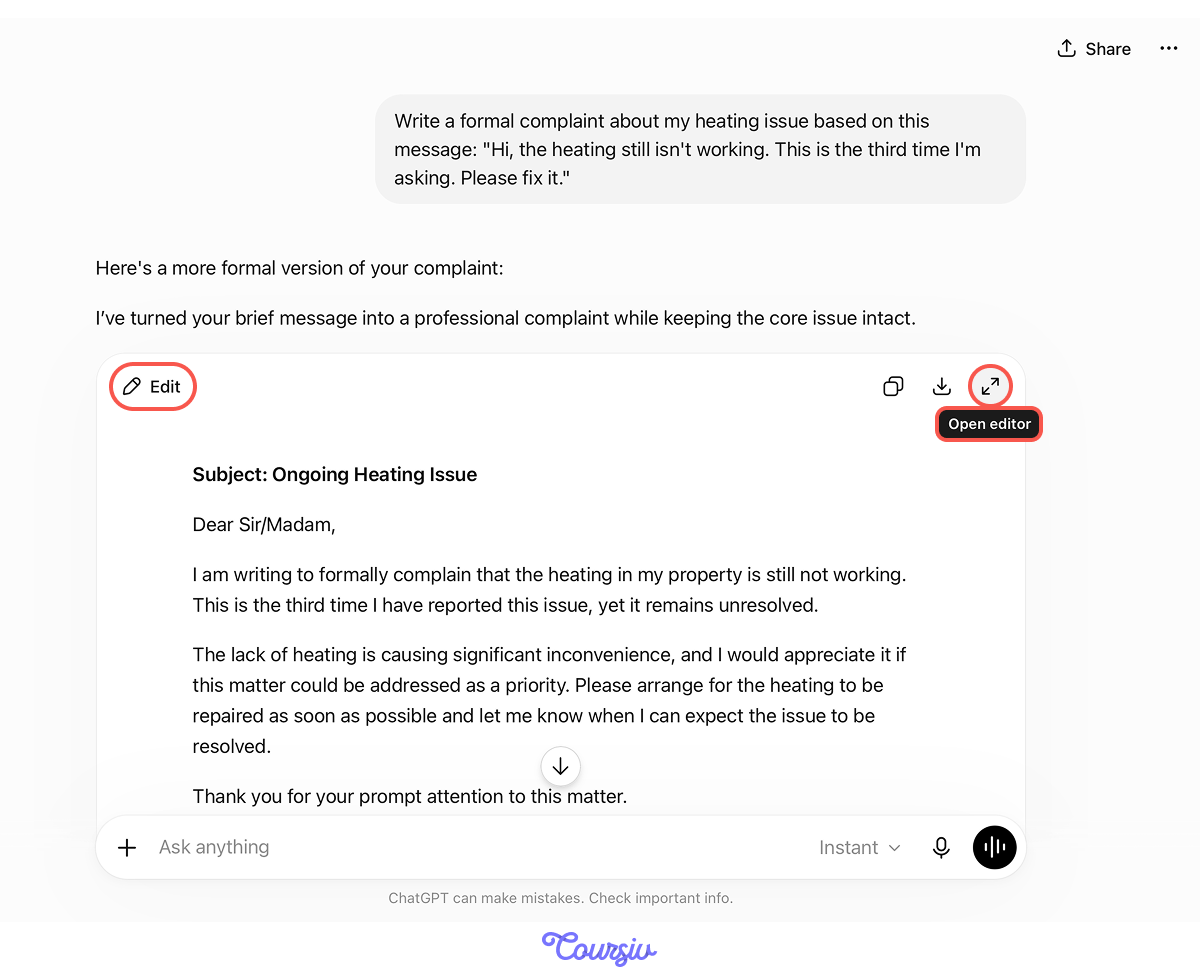
But if your message is longer — say, a formal complaint — that's when it's worth opening Canvas for a final polish before hitting send.
Canvas is ChatGPT's side-by-side editor — it opens a separate panel next to the chat where you can refine your draft with targeted edits without rewriting everything from scratch.
ChatGPT opens Canvas on its own when it sees the task calls for one — typically for writing or code longer than 10 lines. If you want to be sure it opens, add "use Canvas" to your prompt.
Let's say you asked, "Write a formal complaint about my heating issue based on the message I just wrote." ChatGPT recognizes this as a drafting task and opens the draft in Canvas, ready for refinement.
From there, edit by describing what you want in the Ask for changes bar.
You just used the style-guided rewriting approach. Here's how:
- Start with your draft, even if the tone is wrong.
- Ask for specific tone adjustment: "more empathetic and professional."
- Provide examples of your style: 2-3 past emails showing your voice.
- Have ChatGPT rewrite in your style while improving clarity.
- Refine specific phrases iteratively through conversation.
This approach works for any difficult communication you need to write:
- Saying no to a request: Your draft sounds too harsh → Rewrite in your style with an empathetic but firm tone
- Giving constructive feedback: Your draft is too soft → Rewrite with a direct but supportive tone
- Announcing a deadline change: Your draft is too apologetic → Rewrite acknowledging impact while staying clear
- Declining a meeting: Your draft sounds dismissive → Rewrite showing respect for their time while protecting yours
Same pattern: draft → tone adjustment → style matching → phrase refinement.
Choose one
Based on what you learned, when asking ChatGPT to rewrite your email, can you skip providing style examples and just ask for "professional tone"?
practice preview
Interactive practice
Put in order
Next, arrange the steps for rewriting difficult messages with ChatGPT.
Excellent Work!
You now know how to easily polish your writing without losing your voice!
Instead of staring at a difficult message for an hour, you now have a systematic process that works in any context — work, personal, or everyday. Draft quickly, show ChatGPT your style, refine iteratively, and finish in Canvas.

- Don't overthink difficult messages — draft quickly, then let ChatGPT help refine tone.
- Provide 2-3 examples of your writing so ChatGPT matches your voice, not generic corporate language.
- Refine specific phrases iteratively rather than rewriting from scratch.
- This works for any difficult communication: feedback, saying no, announcing changes, declining requests.
What's Next?
In the next lesson, you'll learn how to use ChatGPT to research anything that matters — a purchase, a decision, a topic you need to understand fast.
You'll use Web Search and layered prompting to gather verified information, map your options, and walk away with a clear recommendation tied to your specific situation.