ChatGPT · ChatGPT for Real Life
Plan Anything: Multi-Step Projects
From chaos to clear plan with Projects
The Multi-Step Planning Challenge
Say you've been thinking about starting a small business — a freelance service, an online shop, or a side project you've been putting off. You have a rough idea of what you want, but the information is scattered everywhere — market research notes, cost estimates, competitor names, and a to-do list that keeps growing.
You need to turn this chaos into a clear plan, but where do you even start? Let's use Projects to organize everything and build a structured approach!

The Business Planning Problem
Let's say you want to launch a small online business selling handmade products. You have the idea, the motivation, but not yet the structure.

You've been collecting information for weeks, and now you have:
- Three potential product ideas (different effort, cost, and demand levels)
- Notes on competitors you've researched online
- A rough cost estimate for materials and setup
- A list of things you need to do before launch
- Budget constraints ($3000 maximum to get started)
You need to make decisions:
- Which product to start with?
- Which platform to sell on?
- How much will it actually cost to launch?
- When can you realistically be open for business?
But every time you try to plan, you get overwhelmed.
Choose one
What makes planning a business hardest when information is scattered?
This is where Projects can help: put everything in one place, set your constraints, and let ChatGPT help you structure a plan that considers all your scattered inputs at once.
Let's see how.
Setting Up Your Business Project
First, as you might remember, you need to create a dedicated Project for your business planning.

Then, before uploading files, set project instructions. These tell ChatGPT your priorities and constraints for the entire launch process.
This ensures every conversation stays grounded in what matters most to you.
practice preview
Interactive practice
Fill in the blank
Complete the instructions to guide all planning conversations for this project.
Now, ChatGPT won't suggest expensive product lines over budget or complex launch strategies that require full-time attention.
Creating a Structured Plan From Scattered Inputs
Next, upload all your business materials.
Once uploaded, ChatGPT can reference various sources and compare product ideas while considering your budget and timeline.
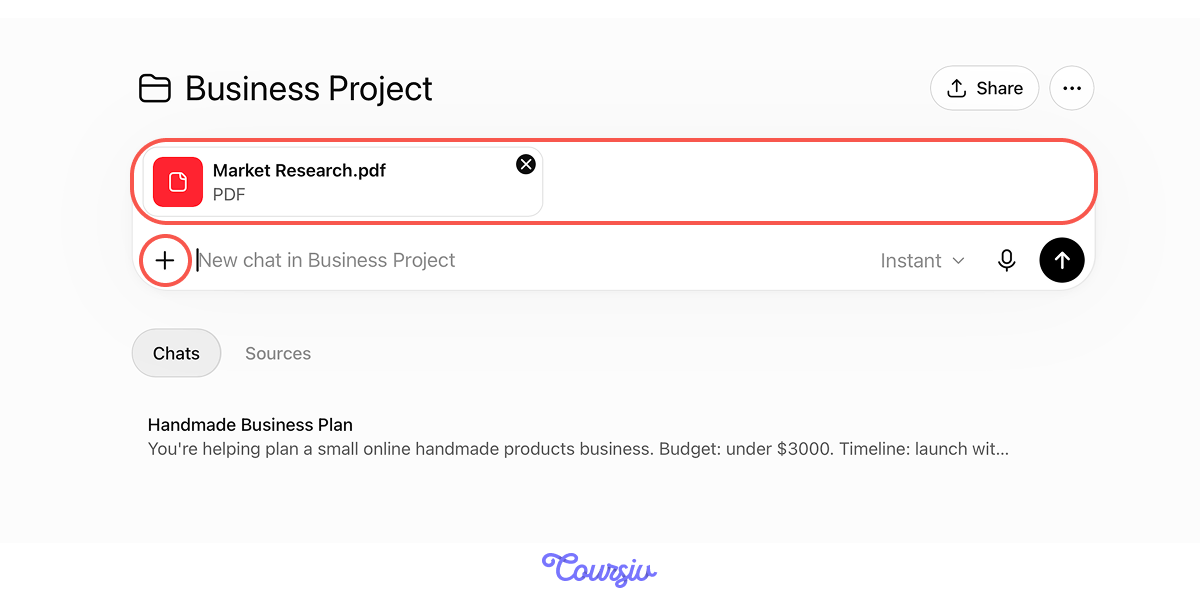
Once your scattered materials are uploaded, let's start your first chat and ask ChatGPT to synthesize everything.
practice preview
Interactive practice
Fill in the blank
Fill in the gaps to create a structured plan from all uploaded materials.
Choose one
The plan looks good, but the budget estimate comes in at $3500-$4000 — over your $3000 maximum. What should you do next?
When you need to make refinements, you can always ask ChatGPT to do it.
So, let's find ways to stay within your budget without compromising!

practice preview
Interactive practice
Fill in the blank
Ask ChatGPT to show how to fit within budget constraints.
Perfect! Now you see clear trade-offs:
- Smaller first batch → saves $300-$500, lower risk before you validate sales
- Basic tools to start → saves $200-$400, upgrade after first revenue comes in
- Simple packaging → saves $100-$150, still looks clean and professional
- Organic marketing first → saves $200-$300, test what works before spending on ads
Instead of guessing what to cut, you have structured options that protect your priorities.
When you set clear constraints upfront (budget, timeline, priorities), ChatGPT's recommendations stay realistic.
For example, if you hit a constraint (like exceeding the budget), ChatGPT shows adjustment options that respect your priorities rather than generic "spend less" advice.
This is constraint-led planning: boundaries guide decisions, not limit them.
Organizing Decisions You Need to Make
Your business plan is shaping up, but many decisions still need to be made: which platform to sell on, what to name the business, how to handle shipping, and when to run your first ad.
Therefore, you might need to create a structured decision list so you know what to do and when.
practice preview
Interactive practice
Fill in the blank
Ask ChatGPT to organize all decisions you need to make, prioritized by their due dates.
Now you have a roadmap for decisions:
- Urgent: Exact product to sell and materials supplier (determines your entire cost structure — decide first)
- Early: Photography style and shop setup (needed before anything goes live)
- Mid-stage: Launch date, initial quantity, and first marketing approach (shapes your first week of sales)
- Later: Paid ads and which product to scale (flexible — decide after you see early traction)
This prevents decision paralysis — you know what to focus on now vs. what can wait.

Organizing Work Across Multiple Chats
Your business project has several aspects to track.
So, instead of one overwhelming conversation, consider using separate chats for each area.
Choose one
Do you remember why using separate chats is a great approach and a main feature of Projects?
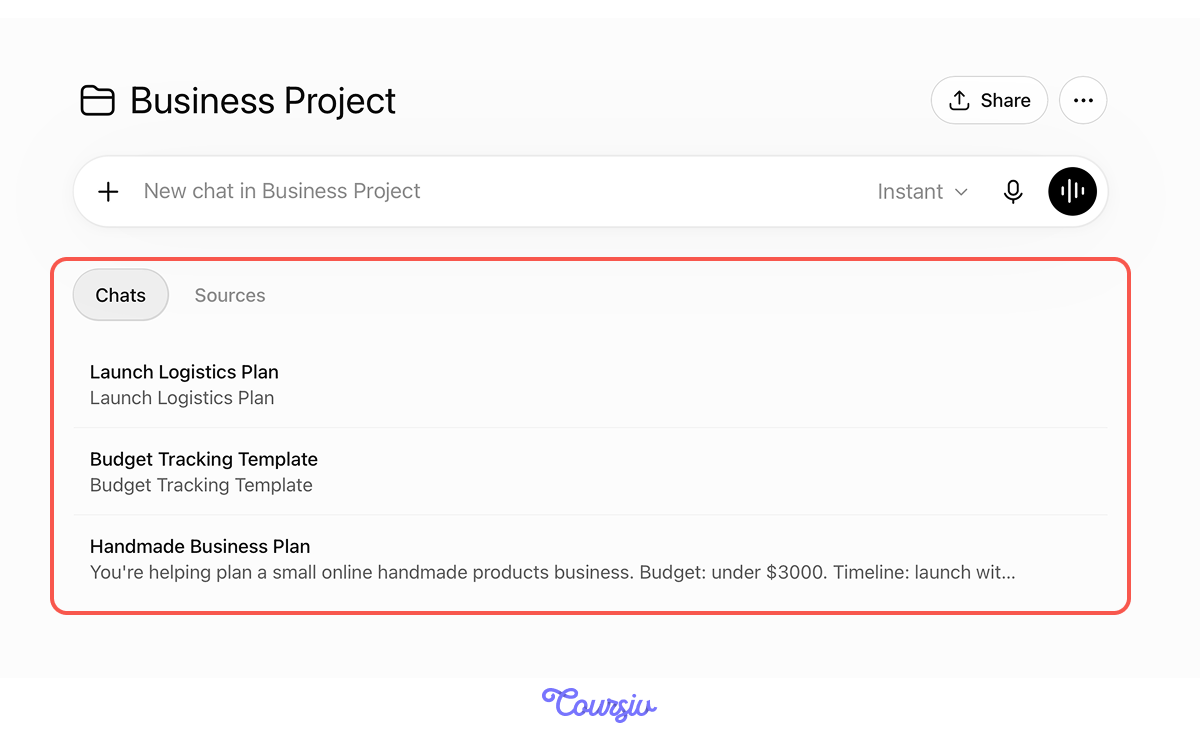
Hence, for your business project, you might create separate chats for:
- Budget tracking chat: Monitor spending, compare actual vs. estimated costs
- Product and branding chat: Work through product decisions, naming, logo, and packaging
- Launch logistics chat: Platform setup, shipping, photography, and listings
- Marketing chat: Ad strategy, social media content, first campaign planning
Each chat accesses the same uploaded files and follows the same project instructions.
Beyond One Task
This structured planning approach works for any complex goal you're working toward:
- Planning a big move: Apartment listings, moving costs, neighborhood research → compare, decide, track spend
- Planning a major purchase: Options, costs, trade-offs → compare, decide, track spend
- Career transition: Market research, skills gaps, financial runway → create a step-by-step plan with clear priorities
practice preview
Interactive practice
Put in order
Arrange the steps for using Projects to organize complex planning work.
There You Go!
You solidified your knowledge of the Projects feature and developed your skill in complex planning that involves balancing multiple constraints and organizing scattered information.
Now you have a systematic approach: consolidate everything → set constraints → build structure → organize decisions.

- Projects keep all planning materials accessible across multiple conversations.
- Set constraints upfront (budget, timeline, priorities) to guide realistic recommendations.
- ChatGPT converts scattered inputs into structured plans and organized decision lists.
- Use separate chats for different aspects — this is Projects' key organizational feature.
What's Next?
Now that you know how to organize complex planning with Projects, the next lesson takes it in a completely different direction — your finances.
You'll learn how to use ChatGPT to analyze your spending patterns, spot what you don't notice, and make smarter money decisions.