ChatGPT · ChatGPT Essentials
Discovering Modes & Features
Know which ChatGPT feature fits your need
Endless Possibilities With ChatGPT
Most people who use ChatGPT are only scratching the surface — and don't even know it. They type a question, get an answer, and call it a day.
It works — but it's a fraction of what the tool can actually do. There's a whole layer of modes and features that completely changes how you interact with it, and this course is where you find out what you've been missing.

Your First ChatGPT Challenge
Imagine you're preparing for a job interview. You need company research, a tailored answer to "tell me about yourself," and three practice questions — all from ChatGPT. Using the same approach for all three would slow you down.
This lesson shows you how to match the right ChatGPT intelligence level and feature to the right task.
Before You Dive In
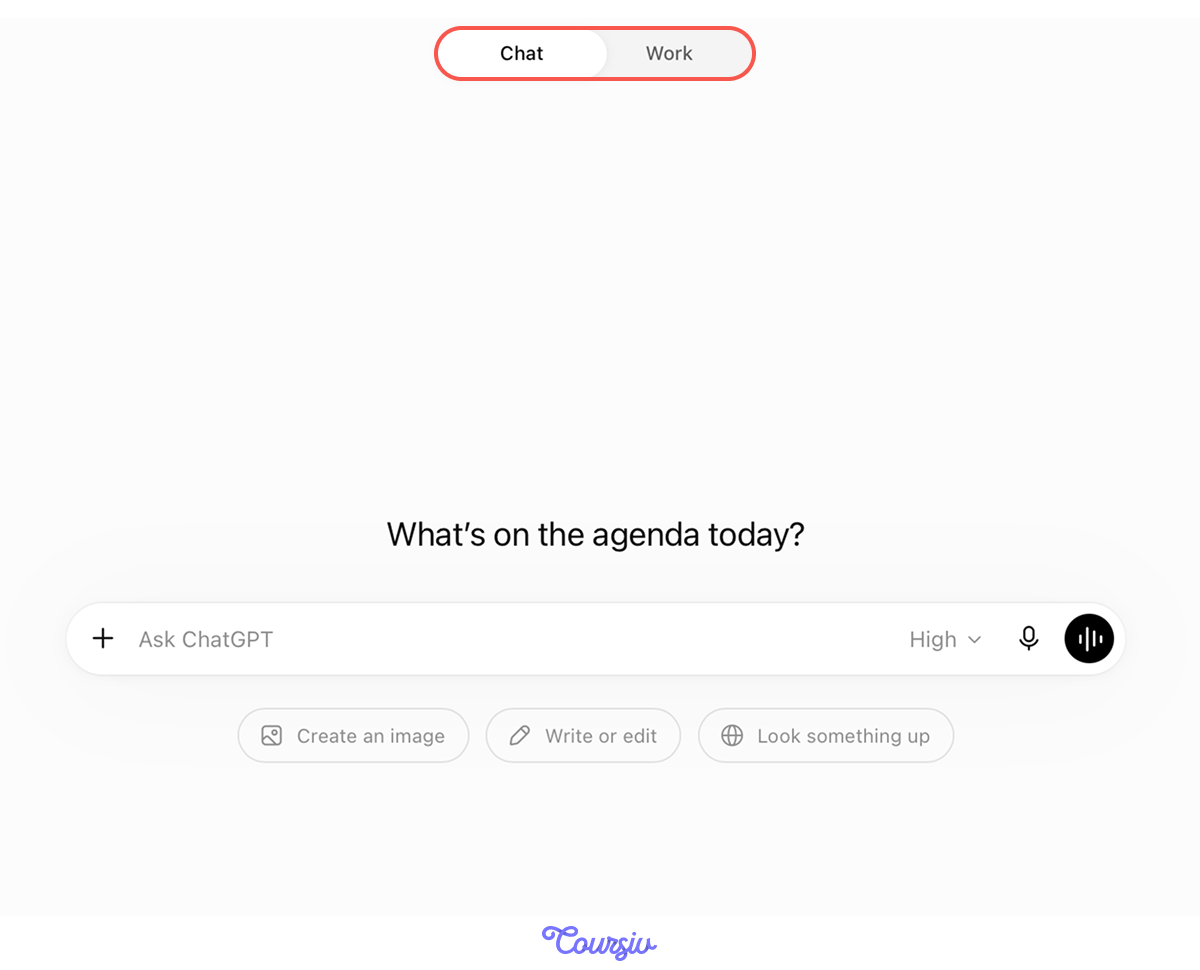
Open ChatGPT, and the home page offers two modes: Chat and Work. Chat is where everyday tasks happen — questions, drafts, and research.
Work is the power mode: an advanced workspace with extra settings for specialized, heavy-duty tasks.
This course sticks with Chat: it covers most tasks you'll run into daily. Work gets its own deep dive in a separate course.
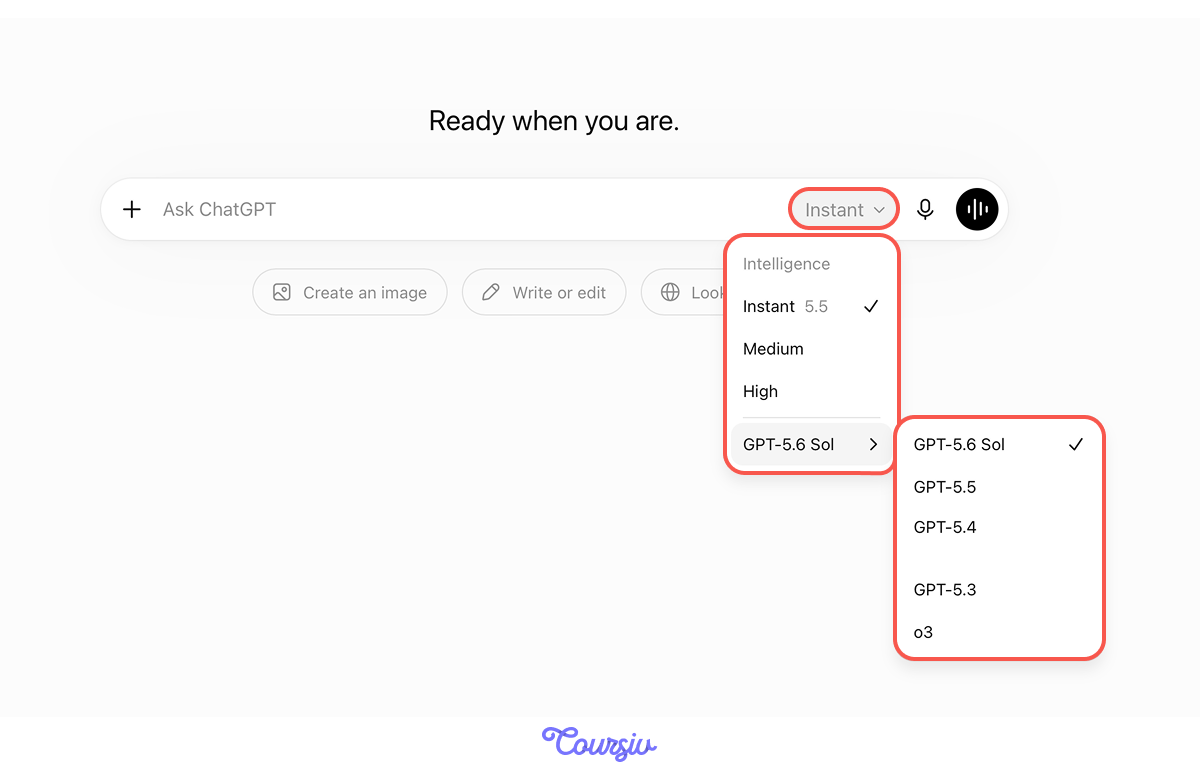
ChatGPT runs on a family of models that keep updating. The latest generation, GPT-5.6, comes in three tiers:
- Sol — the flagship and most capable
- Terra — balances capability, speed, and cost
- Luna — the fastest and lowest-cost in the family
Tiers and availability may change over time. In a standard ChatGPT conversation, however, you usually choose a reasoning level, not a model.
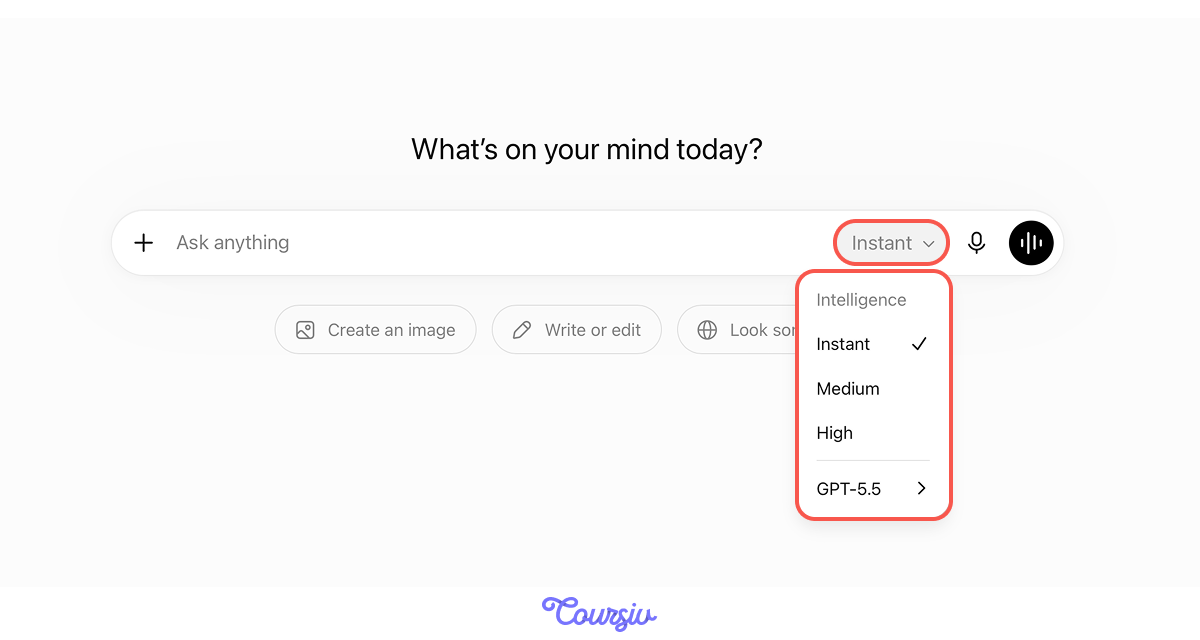
That reasoning level is the Intelligence setting. It has three levels — Instant, Medium, and High (Pro plans unlock a few more) — and the one you pick shapes how much reasoning ChatGPT puts into your response.
Choose one
Say you need to quickly write a summary section in your resume ASAP. What would you choose?
For quick, straightforward tasks, Instant is your best pick. It's the fastest option, designed for everyday questions and immediate results.
practice preview
Interactive practice
True / False
Now, evaluate this task and decide if it's simple or complex.
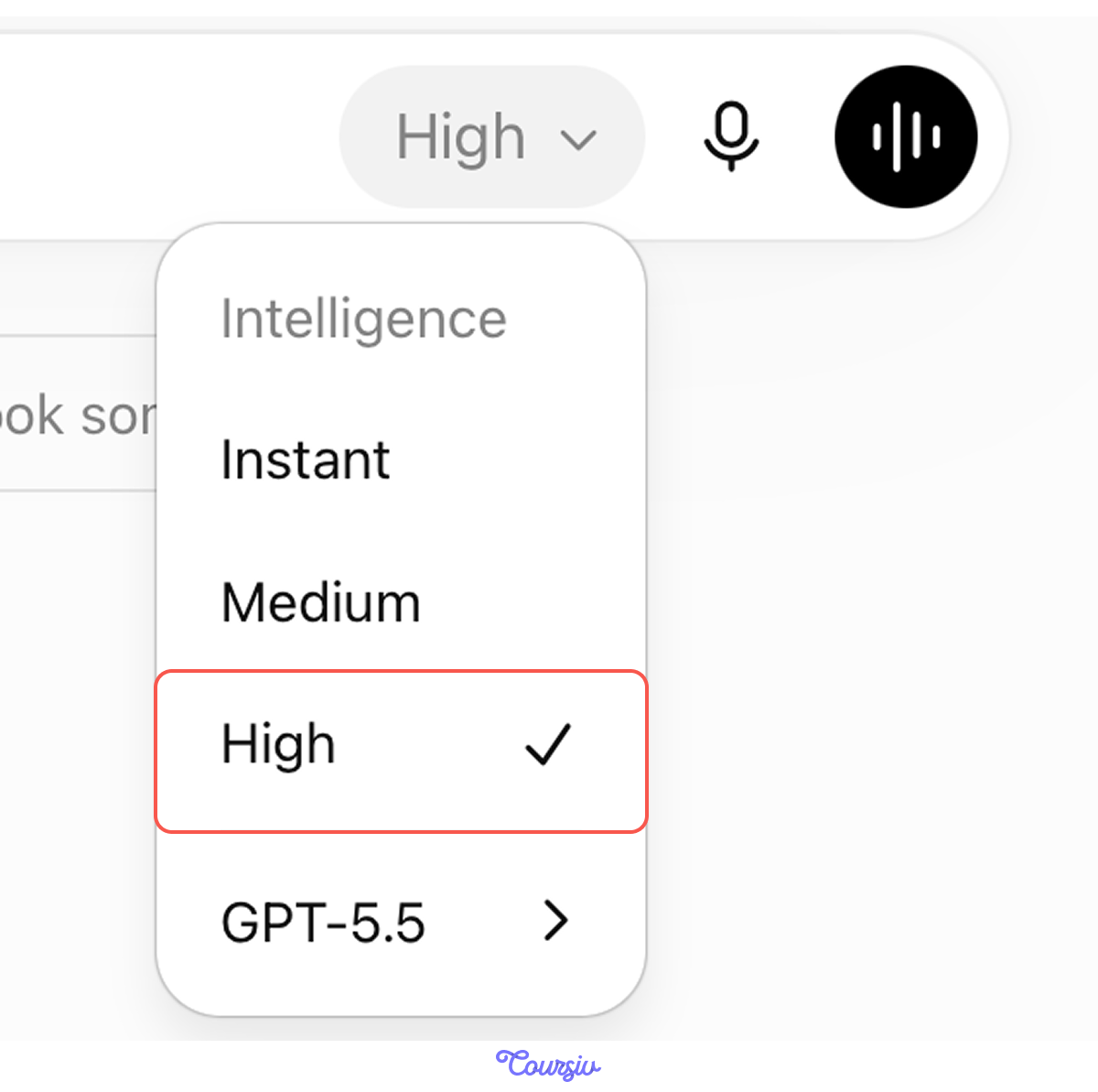
A multi-step task like this benefits from more reasoning. This is exactly what Medium and High are built for.
Both spend more time thinking than Instant, so expect a slower (but deeper) response.
Prefer to skip the choice? Turn on Higher intelligence so Instant scales up to a higher intelligence level when a task needs deeper thinking. Find it in Settings → General.

Think of Intelligence as different gears:
- Instant — fast responses for everyday tasks
- Medium — standard reasoning for tasks that need more analysis
- High — extended reasoning for complex, multi-step work
- Higher intelligence lets ChatGPT move between Instant and Medium for you
Choosing the right intelligence level is just the beginning. ChatGPT also has specialized features that enhance specific types of tasks.
Let's explore which features work best for different scenarios.
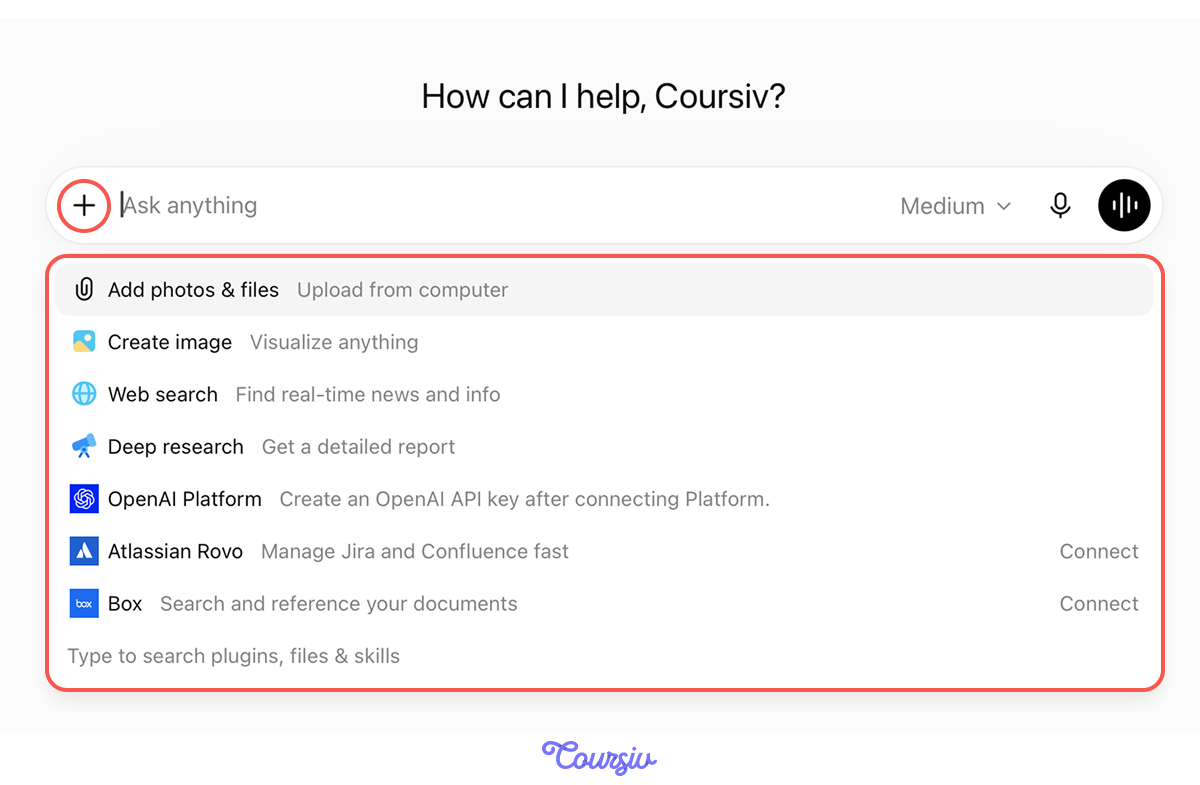
Choose one
Looking at the screenshot above, which ChatGPT feature would be most helpful for an interview prep task we discussed earlier?
Select all that apply
But why doesn't Deep Research fit if you need to research the company, in your opinion?
ChatGPT's Features
You've just identified which features fit which tasks.
Now, let's understand what each feature does and when to use it.
Feature 1: Web Search
Web Search, as mentioned above, pulls current information from the internet — news, company updates, and recent developments.
It's perfect for: company research, current events, and recent product launches.

Let's use the job-hunt scenario: you're preparing for an interview at Nike and need their latest news. Try it.
practice preview
Interactive practice
Fill in the blank
Ask for web information about Nike's sports clothing division with a Web search.
Web Search pulled current Nike news directly into the chat — no digging through news sites yourself. For deeper analysis, switch to Deep Research.
Feature 2: Deep Research
Deep Research is built for multi-step, in-depth questions. It can search the web, use uploaded files and connected apps, and produce a structured report with citations.
Use it for: market analysis, literature reviews, competitive research, and detailed decision briefs.

Feature 3: Add Photos & Files
The Add Photos & Files feature lets you upload images, PDFs, presentations, text documents, and spreadsheets. ChatGPT can summarize them, compare them, extract information, answer questions about their contents, or analyze their data.
Examples: edit an uploaded resume, analyze a spreadsheet, summarize a PDF, or interpret a screenshot.

Feature 4: Create Image
Beyond processing images, ChatGPT can also create and edit images. Describe what you need visually, and ChatGPT generates it.
Use this for: portfolio visuals, brand logos, presentation graphics, social media visuals, or just for fun.

OpenAI Platform
In the toolkit, you'll also see OpenAI Platform. It's the developer side of ChatGPT — an API to build your own apps, workflows, and integrations. ChatGPT is the ready-made app you use here; OpenAI Platform is the toolkit for building your own.
Below the features menu, you can also search for plugins, files, and skills — like Study and Learn for study plans and quizzes, or others tailored to your work.
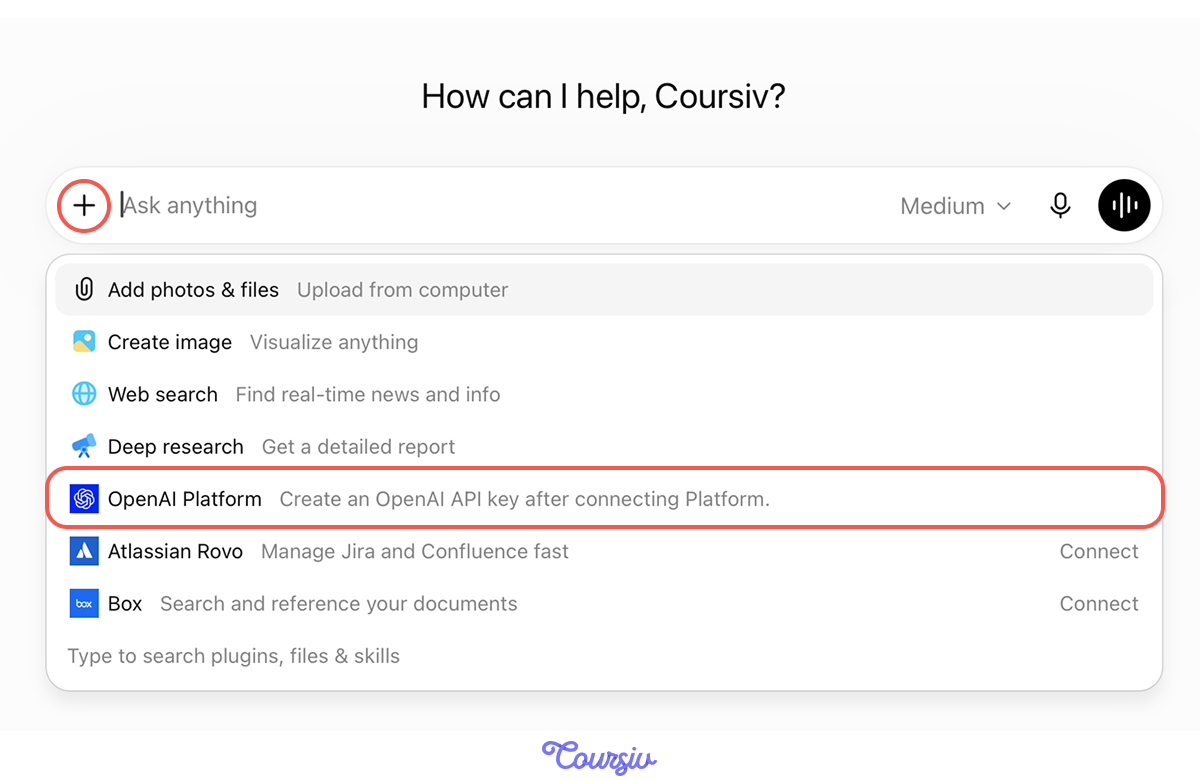
ChatGPT's features are tools in a toolkit:
- Web Search for current info (fast)
- Deep Research for comprehensive analysis (slow)
- Files & Photos for analyzing uploads
- Image Creation for visual content
Matching Intelligence and Features to Tasks
Now, let's practice choosing the right intelligence level and feature for different job-search scenarios.
practice preview
Interactive practice
Match pairs
Tap a left item, then a right item to match.
Let's combine both: an intelligence level and a feature together. Say you want a quick overview of Nike's corporate culture before an interview.
You'd select Instant — the task is straightforward, no deep reasoning needed — and Web search to pull live information.
practice preview
Interactive practice
Fill in the blank
Ask for a quick overview of Nike's corporate culture with Instant and Web Search.
You can now match ChatGPT's intelligence levels and features to different task types and combine them.
This skill multiplies your prompting effectiveness. Knowing how to ask matters, but knowing which tool to use matters just as much.
- Intelligence levels affect speed and reasoning: Instant for everyday tasks, Medium for standard reasoning, and High for more complex work. Some plans include additional levels.
- Auto-switch handles the choice for you. Let Instant scale up to Medium when tasks need more thought.
- Features add capabilities beyond text: Web search, Deep research, Add photos & files, Create image, OpenAI Platform.
- Combine level + feature for the right fit: Like Instant + Web search for a fast company overview.
What's Next?
Next, you'll discover a feature most users walk straight past — Voice Mode: a completely different way to interact with ChatGPT that fits certain tasks better than typing.
Stay tuned!