ChatGPT · ChatGPT Essentials
Build Your Own AI: Custom GPTs
Build your personal AI assistants
The Repetitive Recipe Request
What if you could create your own version of ChatGPT — one that already knows your preferences, follows your rules, and never forgets your instructions?
That's exactly what Custom GPTs let you do. Let's learn how to build one!

The Repetition Problem
Have you ever run out of ideas for what to cook? Or did you get tired of a monotonous diet?
In such a situation, asking ChatGPT for help is a good approach, but it has one issue you might encounter.
practice preview
Interactive practice
Fill in the blank
Let's see how ChatGPT normally responds when you ask for a dinner recipe.
Choose one
The response looks good, but what could be the problem with this recipe?
You might be allergic to certain ingredients, prefer vegetarian options, need calorie counts, or want recipes that always show prep time.
There are many personal factors ChatGPT doesn't automatically consider when generating recipes.
Choose one
Why might you create a dedicated GPT for recurring meal planning?
You could keep returning to the same conversation or rely on ChatGPT’s Memory. But for a recurring workflow, it may be more convenient to create a dedicated GPT with its own stable instructions.

For our example of meal planning, that means repeating: your dietary preferences, cooking time constraints, ingredient dislikes, and skill level — in every single chat.
Custom GPTs: Your Reusable Assistant
Custom GPTs solve this by creating specialized assistants that remember your instructions, preferences, and examples — permanently.
The coolest thing — you build them yourself!

Instead of adding the same constraints to every prompt, you can say, "Give me a weeknight dinner idea." The GPT applies the dietary preferences, formatting rules, and time limits already included in its instructions.
You might wonder: isn't this what Projects do? Not quite.
- Projects organize files and chats for multi-step work or occasional planning (renovations, events, one-time projects). They're great for storing lots of work-related information in one place.
- GPTs are for regular, recurring tasks where you repeat the same instructions every time (weekly meal planning, monthly budgets, daily content creation).
Both preserve context, but Projects = occasional big tasks with many files. Custom GPTs = frequent repeated tasks with consistent rules.

Creating Your Cooking Assistant
To start building a Custom GPT, navigate to the left sidebar. Click GPTs → Create.
Then, you'll see the GPT Editor with three sections: Create, Configure, and Preview.
Note: creating GPTs requires a paid plan and is currently available on the web.
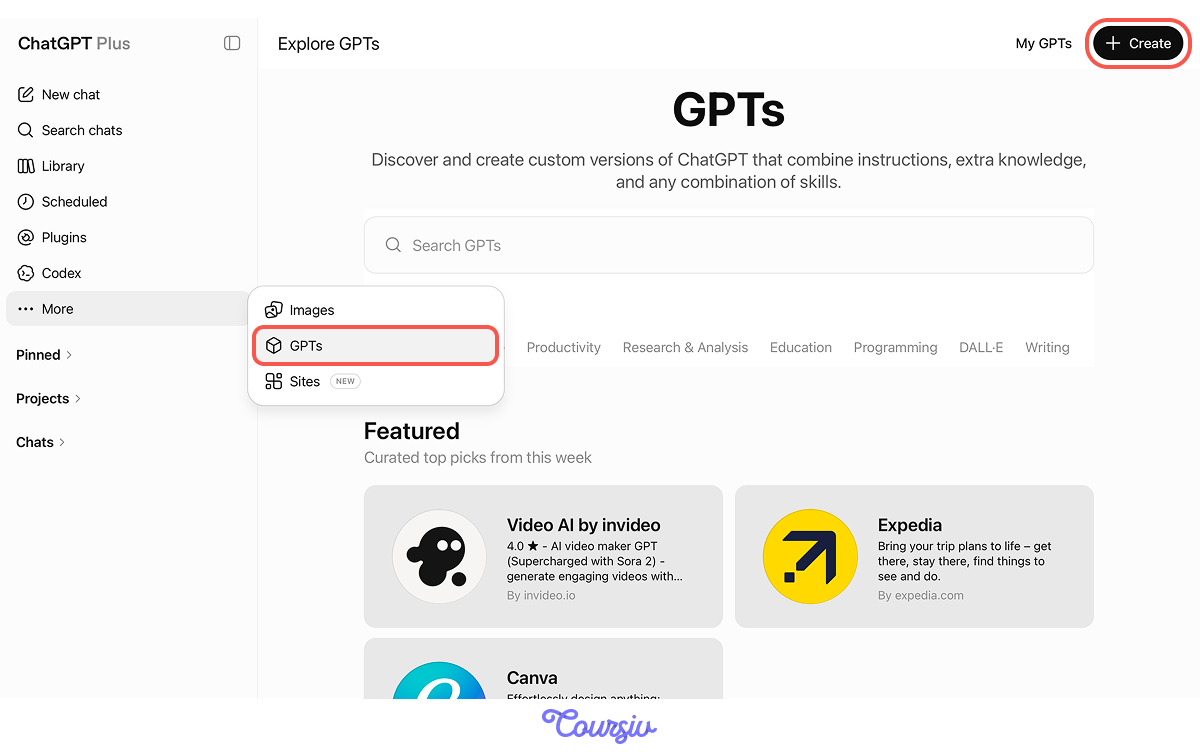
The Create section is where you guide your Custom GPT through prompts. In turn, the Configure section is where you give your GPT name, initial instructions, and upload files.
This is where the magic happens.
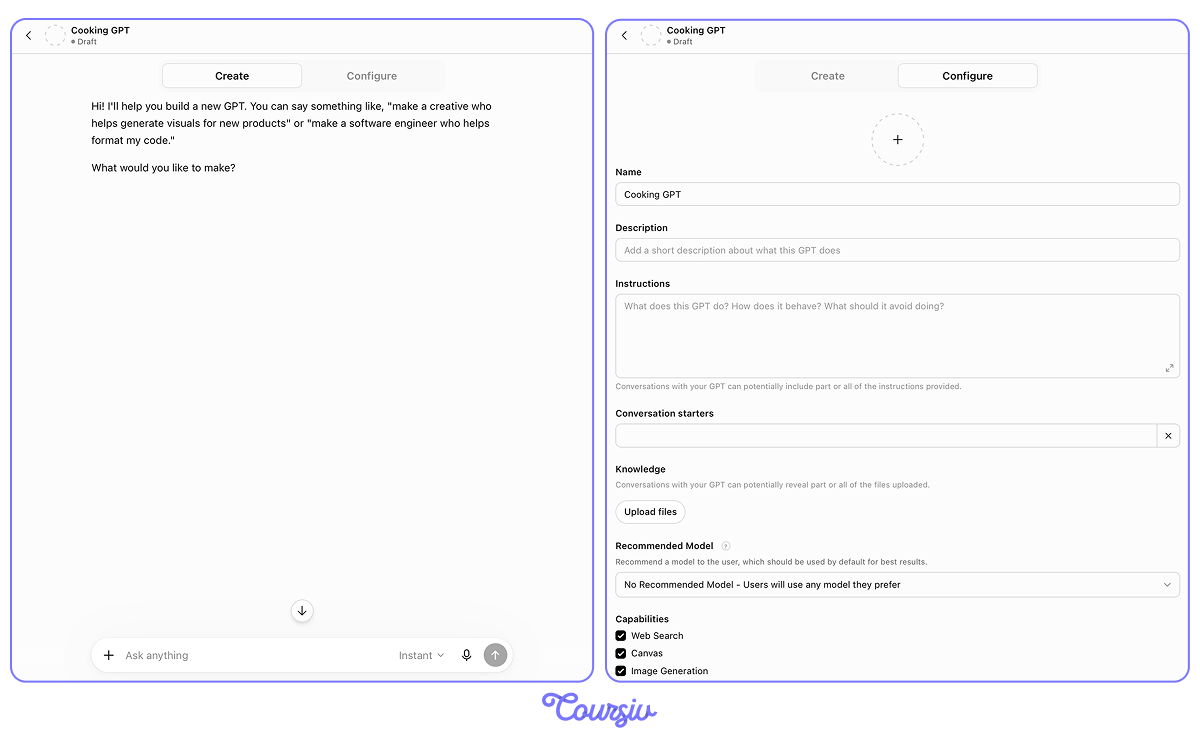
You can also choose a recommended model and Intelligence level for your GPT.
For a cooking assistant, Instant may be enough for quick recipe ideas. If you want a comparison of nutrition plans on top of that, choose Medium or High.
Choose one
What do you think is the first step when building a Custom GPT?
practice preview
Interactive practice
Fill in the blank
Now, complete the prompt to establish the foundation for your Cooking Assistant GPT.
Perfect! You've established the role (cooking assistant), purpose (cooking help), and personality (friendly, knowledgeable) with explicit constraints your Custom GPT will remember forever.
When setting instructions for Custom GPTs, define these core elements:
- Role: What is this assistant? (cooking helper, writing coach, budget advisor)
- Purpose: What does it help with? (quick recipes, grammar fixes, expense tracking)
- Personality: How should it communicate? (friendly, professional, enthusiastic)
- Constraints: What rules must it follow? (30-minute recipes, formal tone, budget limits)
You can set Custom GPTs for any recurring purpose:
- A workout planner that knows your fitness level
- A writing coach that matches your style
- A budget tracker that follows your categories
And many more. The pattern is always the same: define role, purpose, personality, and constraints.

Going back to our Cooking Assistant, let's add more instructions to make it work better for you.
Select all that apply
What additional details could you add to make your Cooking Assistant even more personalized?
Input these details in addition to your initial instructions in the "Create" section. The prompt might look like this:
- User preferences: No cilantro, loves garlic, prefers chicken and fish over red meat
- Dietary needs: Low-carb options when possible
- Rule: Always include prep and cook time estimates
These instructions become permanent — your Custom GPT will follow them in every conversation.
Testing Your Custom GPT
With detailed instructions added, let's test the Cooking Assistant with a real request.
The "Preview" section will show how it responds.
practice preview
Interactive practice
Fill in the blank
Ask your Custom GPT for a weeknight dinner idea.
Notice how your Custom GPT remembered everything: no cilantro, extra garlic, chicken preference, 30-minute limit, low-carb focus, and included prep time — without you repeating any of it.
That's the power of Custom GPTs for recurring tasks!
Regular ChatGPT forces you to re-explain context over time. Custom GPTs remember:
- Your preferences and restrictions (dietary needs, ingredient dislikes)
- Rules you want followed (always show time, keep it simple)
- Format and structure you prefer (how recipes should look)
- Constraints that guide every response (30-minute limit, low-carb)

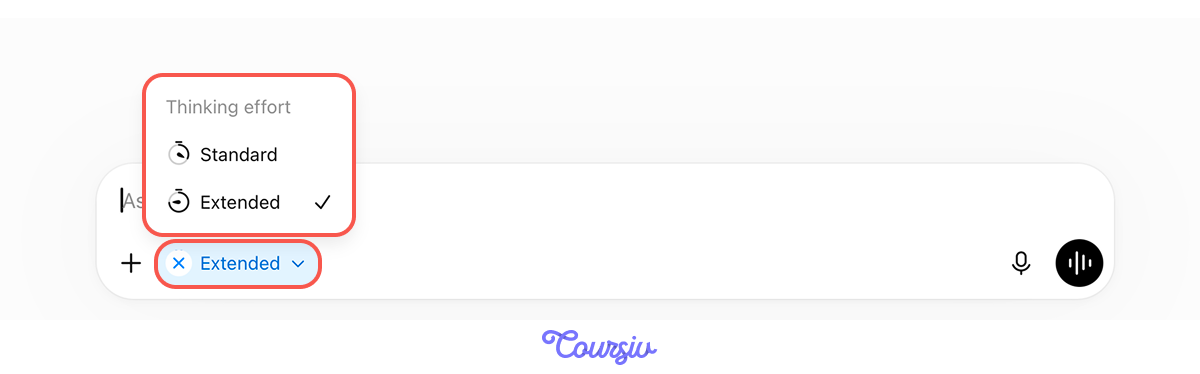
One more control while you're at it: when a plugin — your GPT included — is active in the chat bar, you can set its Thinking effort.
Click the chip next to the "+" and pick Standard for everyday requests or Extended for ones that need deeper reasoning, like balancing a full week of meals around your macros.
Beyond Cooking
In this lesson, we used meal planning as an example, but Custom GPTs work for any recurring task that requires repeating the same instructions. For example:
- Monthly budget reviews (same categories, same analysis approach)
- Weekly newsletter writing (consistent tone, format, audience)
- Workout planning (same fitness level, equipment, goals)
- Content brainstorming (same brand voice, audience, topics)
We'll explore these applications in future lessons. For now, just remember: if you're repeating instructions daily, build a Custom GPT.
practice preview
Interactive practice
Put in order
To finish up, arrange the steps to build a Custom GPT that saves you time.
Excellent Work!
You've learned how Custom GPTs save time by remembering your instructions permanently.
Now, you can create personalized assistants for any recurring task — no more repeating yourself!
- Custom GPTs remember instructions permanently across all conversations.
- Best for recurring tasks where you'd otherwise repeat the same setup.
- Define role, purpose, personality, and constraints in the "Create" section.
- One-time setup enables endless reuse without repetition.
What's Next?
Now that you understand ChatGPT's core features, the following lessons will show you how to apply all of this in the real world.
You'll learn practical prompting techniques for productivity, research, communication, and creative work. Time to use AI like a pro!