Perplexity · Search and Research Foundations
Perplexity's Modes and Features
Choose the right mode for every task
Modes and Controls
You open Perplexity and start typing. The answers come back fine — usable, quick, good enough. Three searches later, you realize you've been running everything on default, and the results could have been sharper the whole time.
So, how do you make your searches deeper and more precise? In this lesson, you'll learn how to customize Perplexity with plans and modes to get exactly the results you need.

Scenario: Researching a Team Offsite
You're building the research case for a company off-site from the previous lesson. You need to:
- Get a quick overview of city options
- Compare costs and logistics in detail
- Find credible data to justify the budget
- Revisit earlier research as new questions come up

Choose one
What's most likely to happen if you use the same default settings for every one of these searches?
The same default settings applied to four very different tasks will fall short on at least some of them. That's what different plans solve. Let's go through it!
Plans — What's Available
Perplexity runs on three tiers:
- The free plan gives you practically unlimited standard searches for research tasks.
- Pro unlocks access to the latest AI models trained for higher accuracy for personal use.
- Max goes further with unlimited usage and the most advanced AI reasoning models for heavy users.

There are also two specialized plans for specific contexts.
- Education Pro for students and educators: suited for academic research and complex reports at a steep discount.
- Business for teams that need more than personal research: premium source citations from PitchBook and Statista, compliance certifications, SSO, and data privacy guarantees.
Plans control your access level. Modes control how Perplexity thinks about your query: how deeply it reasons, which models it uses, and how it structures its answer. The results are sourced, synthesized, and ready to use regardless of which mode you're in.
Best Mode
Best is the default mode — it picks the right model for your query automatically, whether that's a quick fact-check or a deep multi-source comparison.
On the free plan, Best runs silently in the background with no model selector visible. On Pro or Max, you'll see a Model dropdown where you can pick a specific model or stick with Best and let Perplexity decide.
practice preview
Interactive practice
True / False
Decide whether Best mode is the right fit for this situation.
Best mode gets you oriented fast. But some questions need more than a fast answer. They need thorough research across dozens of sources before anything is returned.
Choose one
Your team lead asks: "Prague looks cheapest — but can you back that up with real data on costs, logistics, and what other companies have done for similar offsites?" What does that question need?
Deep Research
Deep Research doesn't just return an answer — it conducts research on your behalf. It breaks your question down, searches across dozens of sources, and synthesizes everything into a structured, cited report.
It's slower than Best mode, but it's built for questions where you need something you can actually stand behind — budget justifications, competitive analysis, anything where sourcing matters.
You now have two modes in your toolkit. The one you pick depends on where you are in the research — how much you already know, how complex the question is, and how much the answer needs to hold up to scrutiny.

practice preview
Interactive practice
Match pairs
Tap a left item, then a right item to match.
Filtering by Source Type
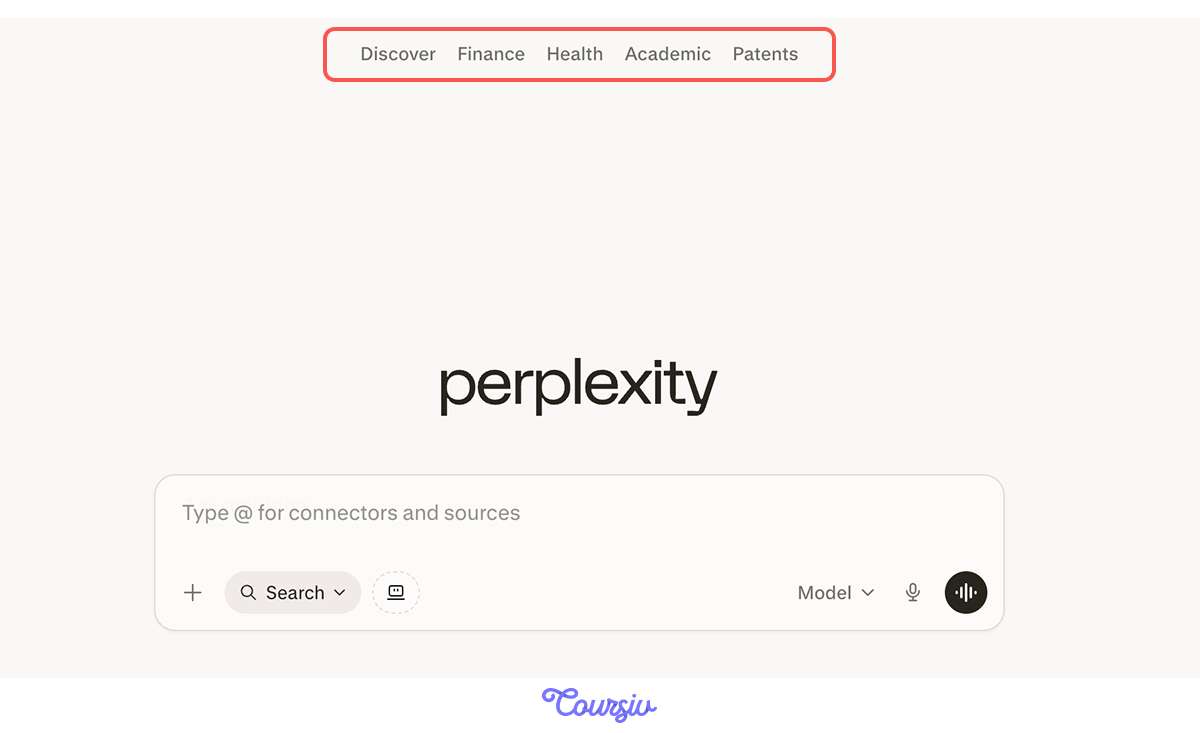
So, you know that modes control how Perplexity thinks about your question. Source filters control where it looks, restricting results to a specific type before the search runs. All of them are available on the free plan, and you'll find them at the top of the screen when you start a new chat.
Filters narrow the search space for Perplexity. Here's what each one does:
- Discover: Surfaces trending topics and news from across the web — good for staying current without a specific question in mind.
- Finance: Pulls from official company financial disclosures and market data.
- Health: Focused on medical sources, clinical data, and health publications.
- Academic: Filters for scholarly papers and peer-reviewed journals.
- Patents: Searches patent databases and intellectual property filings.
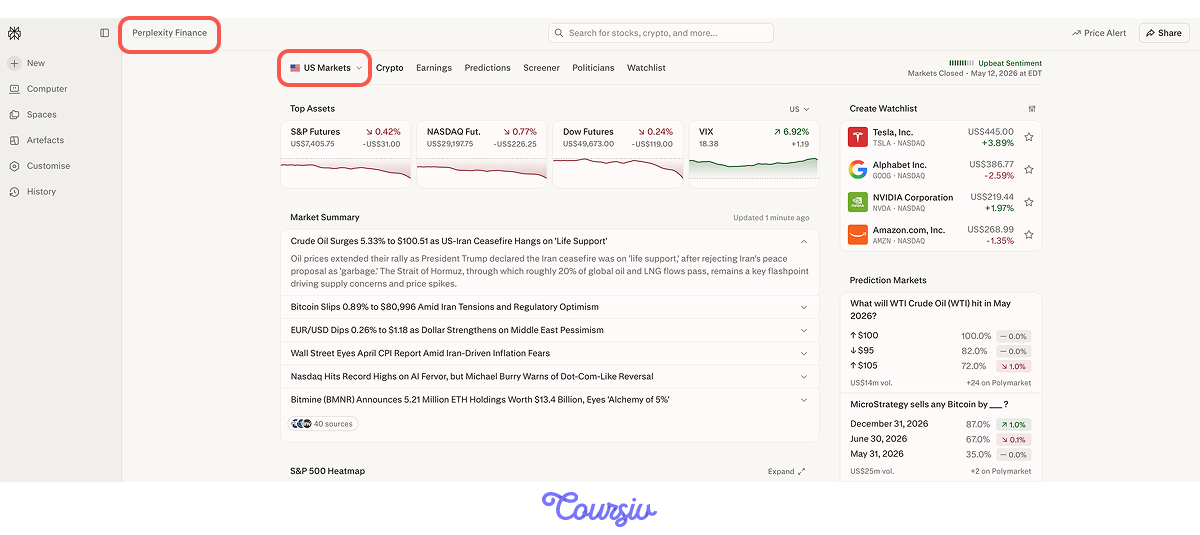
The best way to understand source filters is to see them in action. Imagine you need to check the US market before making any financial decisions for the trip. Instead of scrolling through news sites, you switch to Finance — and Perplexity pulls directly from market data and financial filings.
Perplexity Computer
Source filters narrow where Perplexity looks. But what if the task itself is too complex for a single search and require multiple steps, tools, and decisions along the way?
Perplexity Computer handles that. Think of it as an AI that doesn't just answer questions, but gets things done. You describe the task, and Computer works through it the same way you would, just without you doing any of the steps.
Back to the offsite. You need flight options from Paris to Prague — airlines, frequencies, price ranges, and a recommendation. Instead of opening three tabs and piecing it together yourself or chaining your requests, you hand it to Computer.
practice preview
Interactive practice
Fill in the blank
Use Computer to research flight options between your two shortlisted cities.
Select all that apply
What made Computer useful for this task compared to a standard search?
That's a glimpse of what Computer can do. Later in this course, you'll go deeper — longer tasks, more complex workflows, and how to get the most out of it.
- Free plan covers unlimited standard searches and all source filters
- Pro and Max unlock unlimited Deep Research access when your volume or performance needs to grow.
- Best mode is the default — automatic model selection in Pro and Max, handles most questions well.
- Deep Research searches across dozens of sources and returns a structured, cited report.
- Source filters narrow results by type — Academic, Finance, Health, and more — all on the free plan.
- Perplexity Computer executes full workflows end-to-end — not just answers, but tasks done.
What's Next?
You now know how to get more precise answers — the right mode, the right sources, and a first look at what Computer can handle. Next, you'll go one level deeper: search operators that let you control exactly where Perplexity looks and what it brings back.