Perplexity · Use Cases
News & Trend Analysis
Track and understand breaking stories fast
News & Trend Analysis
You wake up to a flood of messages about something that happened overnight — a platform changed its algorithm, a brand said something it shouldn't have, a market shifted. Everyone is reacting. You want to understand what happened.
In this lesson, you'll learn how to track breaking news, compare sources, and turn a research session into a structured report you can act on.

Choose one
You open the web to follow a breaking story. There are dozens of results from different outlets and different time periods. What's the most important thing to pay attention to?
Searching for a breaking story without filters is like opening a firehose. You get opinion pieces, outdated takes, and reactions to reactions — mixed in with the actual facts. The story gets harder to understand.
Perplexity makes that easier: you can filter by date, compare perspectives, and verify claims in one place instead of switching between tabs. The first thing to add to any breaking news search is a date filter.

Tracking Breaking News
You learned how date operators work in Lesson 5. Here, they do the same job in a news context — restricting results to a specific window, whether that's the last 24 hours, last week, or last month. In a fast-moving story, that single addition keeps the results focused on today's development. Let's apply it to a news search.
practice preview
Interactive practice
Fill in the blank
Search for the algorithm change announcement with a date filter.
Choose one
The search result pointed you to Instagram's official newsroom to confirm the announcement. What should you do?
Perplexity pointing you to additional sources is the starting point for verification. One search gives you the shape of the story. Cross-checking the primary source is what confirms it. That's what the next step covers.

Comparing Perspectives
The same story reads differently depending on who's telling it. Instagram's newsroom says the change helps creators. Analysts say it disrupts brands. Creators report mixed results on the ground. None of them is wrong; they're just seeing different parts of the same thing. So let's try pulling from more than one source.
practice preview
Interactive practice
Fill in the blank
Search for reactions to the same algorithm change across different source types — platform, creators, and industry analysts.
The divergence between Instagram's framing and the analyst's view is where the story lies. Platform announcements protect the platform. Analyst coverage reflects market implications.
For any story with multiple affected groups, the gap between perspectives is what you need to understand before acting.
Discover — News Without Searching
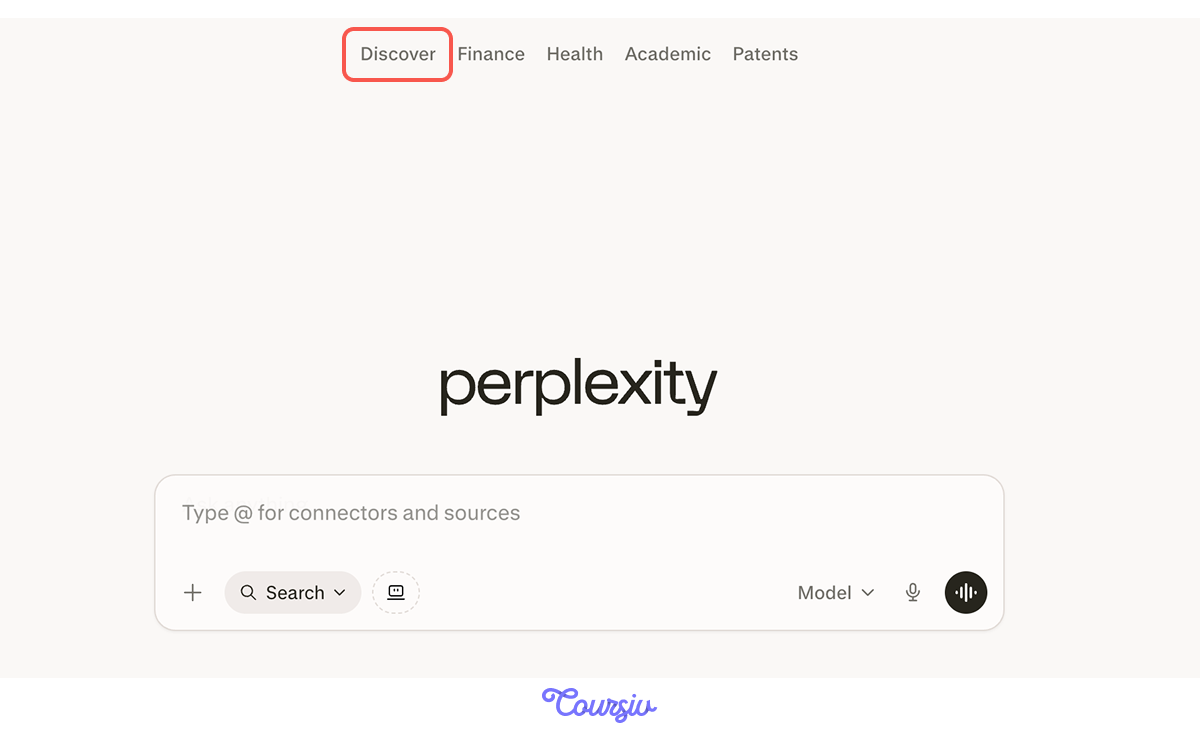
Aside from searching directly, Perplexity has a "Discover" section at the top of the screen that surfaces trending news without any prompt.
It includes For You, Top, and topic categories like Tech & Science, Entertainment, Sports, and Business — useful for staying on top of stories before they hit your inbox.
Checking What You Find
Breaking news move fast — and so do unverified claims. A citation tells you where a claim came from, not whether it held up. One result claims that accounts under 10K are seeing a 40% increase in reach. Before using that figure, it needs a check.
practice preview
Interactive practice
Fill in the blank
Verify the information before including it in anything you publish or present.
See how Perplexity traced the claim back to third-party blogs generalizing about small creator growth, with no Instagram-provided data behind it. The underlying trend has support: smaller accounts are seeing better discoverability through topic-matching and retention signals.
That's the distinction: you carry the trend into your report, hold off on the figure until primary data backs it.

Building a Trend Report
You now have current results, multiple perspectives, and a verified account of what actually happened. You can build a structured summary that someone can read and act on without doing the research themselves. A LinkedIn post, a team briefing, or a client update — whatever the format, the research is already done.
practice preview
Interactive practice
Fill in the blank
Compile everything into a single structured report covering what happened, the timeline, perspectives, and implications.
Select all that apply
What makes Perplexity useful for news research?
- Date filters are the first thing you add to any news search: They keep current results from competing with older ones.
- Multiple source types surface the full picture: Each one covers different ground.
- Discover trending stories without searching: Useful for staying on top of topics before they become urgent.
- Structured reports turn a research session into a deliverable: Specify sections, and the output arrives organized.
You can now track a breaking story, filter for what's current, check what you find, and turn the research into something your team can act on. But how do you know if a source can actually be trusted in the first place? That's what the next lesson covers.
You'll learn how to evaluate source credibility and spot when information shouldn't be trusted before it ends up in something you've published. On to the next!