Claude: Deep Dive · Professional Workflows
Claude as Workflow Designer
Plan multi-step workflows in Claude
Designing Workflows
You've learned how to use each Claude surface on its own. Many projects need more than one. The AI skill to train isn't using one tool well, but deciding which tools to use and how to do it best. That's the meta-skill: workflow design. By the end of this lesson, you'll design and stress-test a complete multi-tool workflow for a real project.
Let's get started!

What's Workflow Design?
A workflow is the sequence of tools, steps, and handoffs that produces a multi-component deliverable. For anything more complex than a single task — a launch, an event, a transition, a campaign — the work isn't one thing. It's a collection of artifacts that have to be planned, sequenced, and connected.
Workflow design is the skill of figuring out which tools to use for which steps, what order to do them in, and how the output of one step becomes the input of the next.

Why Workflows Fail
When a multi-tool project fails, the failure almost never happens inside one of the tools. It happens between them — at the handoffs. The framework you built in chat doesn't translate cleanly to the slides. The slides don't share visual identity with the page. The page collects emails that the follow-up sequence can't access. Each step is fine in isolation, but the whole thing doesn't hold together.
That's why workflow design is such an important skill.
The Four Moves of Workflow Design
Designing a workflow has four moves, in order:
- Clarify: What's the project? What does "done" look like? What's ambiguous in the brief?
- Design: Which tools, in what sequence, with what handoffs between them?
- Stress-test: Where could the workflow fail? What goes wrong at each handoff? How do you prevent it?
- Document: What does the workflow look like as a reusable thing, so the next similar project doesn't start from scratch?
Scenario: The Conference Talk
Let's walk through these four moves in a real project. Let's say you're a senior product manager at a digital reading platform.
8 weeks ago, you submitted a talk proposal to Surface, a conference on product, design, and the craft of making things work. Today, the acceptance came back. You're giving a 30-minute talk titled "The Invisible Layer: Designing Products People Don't Notice but Couldn't Live Without."
The talk is in 8 weeks. About 200 people will be in the room, plus the recording will go online afterward. This is the kind of opportunity that doesn't come often.
The Brief You'd Send Yourself
If you were briefing yourself on this project — or briefing Claude to help you plan it — the first draft may look something like this:
"I'm giving a talk at Surface in 8 weeks. I want to make sure I do this right and get the most out of it."
This brief outlines the project, timeline, and goal. You'd think you could start designing the workflow.
Choose one
You've got the talk acceptance and this draft brief. What do you think is the best next move?
Bringing the Brief to Claude
The clarification step occurs in a regular chat with Thinking enabled. You bring the ambiguous brief and tell Claude what you want from the conversation. It's not the workflow yet, but the clarification work has to happen first.
A prompt that gets you useful clarification names three things:
- The project
- The ambiguity in your own thinking
- Your ask of Claude
practice preview
Interactive practice
Fill in the blank
Write the prompt for the Claude chat to do the clarification work.
The Clarified Project
After the clarification conversation with Claude, the project takes its real shape:
- You want the talk to land well on the day and keep working for you afterward.
- The audience is the 200 people in the room, plus the people who'll find the recording later.
- The framework you'll present is something you want people to reference and build on — not a one-time performance.
The Five Deliverables
With the project clarified, the deliverables become specific:
- The framework and talk outline
- The slide deck
- A pre-talk audience research bundle
- The companion landing page
- The article version and a follow-up email sequence
Five components, all required. Now the question is: which tool for which deliverable, and in what order?

Matching Tools to Deliverables
Each deliverable has a tool that fits best. Forcing the wrong tool onto a deliverable is how workflows get clunky: a slide deck built in Claude Code, a recurring email sequence built as a single chat output, etc.
The tool match for each deliverable matters as much as the sequence between them:
- Reasoning-heavy thinking work and long-form writing stay in chat (with Thinking and Research where depth matters).
- Multi-source synthesis or recurring tasks belong in Cowork.
- Visual-first deliverables — decks, pages, prototypes — belong in Claude Design.
- Production code that ships belongs in Claude Code, often via a Claude Design handoff.
Let's practice!
practice preview
Interactive practice
Match pairs
Tap a left item, then a right item to match.
The Sequence and the Handoffs
Tool selection is half the work. The other half is sequencing — what comes first, what depends on what, and what can run in parallel without blocking the rest.
- The framework is the spine. It has to come first because everything else draws from it.
- The audience research can happen alongside the framework.
- The slides come from the framework.
- The page builds on the slides.
- The article and email sequence come last because they extend what the page collects.
Comparing Two Workflow Designs
Even with the project clarified, there's more than one workflow that could deliver these five components. Two designs for the same project can both look reasonable on paper, but one will hold together under execution and the other won't.
Two Workflows, Same Project
Here are two workflow designs for your talk project:
Workflow A
- Develop the framework first since everything else builds on it (chat + Thinking + Research)
- Run audience research in parallel to inform the framing (Cowork)
- Build the companion page since it's the lasting artifact (Claude Design + Claude Code)
- Build the slide deck from the page's design system to keep the visuals coherent (Claude Design)
- Write the article, set up the email sequence to extend the reach beyond the talk (chat + Cowork)
Workflow B
- Start with the slide deck since the talk is the most urgent deliverable (Claude Design)
- Write the framework alongside the deck, refining both as you go (chat)
- Build the companion page with its own visual direction (Claude Design + Claude Code)
- Run audience research after the deck is drafted to validate the angle (Cowork)
- Write the article, draft the email sequence to extend the reach beyond the talk (chat + Cowork)
Both workflows produce the same five deliverables, but one of them is stronger.
practice preview
Interactive practice
True / False
Identify whether the new Workflow B is stronger than the initial one.
Reasoning Before Production
Your workflow has two halves. The first half — the framework and the audience research — is reasoning-heavy. You can't build the deck until you know what the framework says. You can't write the page until you know who's coming. The reasoning work finalizes the plan.
The second half — the deck, the page, the article, the email sequence — is production-heavy. It's where the work becomes visible. You'll focus on production-heavy work in the next lesson.
Developing the Framework
The framework is the talk's spine. It's the thinking that the slides will eventually carry.
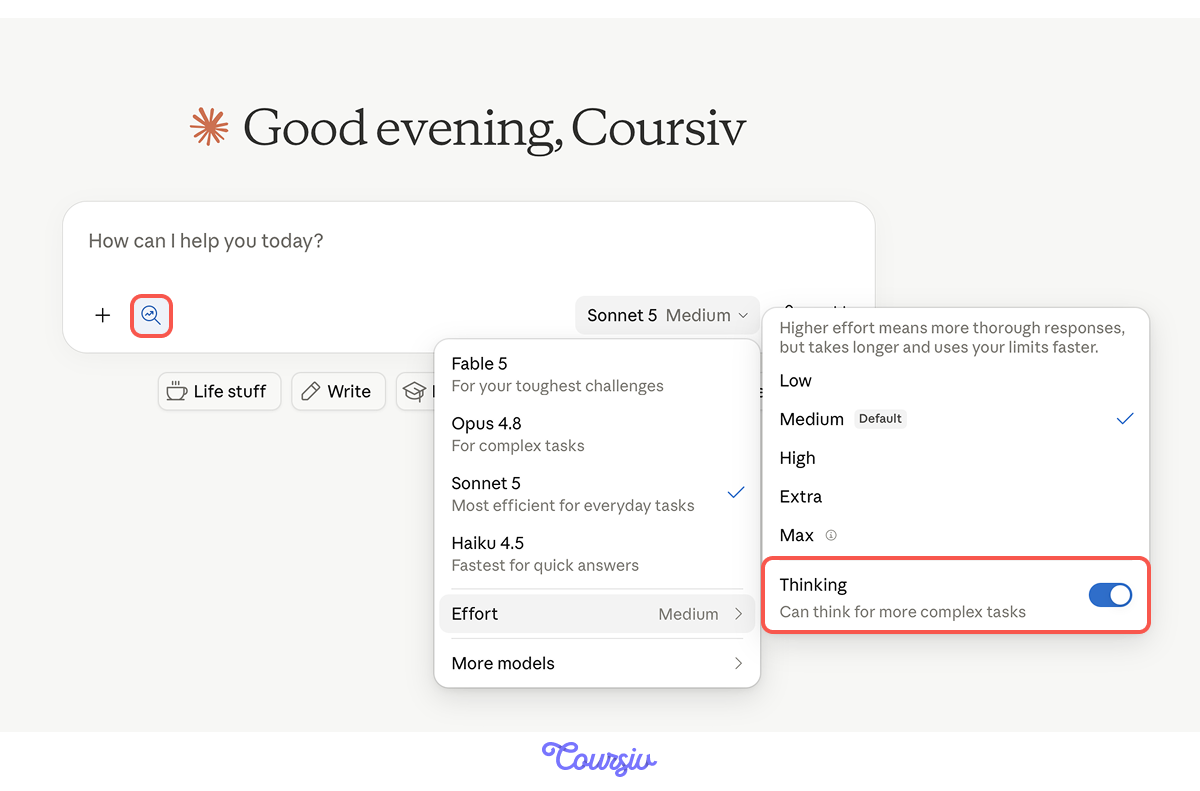
You bring this to chat with Thinking on (so Claude takes the time to reason through it) and Research enabled (so it can pull in references on invisible design where useful). The prompt specifies what the framework needs to do, what the talk is about, and what the audience brings in.
practice preview
Interactive practice
Fill in the blank
Write the prompt that starts the framework development conversation.
From Reasoning to Research
The framework's done! You have a central argument, three case studies that ground it, and a sequence that builds.
The next piece of the reasoning is different. The audience research isn't one thinking task — it's a synthesis across multiple sources (the conference program, public posts and articles, your own network's signals), and it needs to run while you do something else. Exactly the kind of job for Claude Cowork.
practice preview
Interactive practice
Fill in the blank
Write the Cowork task brief. Schedule it as a one-time run in 24 hours. No special connectors required.
Running the Audience Research
Cowork takes a task brief — outcome, sources, scope, schedule — and works through it on its own while you move to other things. For your audience research, the brief tells Cowork to read the conference's published materials, scan the broader public conversation on invisible design, and produce a synthesized brief on who's coming and what they're bringing.
The output is a Word document that can be scanned in under 10 minutes.
Predicted Risks Before Execution
Before execution, you flag the predicted risks, especially within the handoffs you expect to need attention. A useful risk note has four parts:
- Where it occurs — which handoff or step
- What might break and why — the specific mechanism of failure you're predicting
- Preventive measure planned — what you'd add to avoid it
- How you'd verify — what tells you the prevention worked
For your workflow, three handoffs need this attention:
- Framework → slides
- Slides → page
- Page → email sequence
You'll work them out in detail in the next lesson.
The Workflow as a Reusable Document
You've designed the workflow. The next time you give a talk — or the next time a colleague asks how to plan one — you don't want to start from scratch. The workflow needs to live as a document, so you will most likely want to produce a workflow SOP.

A workflow SOP (Standard Operating Procedure) is the documented version of how you handle a specific kind of project. It's a reusable template, not a one-time plan. For your talk, the SOP becomes the thing you (or anyone) opens the next time a similar project comes up: another conference, an internal presentation, or framework-with-companion-artifacts kind of work.
A useful SOP names:
- The steps
- The tool assignments
- The handoff formats
- The checkpoint criteria
- The predicted risks at each handoff
practice preview
Interactive practice
Fill in the blank
Fill in the gaps to ask Claude to draft the SOP for your workflow.
When Workflow Design Matters Most
Not every project needs a designed workflow. Single-tool tasks or recurring work that follows a pattern don't. Where workflow design earns its place:
- Novel projects: work you've never done before in a shape you've never assembled
- Multi-component deliverables: anything that produces more than one connected artifact
- High-stakes work: when the cost of a handoff failure is high enough that catching it in stress-testing beats finding it in execution
- Work you'll do again: anything where building the SOP once delivers value across many future versions
When several are true, workflow design is the most leveraged thing you can do before starting.
- Workflow design is a separate AI skill. Picking which tools to use, in what order, with what handoffs, for novel work.
- The four moves: clarify, design, stress-test, document. Clarify and design happen before execution; stress-test happens during execution; document captures the workflow for next time.
- Workflows can fail at handoffs. Each tool works fine on its own; the failures live in what travels between them.
- The clarify step decides which project you're actually doing. The surface brief is ambiguous; the clarifying questions surface the real interpretation
- Tool selection follows the work. Match each deliverable to the surface that fits, then sequence the deliverables around the handoffs.
- The workflow SOP outlives the project. A documented workflow delivers every time a similar brief arrives, even before execution refines it.
What's Next?
You've designed the workflow for the Surface talk. The plan is in hand: five deliverables, the tool match for each, the sequence and handoffs, the predicted risks, and the SOP that captures it all.
Now you execute! In the next lesson, you move the work through the three production layers. You'll see what handoffs look like in practice, where they break down, and where to build a small automation around what still requires manual effort.
Let's keep going!