Claude: Deep Dive · Claude Capabilities
Research & Reasoning Modes
Apply Claude's modes strategically
The Right Tool at the Right Step
You can ask Claude anything and get a decent answer. But when the stakes are higher, decent isn't enough — how you set it up starts to matter. To solve this, Claude has distinct modes, and choosing the right one changes what you get.
Imagine you're tackling a complex task and have quite a few very different problems to solve. Let's find out where each mode can be helpful and how!

Three Modes, One Project
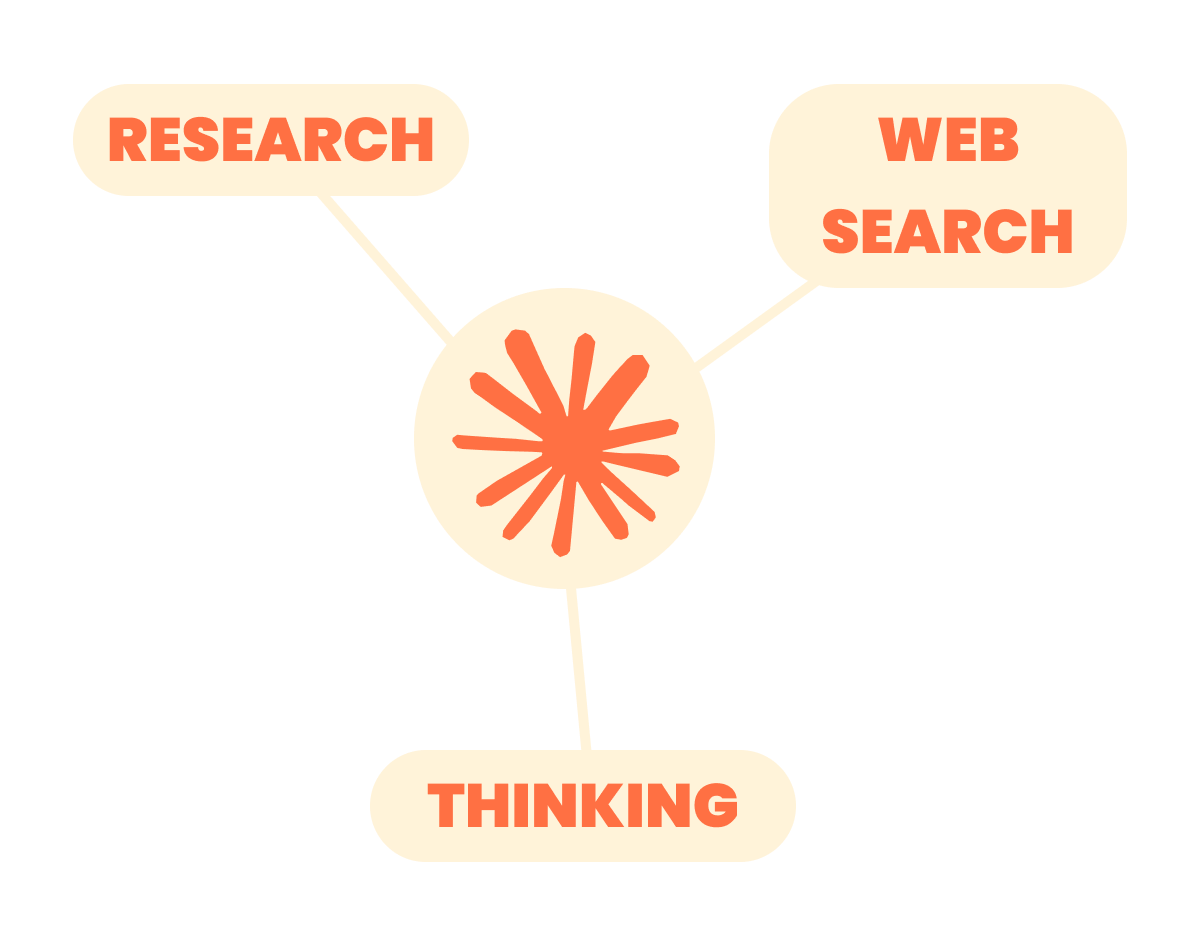
Claude has three distinct modes — and using one at the wrong step is just as costly as not using it at all.
Research, Thinking, and Web Search each do something the others can't.
Your Working Scenario
Imagine you run a growing business, and you're seriously considering expanding into a new product vertical — one you know something about, but haven't operated in.
Before you commit budget, time, or team members, you want to know:
- Is this market actually worth entering right now?
- Is the distribution channel you're counting on as strong as they claim?

Three Jobs, Three Modes
- You need to understand a space you've never operated in. That's Research: an autonomous multi-source investigation that returns a structured report.
- You have the information, but the decision has real trade-offs. That's Thinking: Claude reasons step by step before responding, showing you the work, not just the conclusion.
- One specific claim needs to be checked before you act on it. That's Web Search: live information pulled into your conversation.
practice preview
Interactive practice
Match pairs
Tap a left item, then a right item to match.
Select all that apply
You're deciding whether to launch a new pricing tier for your product. You'd need a view of competitors' prices, an analysis of your unit economics, and verification of one competitor's recent pricing change. Which mode would this work require?
Select all that apply
Before we go further, what do you think makes a task a good fit for Research over a standard Claude response?
Step 1: Get the Lay of the Land
Research is where you start when you need to understand a space you're not already inside. You're basically giving Claude a research brief.
That means telling it which market to look at, which specific questions matter, how far back to go, and what to leave out.
How to Start a Research Session
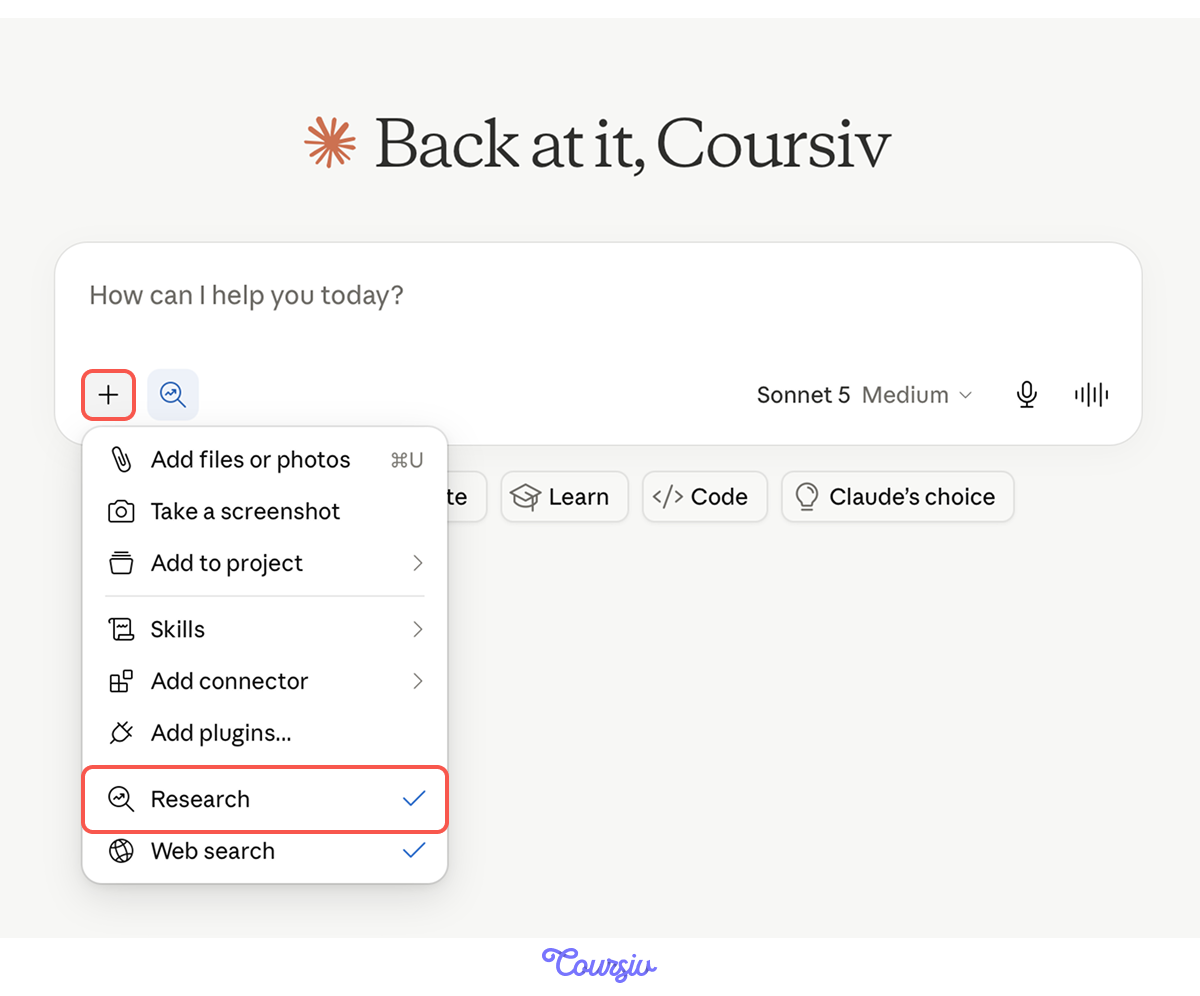
In Claude, click the "Research" button before you submit your prompt. This tells Claude to run a full autonomous investigation rather than respond from its training.
Research works better with Web Search enabled. This way, Claude can investigate across the web and internal sources.
A Brief vs. a Query
A query is a short instruction that tells Claude which topic to look into. A brief is a structured set of directions that tells Claude what questions to answer, how far back to look, and what to exclude.
Research responds to whichever you give it — but the output quality reflects exactly that.
practice preview
Interactive practice
True / False
Identify if this is a brief or a query.
A Report Needs an Audit
Research pulls from open sources. The output looks clean and authoritative, but not every claim inside it can carry the same weight.
Before you build a decision on a Research report, you read it the way an editor reads a draft: looking for what's solid, what's thin, and what's missing.
- Unsupported claims: confident statements with no citation, or a citation that doesn't actually back the claim
- Source gaps: questions in your brief that didn't get answered, or answered only from one type of source
- Stale evidence: citations from years ago when your brief asked about the current state
Read This Excerpt
Here's a section from a Research report on the productivity software market for small teams. Read it carefully — you'll spot the issues after.
"Demand for productivity tools targeting small teams has grown significantly. Most competitors offer feature-heavy products, while async-first workflows remain underserved [Source: TechReview, 2021]. Pricing typically ranges from $8 to $15 per user per month, based on review aggregator data."
Select all that apply
Which issues should you flag in that excerpt before acting on it?
practice preview
Interactive practice
Fill in the blank
Build the follow-up prompt that addresses the three issues you just identified.
Now You Can Trust What's Left
Great job! After the audit and follow-up, the report has citations where it needed them, current data where it was stale, and a second source where it was narrow. That's a report you can build a decision on.
Step 2: Think It Through
You have the landscape. Now comes the harder question: Does moving into this market make sense for your business, right now, with the resources you have?
This is where Thinking earns its place — applying rigorous analysis to a problem with real trade-offs, where the obvious answer isn't necessarily the right one.

When Thinking Is Worth It
Thinking mode adds genuine value when a problem has several competing factors — where variables interact, trade-offs don't have obvious winners, and the quality of the reasoning matters as much as the conclusion.
But for a simple factual question, it adds waiting time without improving the answer.
How to Turn It On
To use Thinking, first make sure you’ve selected a current Claude model. Then, click Model Selector and toggle Thinking on.
Good news: toggling it on doesn't start a new conversation — your existing chat stays intact, so you can switch it on at any point without losing your context.
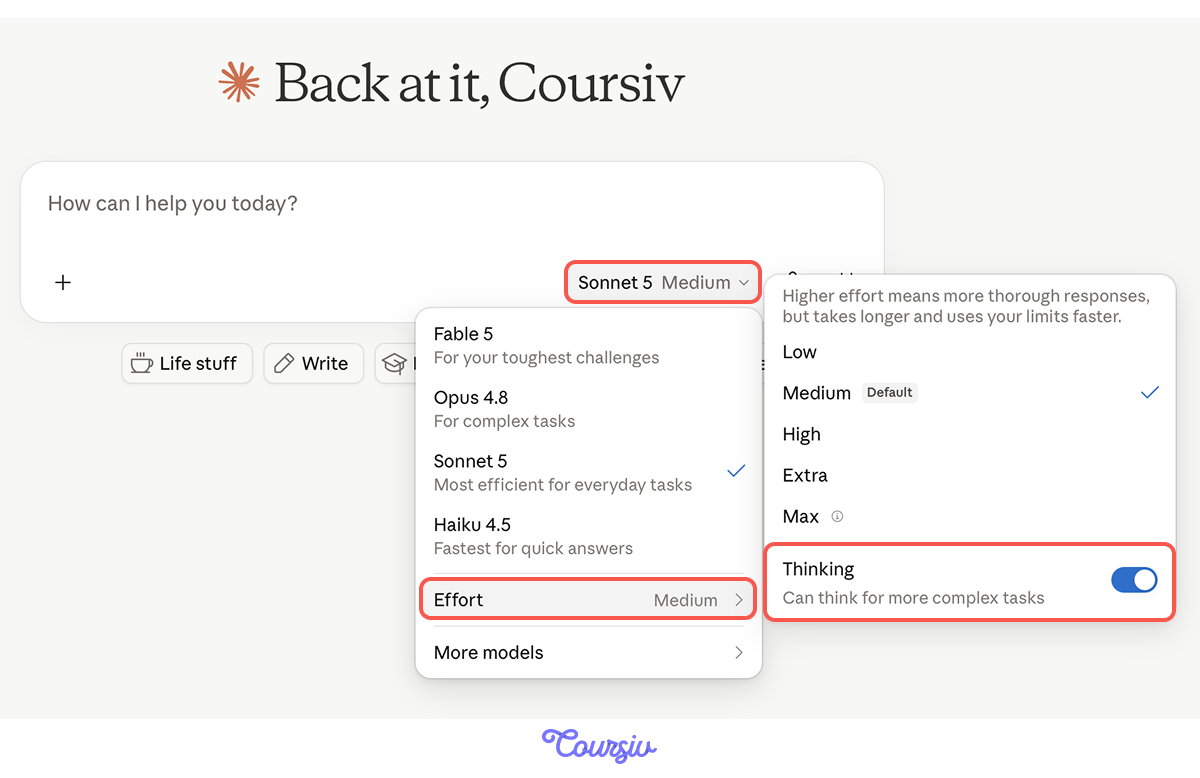
When you turn on Thinking, Claude works through the problem step by step before producing a response — considering competing factors, testing different angles, and checking its own reasoning along the way.
You see a summary of that process above the final answer, in an expandable "Thinking" section. Open it and read it. Reasoning is a valuable part of leading to a certain output.
Alongside Research principles, a few tweaks help Thinking reason better.
- Give it the evidence to work with: The context or the key findings from your Research report, rather than asking it to reason from a general topic description.
- Name the framework explicitly: "Apply Porter's Five Forces" gives the reasoning a structure.
- Ask it to surface its assumptions: "List the assumptions this recommendation depends on" turns the output into something you can stress-test.
practice preview
Interactive practice
Fill in the blank
Complete the "Thinking" prompt using the research you just gathered.
Reading the Output as a Decision-Maker
The recommendation is only as reliable as the reasoning behind it. When you review the "Thinking" output, ask:
- Did it actually engage with the trade-offs?
- Did it use the research findings, or did it reason from general knowledge?
If the reasoning feels thin or generic, the brief probably didn't give Claude enough to work with.
Same Prompt, Two Different Outputs
You ran the same market expansion question twice — once in standard mode, once with Thinking on. Both arrive at the same recommendation: enter the market.
Let's see where the Thinking shines.
Output 1: Standard mode output
"Recommendation: Enter the market. The market is growing fast — 14% per year. Your product solves a real problem. It's simpler, focused on small teams, and priced for them from the start. That's a gap competitors haven't filled.
The numbers support it too. Reaching customers in this space costs less than reaching enterprise customers, and small teams make decisions faster."
Output 2: Thinking mode output
"Recommendation: Enter the market, but the brief got the reason wrong. The brief says to enter because the market is growing fast. Before I agree, I want to check that claim.
The 14% growth is real for the whole market — but most of that growth comes from larger companies, not the small teams you'd be selling to. In the small-team segment specifically, growth is much slower (around 6-8%).
So the answer is "enter", but not because the market is booming. The real opportunity is that existing tools don't fit small teams well."
Choose one
Looking at both outputs, what did Thinking surface that the standard response didn't?
Step 3: Verify
Now, imagine this: the "Thinking" analysis flagged something worth checking before you commit.
For example, you're counting on a specific distribution partner — a company called Prolvex — to reach your target market. They claim a strong reach with the customer segment you're targeting. Before you build your plan around that claim, you need to know if it holds up. Web Search can help you with exactly this.
Web Search Is for Specific Verification
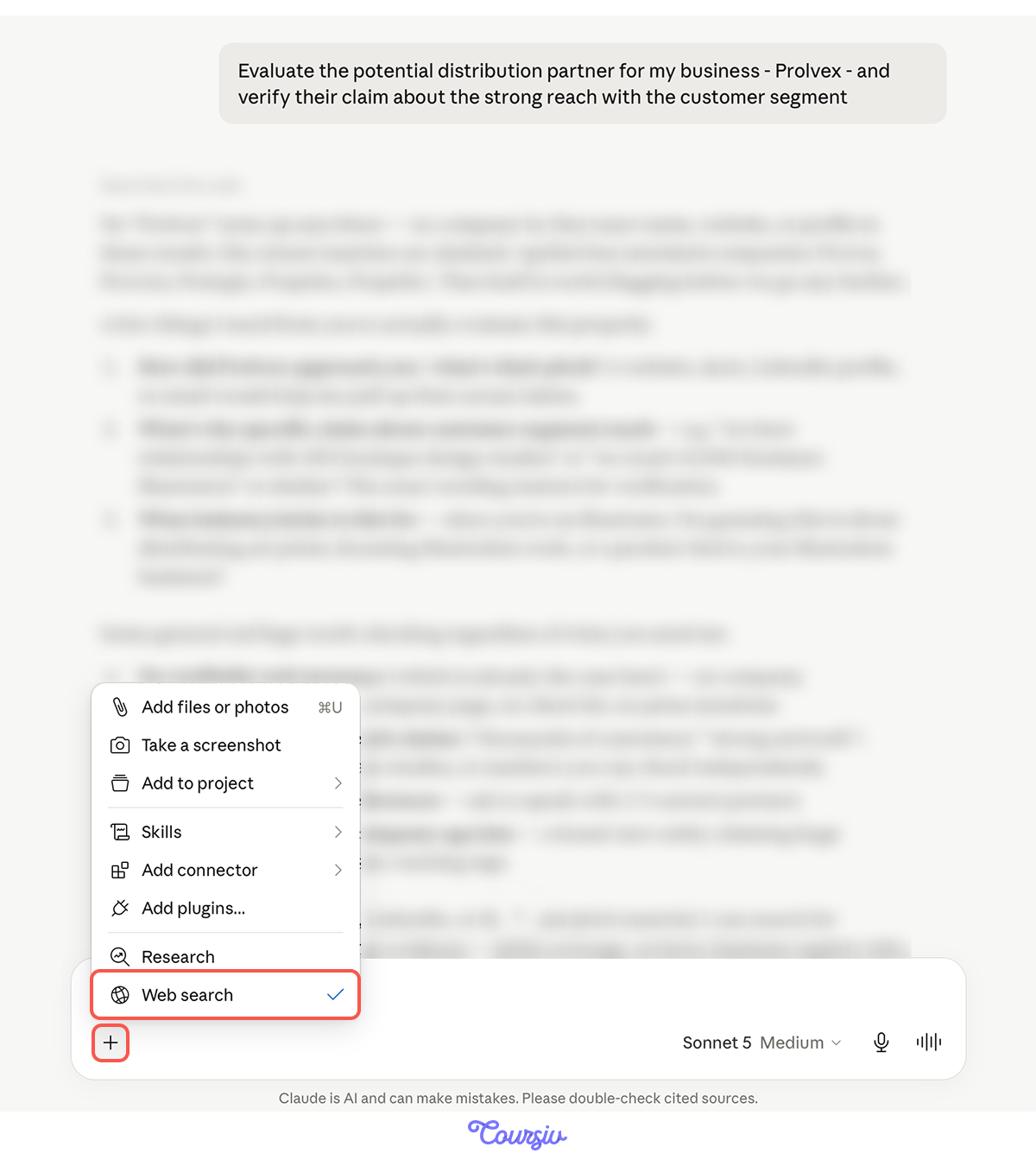
Web Search is a precision tool. You can use it mid-conversation to check a specific claim, confirm a recent development, or pull one current data point — without leaving your analytical context or starting over.
One Setting to Check First
Before using Research, make sure Web Search is enabled. Before using Thinking, decide whether the reasoning also needs current web evidence.
Thinking on Claude models uses it to pull live information mid-reasoning — without breaking out of the thought process to start a new conversation.
Web Search works best when the query mirrors how you'd brief a fact-checker — specific, bounded, and tied to one thing you need confirmed or ruled out:
- Name the source type: "Analyst reports or customer reviews" cuts through irrelevant results better than an open query.
- Set a time window: "In the last 12 months" prevents outdated results.
- Frame it as a confirm-or-challenge: "Find coverage that confirms or challenges this claim" returns a more balanced result.
The Sequence Is Not a Rule
Research → Thinking → Web Search is the natural order for a decision that starts with an unknown market. But the sequence shifts based on what you already know.
The principle is that each mode serves a specific role, and you sequence them based on what your current step needs.

- Research starts with a brief: scope, questions, time horizon, and exclusions upfront, to produce a report built around your decision.
- Thinking shows you the reasoning. Open the Thinking section and evaluate it, not just the recommendation beneath it.
- Web Search is for precision. One specific claim, mid-conversation, without losing your analytical thread.
- The sequence is a starting point. Rearrange it based on what each step actually needs.
- Each mode has a job. Using the wrong mode for a task doesn't just underperform; it produces the wrong kind of output entirely.
What's Next
In the next lesson, you'll take the analysis you've built here and turn it into actual deliverables — a Word report, an Excel tracker, a PowerPoint deck — without opening another tool.
Let's keep going!