Claude: Deep Dive · Claude Capabilities
Custom Skills
Package recurring work as Skills
Make Claude Work Your Way
You've shaped what Claude produces, such as documents that match your structure. But there's another layer: the process behind the work. The way you think about a problem. The framework you apply every time.
This lesson is about packaging that into a Skill — so the next time you need it, Claude already knows how to run it.

From Format to Process
In the last lesson, you used pre-built Skills to produce Word, Excel, and PowerPoint files. Those handle format — they know how to build the artifact.
Custom Skills handle process — the multi-step thinking you bring to recurring work.
There's a category of work you do the same way every time — and every time you do it, you explain it to Claude from scratch:
- How you structure a client check-in
- How you evaluate a candidate after an interview
- How you decide what to ship next
The process is consistent, and re-explaining is overwhelming.
Select all that apply
Which of these work patterns are good candidates for a custom Skill?
Scenario: Product Launch Retrospective
Remember a product launch you shipped in one of the earlier lessons? Let's say it went well, shipped on time, and the deliverables went out. Now what?
Your team is doing a retro. And if it goes the way some of these meetings go, it'll produce a list of more or less generic observations:
- Good comms
- Tight timeline
- Ship demos earlier next time
Nothing that actually changes how you launch next quarter. A custom Skill changes that.
Why Most Retros Are Weak
Most launch retros stay surface-level. What went well, what didn't, what to improve. The structure looks fine, but the thinking underneath it isn't doing real work.
The retro that actually changes how you launch next time looks at the work differently.

Four Moves That Change the Retro
A stronger retro framework asks four things:
- Decisions vs. outcomes: Was the call right, even if the outcome was bad? Did you get lucky on a weak call?
- Counterfactuals: What would a different choice have produced?
- Luck identification: What worked for reasons you can't replicate?
- Forward-looking lessons: What specifically changes for the next launch?
This is the thinking you can implement with Claude Skill.
What Is a Skill
Underneath, every Skill does two jobs: it recognizes when a request is the kind of work it's built for, and it carries out the steps for handling that work. The first job lives in a short description. The second lives in the instructions Claude follows once the Skill kicks in.
Get the description right, and the Skill shows up at the right moment. Get the instructions right, and it does the right thing once it's there.
The Description Is the Trigger
Claude reads every conversation against your Skills' descriptions. When a request closely matches one, that Skill fires automatically, pulling in the instructions you wrote and applying them.
A description shouldn't be vague, as it might fire on the wrong work.
Where Skills Live in Claude
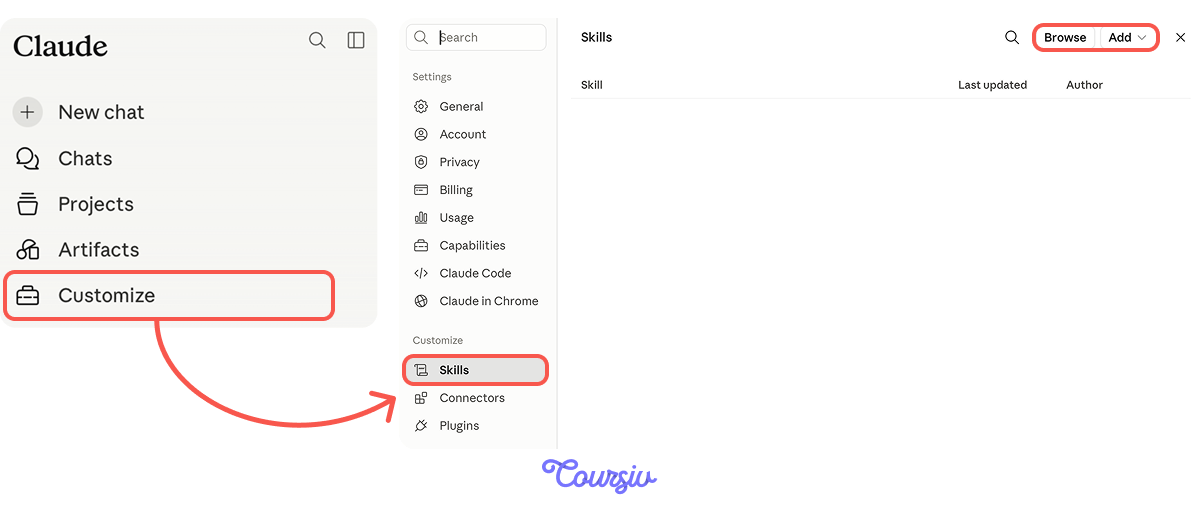
Custom Skills live under Customize → Skills, where you can see everything currently installed, toggle individual skills on or off, and add new ones. Two options appear here: Browse and Add.
Browse skills opens the directory of pre-built Skills from Anthropic and partners, ready to install with a single click. Creating skills is where you build your own.
Worth a Look: Browse Skills
Before building your own, it's worth checking what already exists in the directory. Anthropic and its partners maintain a growing library, and some of the skills are useful for different kinds of work out of the box.
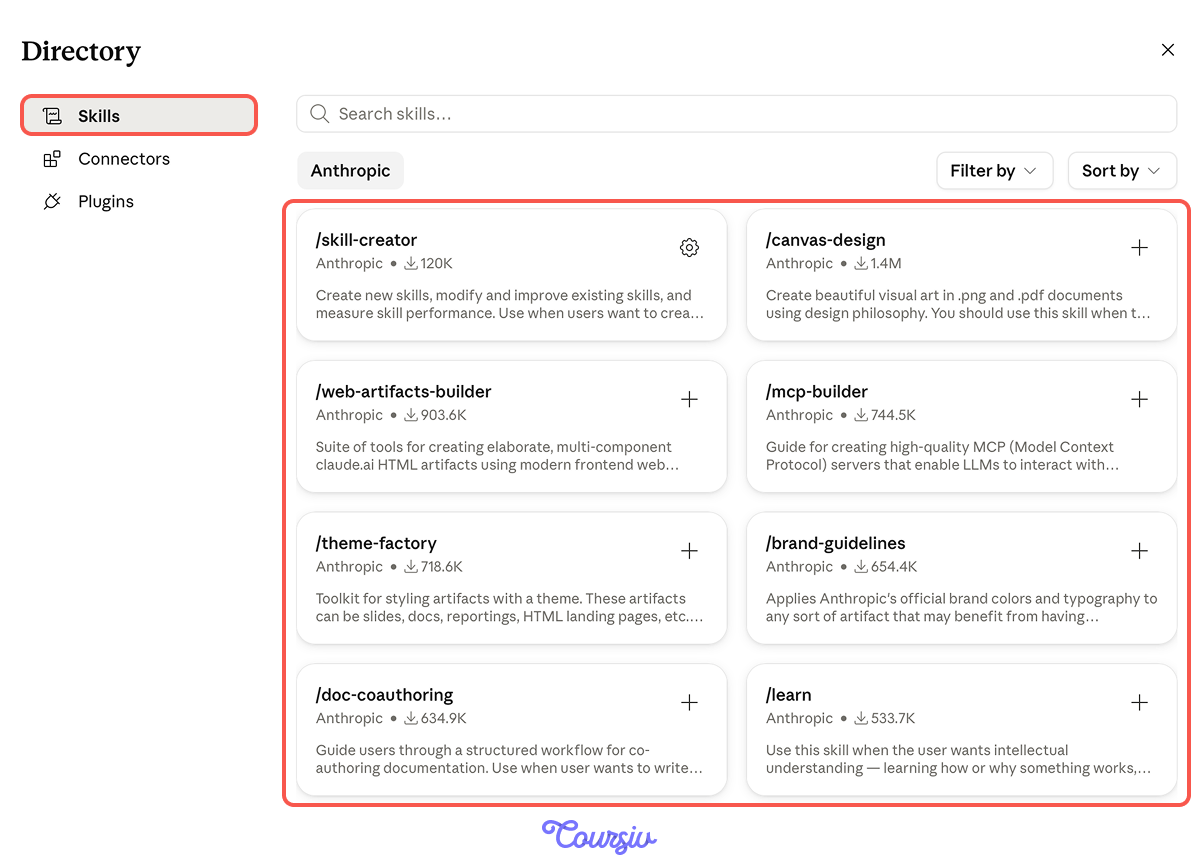
- /internal-comms packages company communication formats for routine internal writing.
- /brand-guidelines applies a consistent visual identity across artifacts.
- /learn is built for moments when you want to actually understand a topic rather than just get an answer, walking you through the why behind it.
- /skill-creator, from Anthropic itself, helps you build new skills by interviewing you about your workflow.
Three Ways to Build Your Own
When you click "Create skill," Claude gives you three paths, each suited to a different starting point:
- Create with Claude opens a conversation in which Claude asks about the workflow, trigger phrasing, the inputs you'll provide, and the output you want.
- Write skill instructions opens the manual editor, where you fill in the name, description, and instructions directly.
- Upload a skill lets you bring in an already-built Skill (yours, a teammate's, etc.) as a ZIP file. Useful for sharing across a team or moving Skills between accounts.
Which Path Fits the Retro Skill
For the launch retro Skill, Create with Claude is the natural starting point. You have the framework in your head — the four moves — but writing the full Skill from scratch means thinking through trigger phrasing, edge cases, and instruction structure all at once. Letting Claude interview you surfaces those decisions one at a time.
Let's walk through what that conversation looks like.
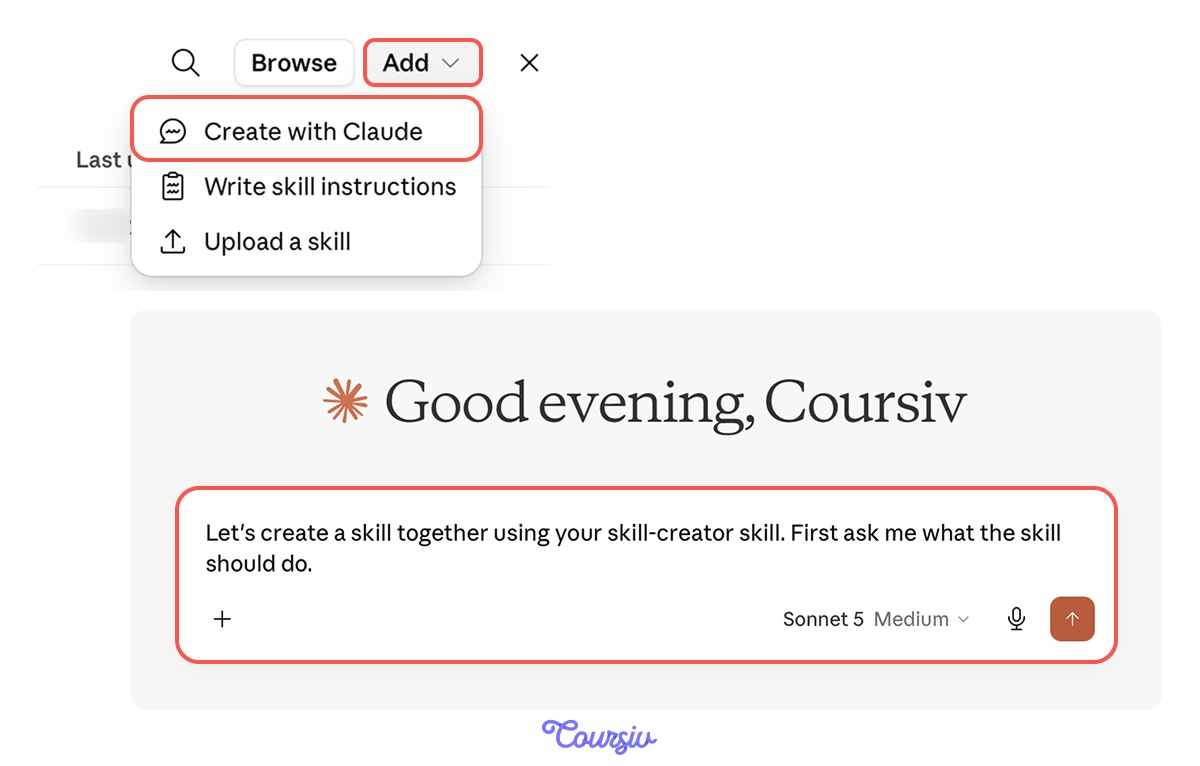
What Claude Asks
When you choose Create with Claude, it opens a chat focused entirely on building the Skill. The conversation covers:
- What the Skill does: the work it handles, in your own words. This becomes the instructions.
- When it should fire: the phrasings you'd use to start this work. This becomes the description.
- What inputs it expects: what you'll provide each time you trigger it.
- What it produces: the structure and depth of the output.
- A reference material: the output samples or supporting documents.
Claude asks one area or some of them at a time, then drafts the full Skill from your answers. You see the draft before saving.
Answering "What the Skill Does"
Your answer here becomes the instructions Claude follows when the Skill fires. This is where the four-moves framework becomes the Skill's actual content. Saying "run a launch retro" produces a generic Skill; saying "separate decisions from outcomes, examine counterfactuals, identify what was luck, and surface forward-looking lessons" encodes the thinking you actually want it to do.
The more specifically you describe the framework, the more specifically the Skill applies it.
Answering "When It Should Fire"
Your answer here becomes the Skill's description — the line Claude reads to decide whether to activate it. Name the phrasings someone would use to start a launch retro ("we just shipped X," "the launch is done," "let's debrief on the rollout"), and the cases where the Skill should stay quiet (incident retros, sprint reviews).
Be concrete. Vague descriptions are the most common reason Skills misfire.
practice preview
Interactive practice
Fill in the blank
Claude shows you the draft description from your answers. Fill in the specifics to complete the skill.
What That Description Does
Three pieces of work happened in that field. The trigger phrasing tells Claude when to fire. The framework name and outputs tell Claude what to produce. The exclusion list keeps the Skill from firing on retros that aren't launches.
Skip any one of those pieces, and the Skill misbehaves.

Two Ways Descriptions Fail
There are two failure modes for Skill descriptions:
- Under-triggering: The description is so specific that real launches don't match it. The Skill never fires.
- Over-triggering: The description is so vague that unrelated work fires it. You get retro output on a sprint review.
The fix for both is the same: be specific about what triggers it and what doesn't.
How to Tighten a Description
When a Skill mistriggers, the fix is in the description, not the instructions. Two moves:
- Name the specific trigger context (completed product launches), not the general category (retros).
- Add what the Skill explicitly doesn't handle (incident retros, sprint retros, general project debriefs).
Both work together: specificity in what fires it and exclusions in what doesn't.
Choose one
You wrote a Skill description, "Use this Skill to run retros." Which sample request is most likely to mistrigger it?
The Three-Sample Test
Before you trust a new Skill with real work, run it against three sample requests:
- One that should clearly fire it
- One adjacent request that should not fire it
- One edge case where the call could go either way
The three samples cover the failure modes — over-triggering, under-triggering, and the boundary cases.
Select all that apply
Which of these samples gives you the most useful signal when testing the launch retro Skill?
What Each Result Tells You
After running the three samples, you have three signals: the clear fire (does the core work?), the rejection (does the boundary hold?), and the edge case (where does the boundary live?).
Adjust the description based on the rejection failures and the edge case calls. Repeat until the boundary lives where you want it.
The Production Stack
A Skill on its own is one layer. Combined with Projects, it becomes a working environment that loads automatically:
- Project holds the context for this launch (planning docs, team list, timeline).
- Skill holds the framework (the four moves).
A quick reminder: Projects are Claude's way of organizing related conversations around a shared body of work. A Project stores files, instructions, and accumulated context, so when you open a new conversation within a Project, Claude already has everything it needs about that body of work.
practice preview
Interactive practice
Match pairs
Tap a left item, then a right item to match.
- Custom Skills encode the thinking you bring to recurring work: Not templates, but multi-step processes with judgment built in.
- The Skill's content is your framework. Generic instructions produce generic output, so the more specifically you describe the thinking, the more value the Skill carries.
- Create with Claude is the lightest on-ramp. When the framework lives in your head, the conversational flow surfaces the structure one decision at a time.
- The description is the trigger. Name the specific work it handles, the phrasings that should fire it, and what it explicitly does not handle.
- Two failure modes, one fix. Under-triggering and over-triggering both come down to vague descriptions; the fix is specificity plus exclusions.
- Test before trusting. Three samples (clear fire, clear rejection, edge case) reveal where the boundary actually lives.
What's Next?
You have process, format, and voice all loaded into new conversations. The one thing still missing is context that follows you across projects entirely — who you are, what you do, the standards you hold in every conversation.
That's Memory, and it's the last layer of the production stack.