AI in Design · Design: From Concept to Real Assets
AI Feedback and Iteration
Build a structured iteration workflow
Check What Works
The Bloom social post from previous lessons looks on-brand. The FocusShift landing page copy feels right. But "looks right" and "feels right" aren't the same as "works."
In the last lesson, you gave ChatGPT a heatmap and got back a prioritized list of UX problems for the Loop screen. That same critique approach works on everything else you've built across the guide. Let's dive in!

What's a Useful Critique?
ChatGPT's Loop evaluation worked because the input was specific. That's the same principle you applied to prompts in Lesson 2. Whether you're generating a visual or requesting a critique, the more precisely you define the design, its goal, and what you want evaluated, the more useful the output.
Choose one
You want ChatGPT to critique the Bloom Instagram post. Which prompt produces the most useful feedback?
A vague prompt — "what do you think of this design?" — produces a vague response: generic praise, surface observations, no prioritized fixes.
A specific prompt defines the design type, the audience, the goal, and the exact dimension you want evaluated.
A useful critique prompt has four parts:
- Role = "you are a senior brand designer"
- Context = product, audience, goal
- Criteria = what specifically to evaluate
- Priority = "flag the highest-impact problem first"
Critique the Bloom Social Post
The Bloom Instagram post from Lesson 6 has a hero image, a headline, a supporting line, and a CTA, but it hasn't been checked. The critique prompt goes in now.
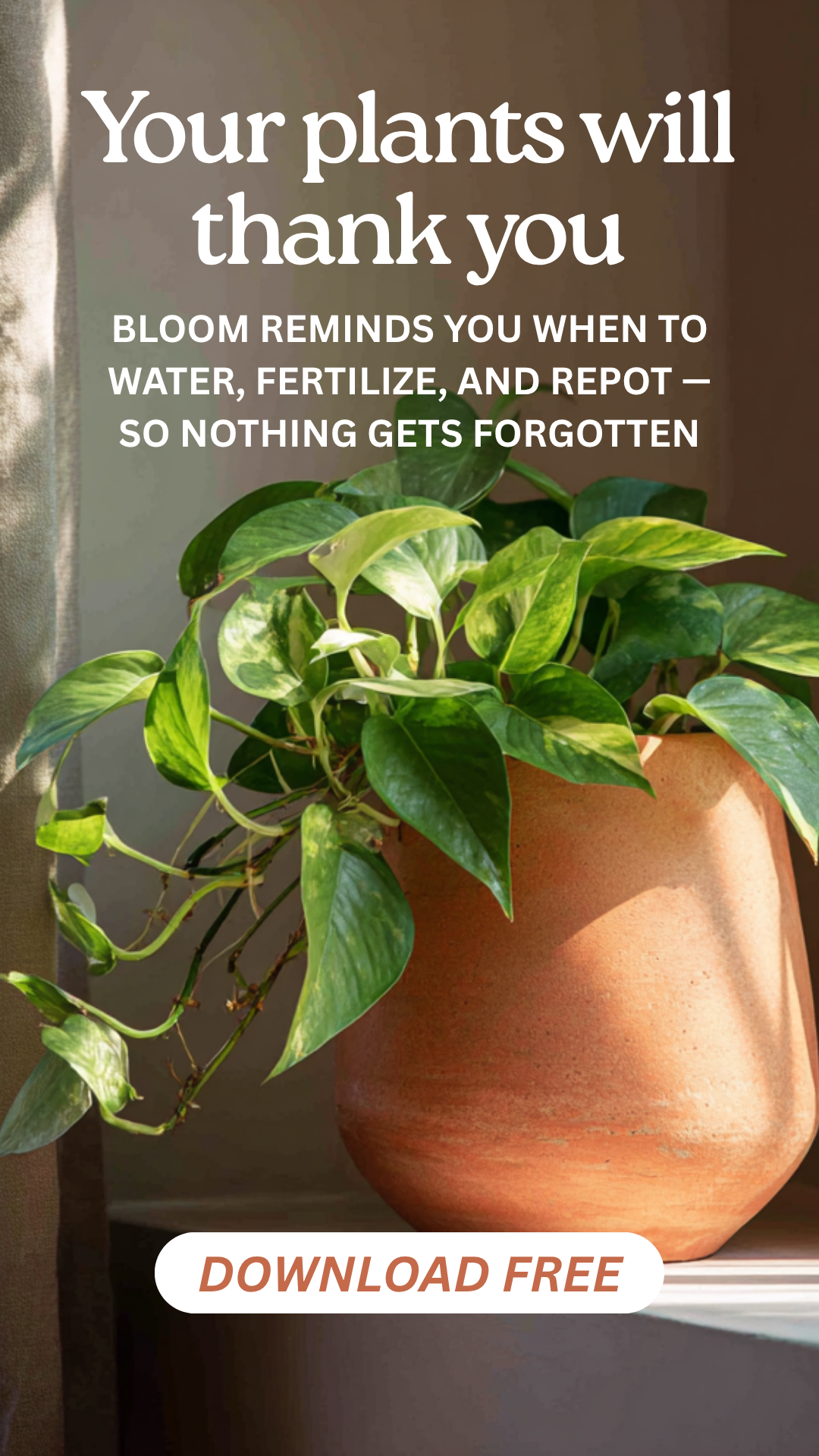
The goal of the post is to drive app downloads from urban adults aged 25-45 who follow plant content. That context goes into the prompt. The criteria: headline clarity, CTA visibility, and whether the copy and image are doing different jobs or the same one.
practice preview
Interactive practice
Fill in the blank
Upload the visual and ask ChatGPT to critique the Bloom Instagram post using a structured prompt.
One problem is clearly stated: the headline is too vague to do its job. "Your plants will thank you" is generic — it could apply to fertilizer, a watering can, or any other plant product. It doesn't tell the user why this app, specifically, is worth downloading.
The fix is targeted: make the benefit concrete and immediate. The headline needs to answer the question a first-time visitor is asking — what does this actually help me do?

AI critique reads patterns: it flags what statistically underperforms. It doesn't know that a vague headline was an intentional brand tone choice, or that a low-contrast CTA was a deliberate design decision. Before applying any fix, ask, is this a real problem, or a misread of intent? The decision should always be yours.
Critique the FocusShift Landing Page
The FocusShift landing page copy from Lesson 2 has a headline, a tagline, and a CTA. It was written to feel warm and encouraging — but warm copy and persuasive copy aren't automatically the same thing. The critique prompt checks whether it does the job it was built to do.
Let's remember what the copy sounded like:
Headline: "Your best work happens in 25 minutes"
Tagline: "A simple way to manage deep work with steady, timed sessions, so you can stay present, make progress, and finish what matters."
CTA: "Start a focused session"
The landing page goal is to convert visitors into app downloads — adults aged 40-60 who want to build focus habits. The criteria: whether the headline communicates a clear benefit, whether the tagline supports or repeats it, and whether the CTA creates enough momentum to act.
practice preview
Interactive practice
Fill in the blank
Ask ChatGPT to critique the landing page copy using a structured prompt.
The feedback is specific: weak, indirect benefit in the headline. "Your best work happens in 25 minutes" is not clearly about the user's outcome, but about a concept. It requires interpretation, especially for a 40-60 audience.
The suggested revision — "Get more done with simple, timed focus sessions" — speaks to the outcome. Now, the headline communicates what the app helps users do.
practice preview
Interactive practice
True / False
ChatGPT flagged one high-impact problem in the FocusShift headline. Sort the statement.
The before/after comparison is only useful if you articulate what changed and why. "It looks better" isn't a design decision. "The headline now communicates the promise instead of explaining the method" is.
Before: "Your best work happens in 25 minutes" — sounds like a claim, not what the app helps you do.
After: "Get more done with simple, timed focus sessions" — translates directly into a practical benefit and speaks to outcome, not process.
That articulation is transferable. It's not just a fix for FocusShift, but a principle you can apply to any landing page copy, social media visuals, UI screens, and any other design piece you produce.
practice preview
Interactive practice
Put in order
Arrange the steps in the correct order for running an AI critique and improving a design.
Once the fix is made and the reasoning is clear, save the updated asset and note the principle somewhere reusable — a line in the brand kit, a prompt template, a personal style rule. That record is what turns a one-time fix into something you apply to the next brief.
- Four inputs make a critique prompt work: Role, context, criteria, and prioritization.
- Specific questions produce specific fixes: "Flag the highest-impact problem first" turns a list of observations into a prioritized action. Ask for priority.
- AI critique can misread intentional decisions: The feedback is pattern-based, not context-aware. Run every fix through your own judgment before applying it.
- The before/after is the learning: Articulating what changed and why it's stronger turns a one-time fix into a transferable principle. "It looks better" is not a design decision.
What's Next?
You can now run a structured critique on any design — UI, social post, landing page, or anything else you build. In the final lesson, you'll step back from individual assets and build the workflow that connects everything: a repeatable AI-assisted design process you can apply to any project from here.