AI in Design · Create: From Idea to Visual Direction
Moodboards with AI
Lock a consistent visual style
A Brand Needs More Than a Logo
In the previous lessons, you've created a logo and landing page copy for FocusShift, a productivity app. That's a great start, but hand it to another designer tomorrow, and they'll ask: what's the visual style? Warm or clinical? Bold or soft? Dark or light?
Right now, you don't have an answer, and without one, every next design decision starts from zero. This lesson solves the challenge.
A Direction or Endless Decisions
A common first instinct is to treat a logo as enough visual direction and skip straight to building assets — social posts, landing pages, UI screens.

The result is a brand that looks slightly different everywhere it appears. This happens because no one agreed on what it was supposed to look like before execution started.
Choose one
A designer builds five social media posts for FocusShift without a locked visual direction. Each post looks polished individually. What's the most likely problem?
Every asset you build without a locked visual direction is a guess. A moodboard makes the decision once, then every asset that follows has a reference to work from.
Start With Three Directions
The mistake most people make is committing to a visual style before they've seen the alternatives. Three directions side by side reveal which one fits.

For FocusShift, these directions are worth exploring:
- Direction A: Productivity as a system. It's clean and clinical: white space, structured grids, sharp sans-serif type.
- Direction B: Productivity as a habit. It's warm and human: soft textures, rounded shapes, muted earth tones.
- Direction C: Productivity as a focus. It's bold and minimal: high contrast, heavy typography, dark backgrounds.
All three are credible for a productivity app. But credible isn't the same as right. FocusShift's audience — adults aged 40-60 building focus habits — will respond to one of these and scroll past the other two. Let's use AI to generate options, and you decide which one fits.
practice preview
Interactive practice
Fill in the blank
Prompt Midjourney for FocusShift's first visual direction. Use "--no" to exclude anything warm or organic.
Direction A is coherent and professional — but when you think about it, for an audience building daily focus habits, "clinical and precise" might feel more like a tax tool than a habit coach.
Don't treat this prompt as a failure. It's a direction you can rule out, and it's part of the process.
practice preview
Interactive practice
Fill in the blank
Prompt Midjourney for FocusShift's second visual direction.
More Directions, Clearer Choice
You've generated two directions and already have a basis for comparison, but it's still worth considering Direction C before committing. Let's use the same approach to generate a bold and minimal moodboard.
practice preview
Interactive practice
Fill in the blank
Prompt Midjourney for FocusShift's third visual direction.
Three Directions
You now have three generated visual directions. Run each through the two filters:
- Audience fit: Which direction speaks to adults aged 40-60 who are building focus habits?
- Tone fit: Which direction matches the copy — "Your best work happens in 25 minutes"?
The direction that passes both filters is the one to lock.
The verdict is: Direction B fits FocusShift's tone — warm, supportive, not pressuring — and matches the copy. "Your best work happens in 25 minutes" is a calm promise that doesn't feel like a performance target.

Collect, Don't Just Generate
Once you've picked a direction, the next step is strengthening it.
AI outputs get you to a starting point. Real-world references — Pinterest, competitor sites, editorial photography — show how that style performs on an actual screen, in print, or in a social feed.

Lock the Style in Midjourney
Once you have references worth keeping — AI outputs, screenshots, saved images — Midjourney's Moodboard is where they come together.
You upload the images, Midjourney analyzes their color, composition, and patterns, and generates a unique code that encodes that aesthetic. Add that code to any future prompt, and the style carries over.
Step 1 — Create a Moodboard
Here's how to build one:
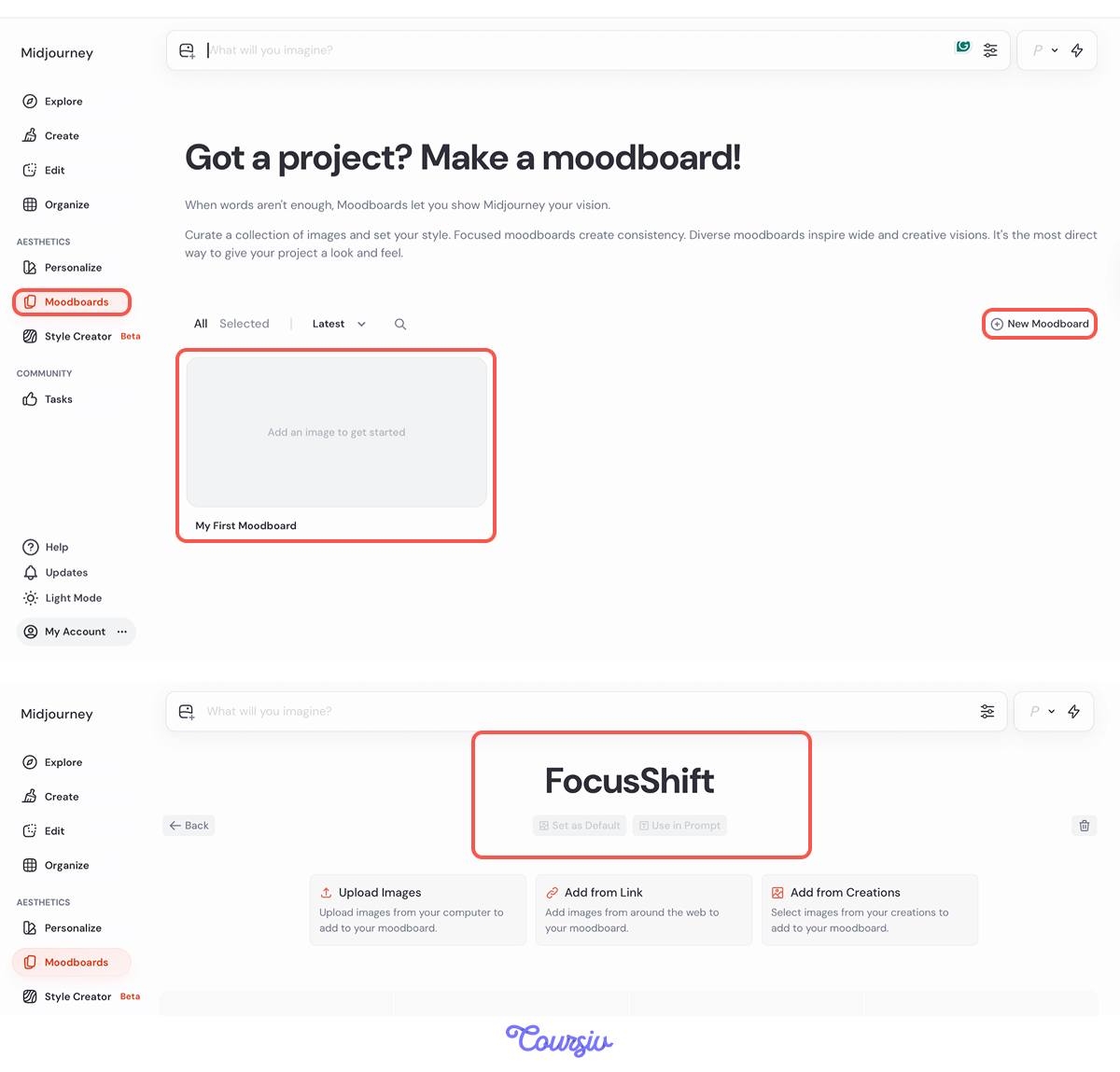
- Open Midjourney and click Moodboard in the left-side navigation.
- Hit My First Moodboard or New Moodboard and give it a name.
Step 2 — Add References
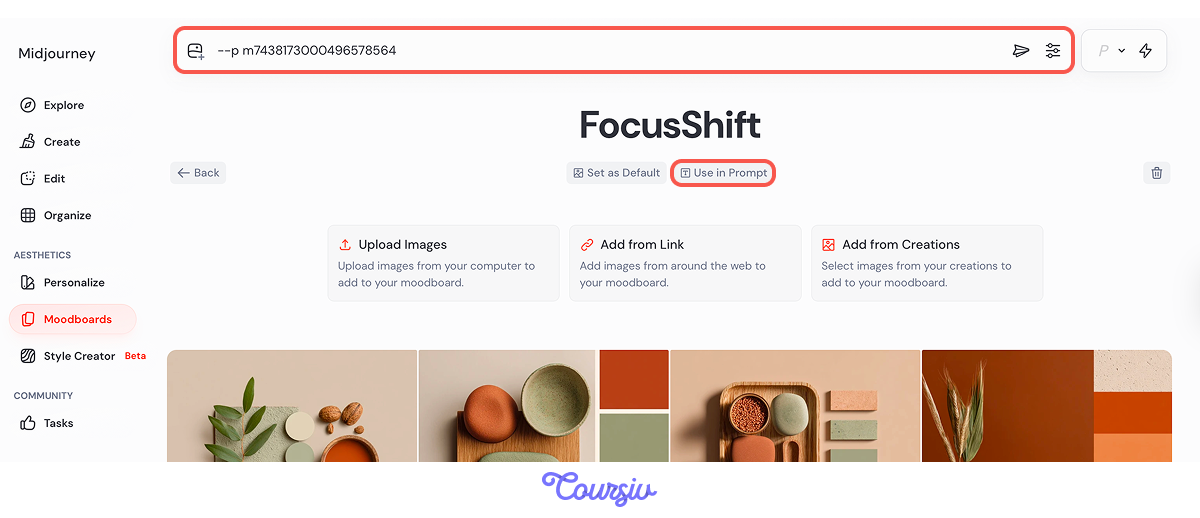
Add your references: drag and drop images, paste image URLs, or pull directly from your Midjourney gallery. Once the board is populated, Midjourney generates a unique ID for it.
Step 3 — Lock the Style
Copy that ID and add it to any prompt using --p mID — the moodboard style applies automatically.
From that point on, every prompt you run with that code is anchored to the same visual language.
Select all that apply
Which of the following belongs in a structured moodboard for a brand direction?
Once your moodboard is ready, you can share the --p mID code with anyone working on the same project. They add it to their own prompts and get outputs anchored to the same visual language. No need to re-describe the style.
practice preview
Interactive practice
True / False
FocusShift has a locked visual direction. Consider what happens when it needs to show up in different places.
practice preview
Interactive practice
Put in order
Arrange the steps in the correct order for locking a final visual direction.
- Direction before execution: Every asset built without a locked visual reference is a separate creative decision. A moodboard makes that decision once.
- More directions, clearer choice: Generate all three options before committing — ruling a direction out is part of the process, not a failure.
- Midjourney Moodboards lock the style: Upload your references, get a unique code, and add it to any prompt with "-p mID." The aesthetic carries over without re-describing it each time.
- Two filters make the decision: The audience and tone fit together identify the direction.
What's Next?
You have a locked visual direction for FocusShift. In the next lesson, you'll turn it into a working brand kit — colors, typography, and visual style documented in one place so every asset you build from here stays consistent.