No-Code Websites and Apps · Build Your Product with AI
Your First Website With AI
Build a website from scratch
Your First Website With AI
What if you could go from "I have an idea" to a real digital product — a website or an app — without writing a single line of code? This guide makes that possible. Over the next 7 lessons, you'll build a project from scratch.
You'll start by turning a blank page into a working website draft with pages and structure — all using AI. Let's get started!
Select all that apply
You're about to build a children's educational website. What do you think you should define before opening any builder?
What Makes a Website Work
A website is a tool that serves a specific purpose for a specific audience. Before you open any builder, you need to know three things: who it's for, what it offers, and what you want visitors to do.
Purpose, Audience, and Action
Every effective website starts with a core purpose — the reason it exists.
Then comes the target audience — the specific people it serves.
Finally, the primary call to action — the one thing you want visitors to do. Without these three, even a beautiful website won't deliver results.

Define Your Website's Core With AI
You don't need to figure out your website's purpose alone. AI can help you articulate it, but only if you give it enough to work with. Let's see what happens when you try.
practice preview
Interactive practice
Fill in the blank
Ask ChatGPT to help you define the website's purpose. Fill in the gaps.
Give AI the Details It Needs
The output is too vague to act on. The difference between a useless output and a useful one is specificity. Tell the AI who your audience is, what problem you solve, and what you want visitors to do. The more concrete the input, the more actionable the result.
practice preview
Interactive practice
Fill in the blank
Rewrite the prompt with concrete details about the audience, content, and goal.
From Purpose to First Draft
You've defined the foundation. Now let's use it to build a real website.
Lovable is an AI website builder that turns text descriptions into working websites — pages, navigation, layout, and all. You describe what you want, and it builds the draft. No code needed. Note: Lovable works better when your prompt is properly structured.
practice preview
Interactive practice
Fill in the blank
Give Lovable a detailed prompt with pages, audience, and style direction.
How Lovable Works
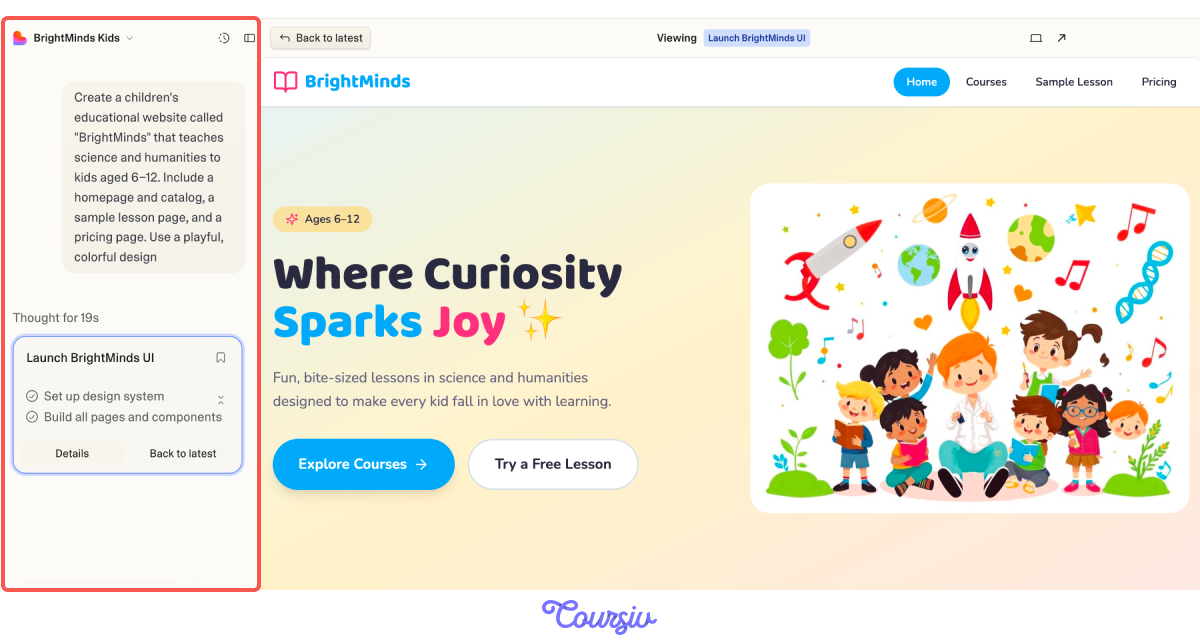
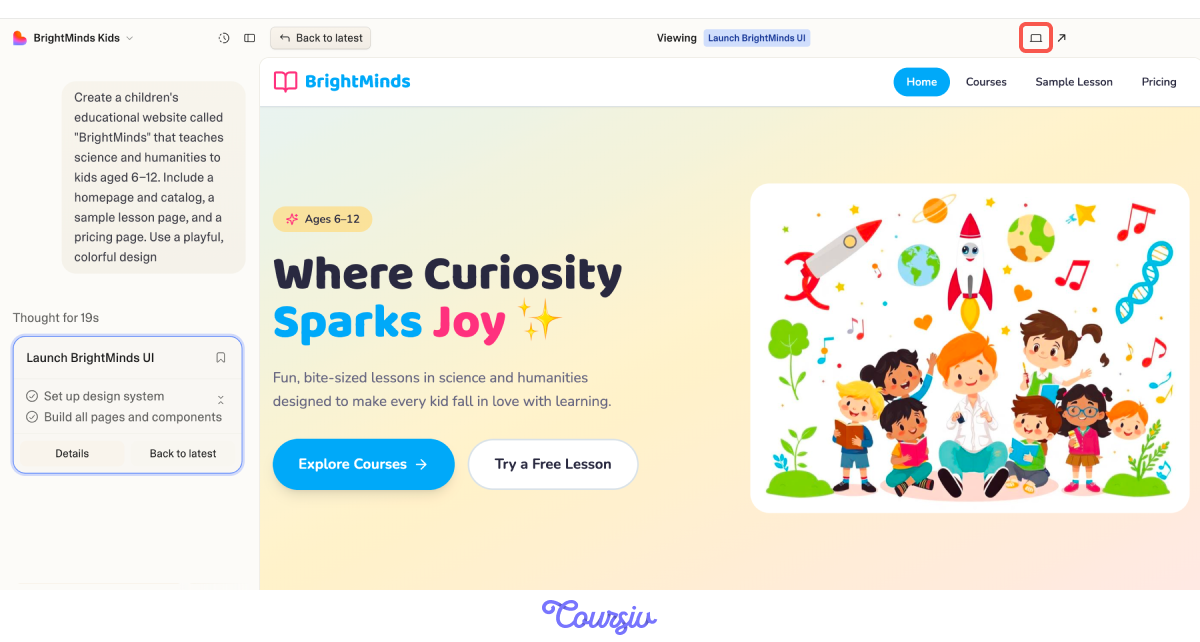
This is how Lovable's interface is set up.
On the left, you have the chat panel — this is where you type every prompt. On the right, the live preview updates in real time as the AI builds. Every change you request happens through the chat.
The Edit-Preview Loop
You can switch between desktop and mobile preview to check how the site looks on different screens. If something breaks or looks wrong, your next prompt fixes it — the AI keeps the full context of your project.
Your Draft Is Live
Lovable just generated a working website with multiple pages, navigation, and layout. But a first draft is not the final product. Open the preview and look at the homepage — what's there, what's missing, and what feels off.
Choose one
Your homepage has a hero section, a subject catalog, and a pricing block. What's the biggest risk of moving straight to publishing?
Iterate With Follow-Up Prompts
In Lovable, you don't rebuild when something's off — you refine. Every follow-up prompt builds on what's already generated.
practice preview
Interactive practice
Fill in the blank
Write a follow-up prompt to improve the homepage structure in Lovable.
practice preview
Interactive practice
True / False
Does this prompt work for refining a Lovable draft?
Create a "How It Works" Page
Your homepage now has a clear flow. Parents are willing to pay for something they understand — so let's show them exactly what their child's experience looks like.
Pages, Components, and Navigation
Lovable organizes your site into pages listed in the sidebar. Each page is made up of components — hero sections, content blocks, and footers. When you ask for a new page, Lovable creates it and automatically adds it to the navigation.
Let's try it and build a "How It Works" page.
practice preview
Interactive practice
Fill in the blank
Prompt Lovable to create a page that explains the BrightMinds experience to parents.
Great Work!
BrightMinds now has five pages: Home, Courses, How It Works, Sample Lesson, and Pricing. Each one serves a clear role. In the next lesson, we'll dive deeper into designing a visitor's journey.
- Every effective AI-built website starts with three decisions: purpose, audience, and call to action.
- A specific prompt produces a useful draft.
- In Lovable, you build through conversation: first prompt generates the draft, follow-up prompts refine it.
- Structure the page around your visitor's journey, not only your content.
What's Next
You have a working website with pages, structure, and a clear visitor flow. In the next lesson, you'll give BrightMinds a real visual identity — colors, typography, a mascot — and shape the site so users can navigate it easily and take action.