No-Code Websites and Apps · Launch Your Product
Adding AI Features
Build AI into your product
Add AI Features and Automation
You have two products in your portfolio — BrightMinds, an educational platform, and FitBase, a booking app. Before you launch either one, there's a question worth asking: where could these products be smarter? In this lesson, you'll add AI features and automations that make both products stronger, more useful, and harder to compete with.
Let's get started!
AI as a Product Extension
Adding AI to a product is about finding the moments where the product could respond, assist, or act — and currently doesn't. A child stuck on a lesson with no one to ask. A gym member who knows what class they want but has to scroll through the whole schedule to find it. AI fills those gaps.
Different Products, Different AI
Different products need different AI features. An educational platform benefits from features that assist learning. A booking app benefits from features that reduce friction. Before you build anything, ask: what's the core action, and where does the user get stuck or slow down?

AI for BrightMinds — A Tutor Chatbot
Your educational platform teaches kids about science and the humanities. But a lesson doesn't cover everything. An AI tutor chatbot gives kids a place to ask follow-up questions and get age-appropriate answers, right inside the lesson.
practice preview
Interactive practice
Fill in the blank
Prompt Lovable to add a tutor chatbot to BrightMinds.
Making the Content Visible
The tutor chatbot helps kids go deeper into a lesson they've already found. But what about finding the right lesson in the first place? Right now, a child has to browse through categories manually. That's fine for adults, but challenging for a 7-year-old.
AI for BrightMinds — Smart Search
A smart search feature lets them type (or even ask) what they want to learn — "I want to learn about dinosaurs" — and the AI finds the right lesson, even if the child doesn't use the exact title.
practice preview
Interactive practice
Fill in the blank
Prompt Lovable to add an AI-powered search bar to BrightMinds.
Two Features, One Principle
The tutor chatbot and smart search solve different problems: one helps kids learn deeper, the other helps them find content faster. But both follow the same rule: they respond to what the user is doing at the moment. That's the test for any AI feature. Let's apply it to FitBase.
Let's Work on FitBase
FitBase has different problems to solve. The studio owner currently sends booking confirmations by hand, and every member sees the same schedule regardless of what they book. Let's fix it!
AI for FitBase — A Booking Assistant
FitBase members know what they want — "yoga tomorrow morning" — but the app makes them scroll through a full schedule to find it. An AI booking assistant lets members type or tap a quick request and get matched to the right class instantly. It turns a browse-and-search task into a single sentence.
practice preview
Interactive practice
Fill in the blank
Prompt Bolt.new to add an AI booking assistant to FitBase.
Great job!
You've just implemented pro AI features into your products to make them more user-friendly. But every product has many background tasks that require automation. Let's handle them!

From AI to Automation
AI features respond to user behavior in real time. Automations handle the tasks that happen in the background — sending confirmations, following up after no-shows, notifying members when a spot opens up.
Meet Zapier
Zapier connects your apps to other tools — like email, SMS, or calendar — through simple "if this, then that" rules called Zaps. When something happens in your app, Zapier triggers an action elsewhere (e.g., sending a confirmation email). No code needed.
The bridge between your app and Zapier is a webhook — a URL that Zapier generates, and your app sends data to whenever something happens.
That's how the setup works: you create a Zap in Zapier and choose "Webhooks by Zapier" as the trigger. Select "Catch Hook" — this tells Zapier to listen for incoming data. Zapier generates a unique webhook URL. Copy it.
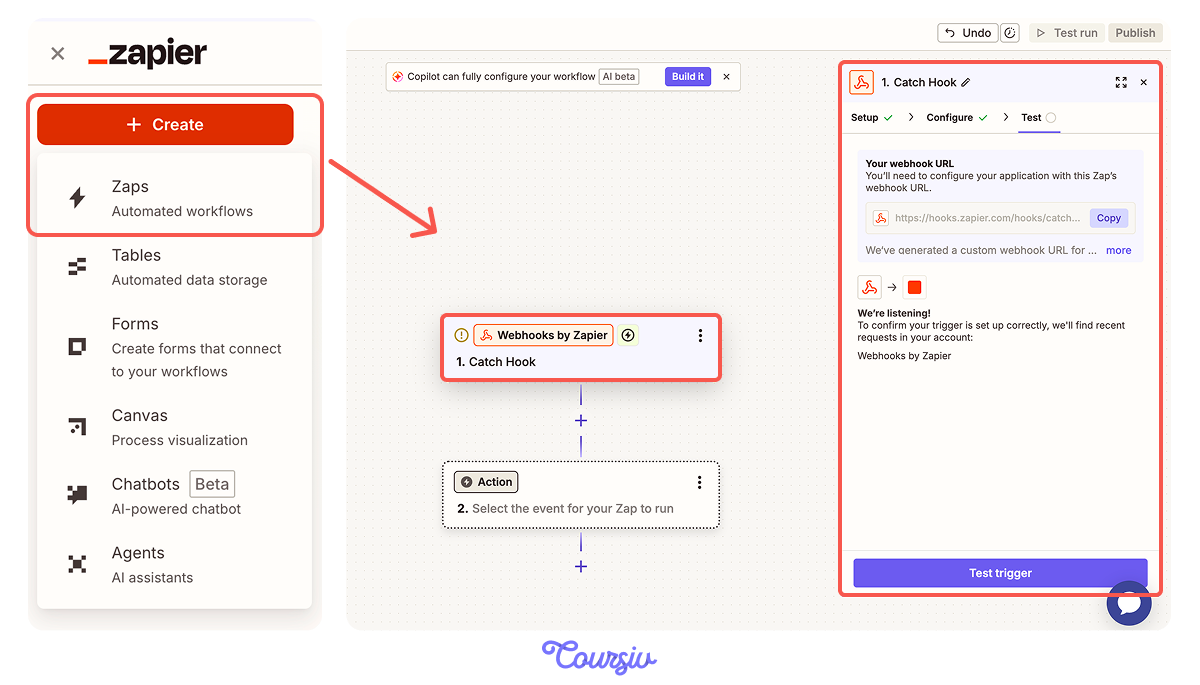
Then go to Bolt.new and prompt, "When a new booking is created, send the booking details (class name, date, time, member email) to this webhook URL:" and paste the URL. This tells your app to push data to Zapier every time a booking happens.
Now add an Action — what happens after the trigger fires. Choose Gmail (or Email by Zapier if you don't want to connect a Gmail account). Select "Send Email" as the action event.
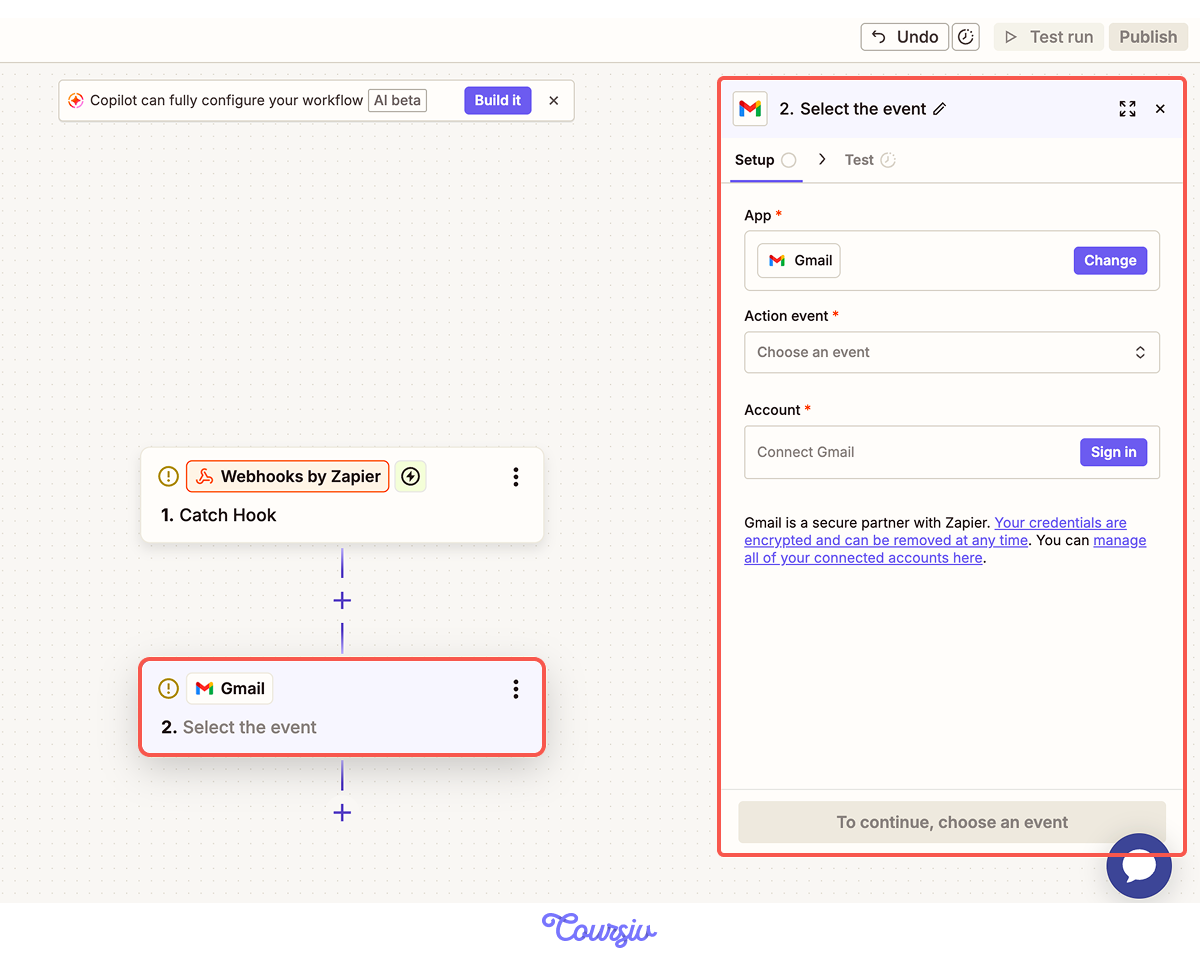
Click "Test action" to send a real test email. Check your inbox. If it looks right, publish the Zap — it's now live and will send a confirmation email for every new FitBase booking automatically.
Automations Live
Your product now has automations running in the background. But AI and automation need rules — especially when they touch real users.
Guardrails for AI Features
AI features aren't set-and-forget. They need guardrails — rules that define what the AI can and can't do. Without guardrails, a children's chatbot might generate inappropriate content, or a booking assistant might confirm a class that's already full.
Define Your Guardrails
Write your guardrails out before implementing them. For each AI feature, answer: what should it never do? What should trigger a human review? And what's the fallback if the AI gets it wrong?
practice preview
Interactive practice
Fill in the blank
Ask ChatGPT to define guardrails for one AI feature in each product.
Implement Guardrails in the Builder
Defining guardrails is step one. You need to write them into the product.
In Lovable, chatbot behavior is controlled by a system prompt — the hidden instructions that tell the AI how to respond. You set these by typing a follow-up prompt directly in Lovable's chat panel, just like any other change. Lovable writes the rules into the chatbot's code automatically.
practice preview
Interactive practice
Put in order
Arrange the steps to add any AI feature to a product.
- AI features should solve a real user problem, not just exist for novelty.
- Different products require different AI features. Choose properly.
- Smart search should go beyond understanding natural language.
- Zapier automates background tasks like confirmations, follow-ups, and reports with simple trigger-action rules.
- Every AI feature needs guardrails: what it should never do, when a human should review, and a fallback if it fails.
What's Next
Both products now respond to their users and run automations in the background. In the next lesson, you'll connect them to real revenue — monetization models, pricing, payment setup, and launch preparation. Let's keep going!