No-Code Websites and Apps · Launch Your Product
Launching Your Product
Price your work and publish
Monetize and Launch the Product
Both BrightMinds and FitBase have AI features and automations. But neither product is making money yet.
In this lesson, you'll connect both products to real revenue — set up payments, prepare for launch, and get them in front of actual users.

Pricing Client Work
Building websites and apps with no-code tools is a real, sellable skill. There's no single right way to charge. But the wrong way is to guess. Your pricing should reflect:
- Scope: How much are you building?
- Value: What is it worth to the client's business?
- Ongoing relationship: Will they need updates after launch?

Pricing Models
There are three models:
- One-time project fee: You build it, hand it off, done. Works when the scope is clear, and the client won't need regular changes.
- Monthly retainer: You maintain and update the product on an ongoing basis. Works when the product needs frequent adjustments.
- Hybrid: A project fee to build, plus a smaller monthly retainer for maintenance. This is the most common model for app and website work.
practice preview
Interactive practice
True / False
Which model fits this situation better?
Put It in Writing
You've chosen the hybrid model — now the client needs to see it in a professional proposal. A good proposal lists what's included, what it costs, and when it'll be delivered.
practice preview
Interactive practice
Fill in the blank
Use ChatGPT to draft a project scope and pricing proposal for the studio.
Prepare for Launch
You've priced the work and written the proposal. Now both products — BrightMinds and FitBase — need to go from builder drafts to real, public-facing products. That starts with giving them a proper address on the internet.
Custom Domains
A domain is your product's address on the internet — what people type into their browser to find you. Right now, your products live on builder subdomains (brightminds.lovable.app or fitbase.bolt.new.) That works for testing, but not for launch.
A custom domain (brightminds.com, fitbasestudio.com) makes the product look professional and trustworthy. You purchase domains through providers like Namecheap, Google Domains, or Cloudflare — search for the name you want, check if it's available, and buy it for around $10-$15 per year.
Connect a Domain in Lovable
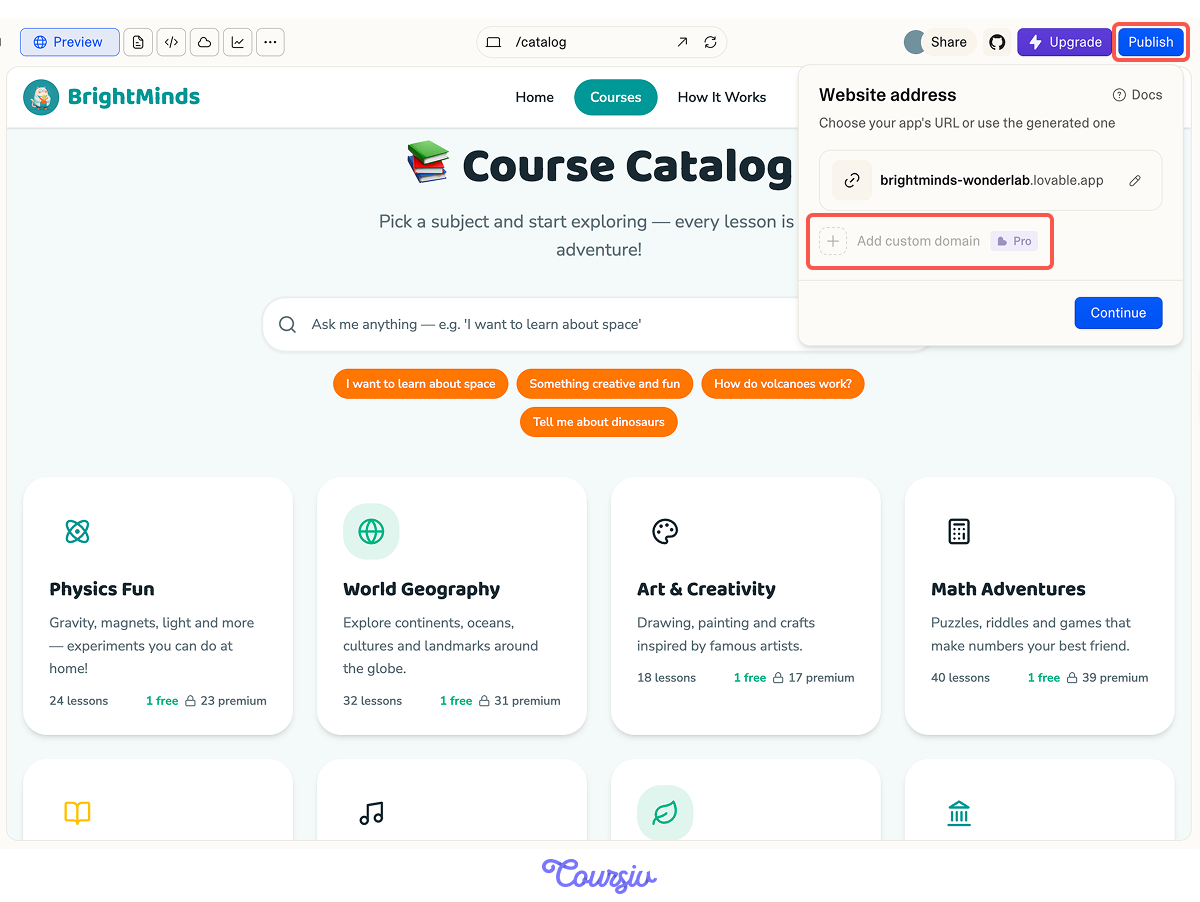
In your Lovable project, go to Publish and click "Add Custom Domain" (paid feature). Enter the domain you purchased, and Lovable gives you the option to add to your domain provider. This points your domain to Lovable's servers.
Hosting
Hosting is where your product's files live on the internet. The good news: both Lovable and Bolt.new handle hosting for you.
When you publish your project, your product is hosted automatically. For most projects, this built-in hosting is enough. If a client needs advanced hosting (custom server, specific region), you can export the code from either builder and host it on platforms like Netlify or Vercel.
SEO Basics
SEO (Search Engine Optimization) helps your product appear in Google results. Parents searching "fun science lessons for kids" will find BrightMinds. Setting up SEO is a skill that adds value to every project you build.
What Search Engines Need
Every page needs two things to rank: a title tag (the clickable headline in search results) and a meta description (the short text underneath).
Good title tags are specific, include keywords, and stay under 60 characters. Meta descriptions should be under 160 characters and describe the page's value.
practice preview
Interactive practice
Fill in the blank
Ask ChatGPT to write optimized title tags and meta descriptions for every BrightMinds page.
Add Your Data to Lovable
Copy the metadata ChatGPT generated and pass it to Lovable in a single follow-up prompt: "Add these SEO title tags and meta descriptions to each BrightMinds page:" followed by the full list. Lovable will apply them to the correct pages. Preview the site and check that each page shows the right title in the browser tab — that's your title tag working.
Choose one
You're setting up SEO for the FitBase app landing page. Which title tag would perform best?
The Launch Checklist
Before you publish either product, walk through this checklist. Every item takes minutes to verify, but can prevent real problems after launch.

For both products:
- Test the full payment flow with a real card (Stripe has a test mode for this).
- Check every page on mobile.
- Verify all links work.
- Make sure the post-payment experience delivers value immediately — unlocked content for BrightMinds, updated account for FitBase.
- Domain connected, SEO metadata on every page, Zapier automations active and tested.
- Hybrid pricing (project fee + monthly retainer) works best for client work that needs ongoing updates.
- Custom domains make products look professional — always ensure the client owns their domain for client work.
- Lovable and Bolt.new both handle hosting automatically when you publish your product.
- Every page needs a unique title tag and meta description for SEO.
What's Next
Both products are live and accessible to real users. But launching is just the beginning. In the final lesson, you'll track how each product performs, spot weak points, and improve conversion, retention, and revenue through focused iteration.