Kling · Introduction to Kling
Prompting Fundamentals
Learn to turn any rough idea into a structured prompt
Prompting <b>Fundamentals</b>
When most people open Kling for the first time, they type something like "a woman in a café." Kling generates something, but it's probably not what they had in mind. This happens because the prompt never gave it enough to work with.
In this lesson, you'll learn a six-part formula that turns a rough idea into a prompt that gets you what you need — and how to use DeepSeek, built directly into Kling, to get there faster.

Let's Try It
Before we break down in detail what makes a prompt work, let's see the problem firsthand — generate the video and see what comes back.
Here is how it turned out. It looks good at first glance — but before moving on, let's take a closer look at what's missing and why it matters for the final result.
Choose one
What is the core issue with the prompt "A woman in a café"?
Yes, Kling generated a video. But the lighting is flat, the mood is neutral, and nothing in the image feels deliberate. To fix this, let's try the 5W1H formula.
The 5W1H Formula
Kling's recommended framework for building detailed prompts centers on 6 questions: Who, What, When, Where, Why, and How.

Here's what each element covers:
- Who — the subject: appearance, age, expression, clothing, defining features.
- What — the action or state: what the subject's doing, feeling, or how they're positioned.
- When — the time context: time of day, season, era, or historical period.
- Where — the setting: location, space, and surrounding environment.
- Why — the mood and atmosphere: the emotional tone an image should carry.
- How — the style and execution: photography style, art movement, rendering approach, lens type, or color grading.
Each one adds a specific layer of direction, and together they give Kling everything it needs to generate something usable.
Now let's go back to the prompt about a woman in a café and rebuild it properly.

practice preview
Interactive practice
Fill in the blank
Turn the vague prompt into something Kling can work with.
Look at the difference. This time, Kling had a full brief to work from. The mood, the lighting, and the style are all there because you told it what you wanted. That's what a structured prompt does.
Use It Flexibly
The 5W1H formula is a great framework, but not a checklist. Depending on your task, you might not need all 6 elements every time. The right approach is to identify which dimensions matter most for the visual you're building and to weight the prompt accordingly.
For example, a landscape prompt might need almost no "Who" or "What". Strong "When", "Where," and "Why" will carry the whole image. Stacking all six can sometimes overload the generation and reduce output quality. Use what serves the image, and leave out what doesn't.

practice preview
Interactive practice
True / False
Decide if "Who" and "What" are useful for this prompt.
Good. Knowing which elements to include — and which to leave out — is what separates a focused prompt from an overloaded one. Now let's put the selective approach into practice.
practice preview
Interactive practice
Fill in the blank
Generate a cinematic coastline landscape only with the 5W1H elements that matter for this image.
A focused three-element prompt produced a cinematic result.
The framework is flexible precisely because not every image needs every element. It all depends on your idea and the task.
Choose one
You generate the coastline landscape, and it looks accurate, but the image feels flat and emotionless. Which element is most likely missing from your prompt?
That's the formula working selectively, each element placed where it earns its place, nothing added for the sake of it. Now, what if you have a rough idea but can't find the right words to describe it?
DeepSeek Inside Kling
Kling has a built-in reasoning assistant — DeepSeek. It's accessible directly from the Image and Video Generation workspaces without opening another tool or tab.

So when you have a concept but can't articulate it precisely, DeepSeek fills that gap.
It applies cinematic, design, and technical language you may not have, turning "A woman in a café" into a generation-ready description with built-in character, setting, atmosphere, and rendering style. Let's try it!
Select the DeepSeek icon inside Kling and type a simple prompt like "A woman in a café." DeepSeek suggests three prompt variations. You can choose the one that looks the most effective for your goal. Click "Use prompt", and it appears in the main field.
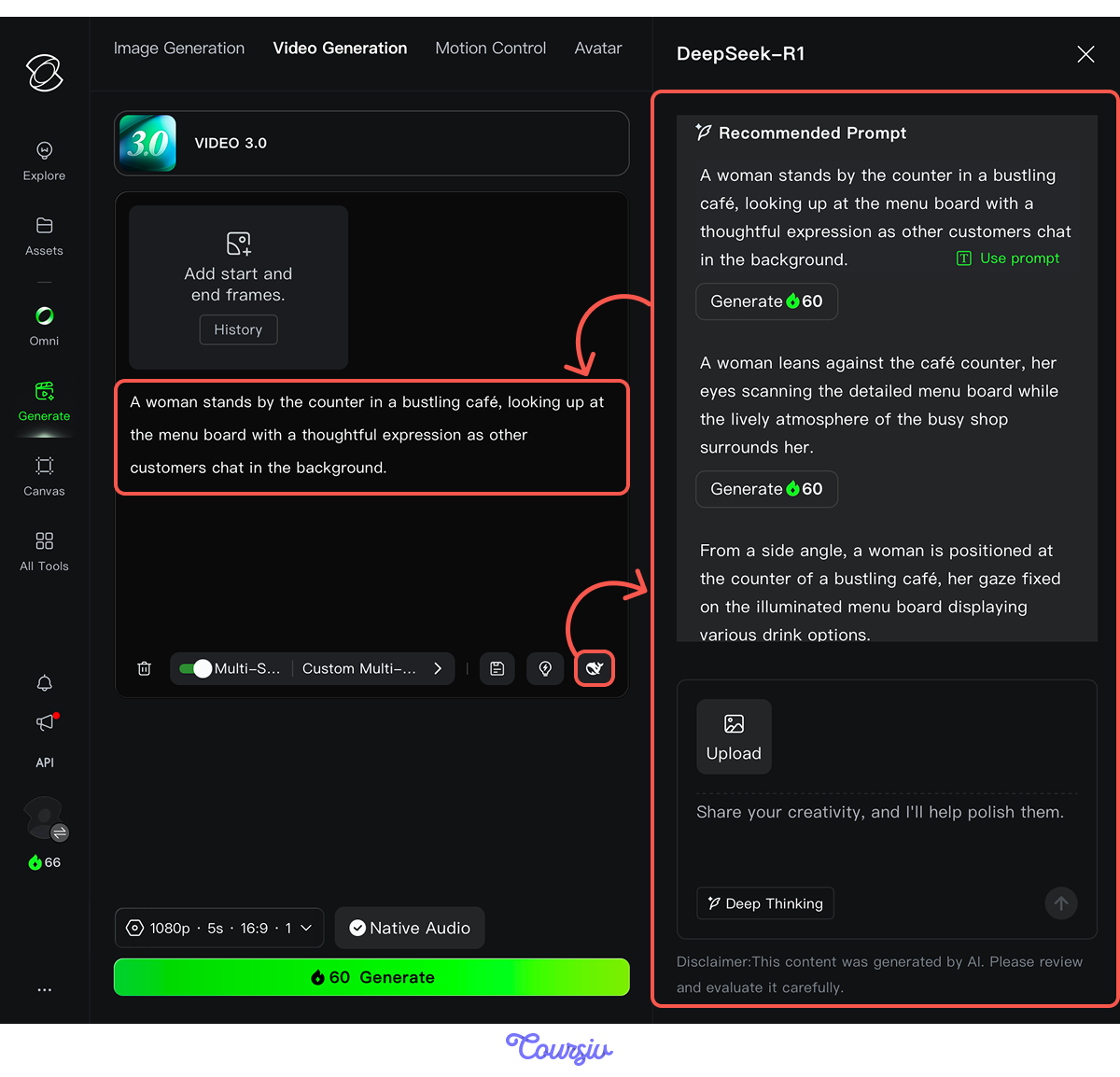
A rough idea became a precise, generation-ready brief. This is what Kling produced from it.
Choose one
What makes DeepSeek useful inside Kling?
And the best part is that DeepSeek lives inside Kling itself. You can enhance your prompt right where you generate, without leaving the platform.
Between the 5W1H formula and DeepSeek, you now have two reliable ways to get from a rough idea to a prompt that produces what you had in mind.
- Vague prompts produce vague results: Kling needs direction, not just a subject and location.
- The 5W1H formula: Who, What, When, Where, Why, and How each adds a specific layer of direction.
- Use it selectively: Focus on the elements that serve the image and leave out the ones that don't.
- DeepSeek is built into Kling: Use it to expand rough ideas into structured prompts.
Unit 1 Completed!
Good work! You know what Kling is, how it works, and how to write structured prompts that get you what you had in mind.
Now it's time to go deeper — Unit 2 puts each tool to work, starting with Image Generation. Let's go!