Kling · Kling in Professional Practice
Kling for Educators
Design a full course with one consistent avatar
Kling for Educators & Trainers
Another way you can use Kling in a professional context is in education. Whether you're building an onboarding course, a training module, or a lecture series, Kling gives you a production team of one.
In the final lesson of this guide, you'll learn how to create a consistent avatar instructor, assign scripted content to it, and deliver the same course in multiple languages.

The Challenge
Say you need to build a five-module onboarding course. You can do all of it without a camera or a studio. But how do you make sure the course looks and feels like a single cohesive experience?
The answer is the avatar. Generate your presenter once, save it, and reuse it across every module. Let's build it step by step.
Step 1: Create the Avatar Instructor
Generate your presenter in Kling's Avatar workspace: set the appearance, choose the voice, and save it. That character becomes the instructor for every module.
practice preview
Interactive practice
Fill in the blank
Generate an avatar instructor image for a training course in Kling Avatar.
You've created and saved your instructor. Let's add a script and get them talking.
Step 2: Assign the Training Script
Go to the Speech panel in the left sidebar under your uploaded image, and type your training script directly into the text field. Kling will generate a video of the avatar delivering the speech.
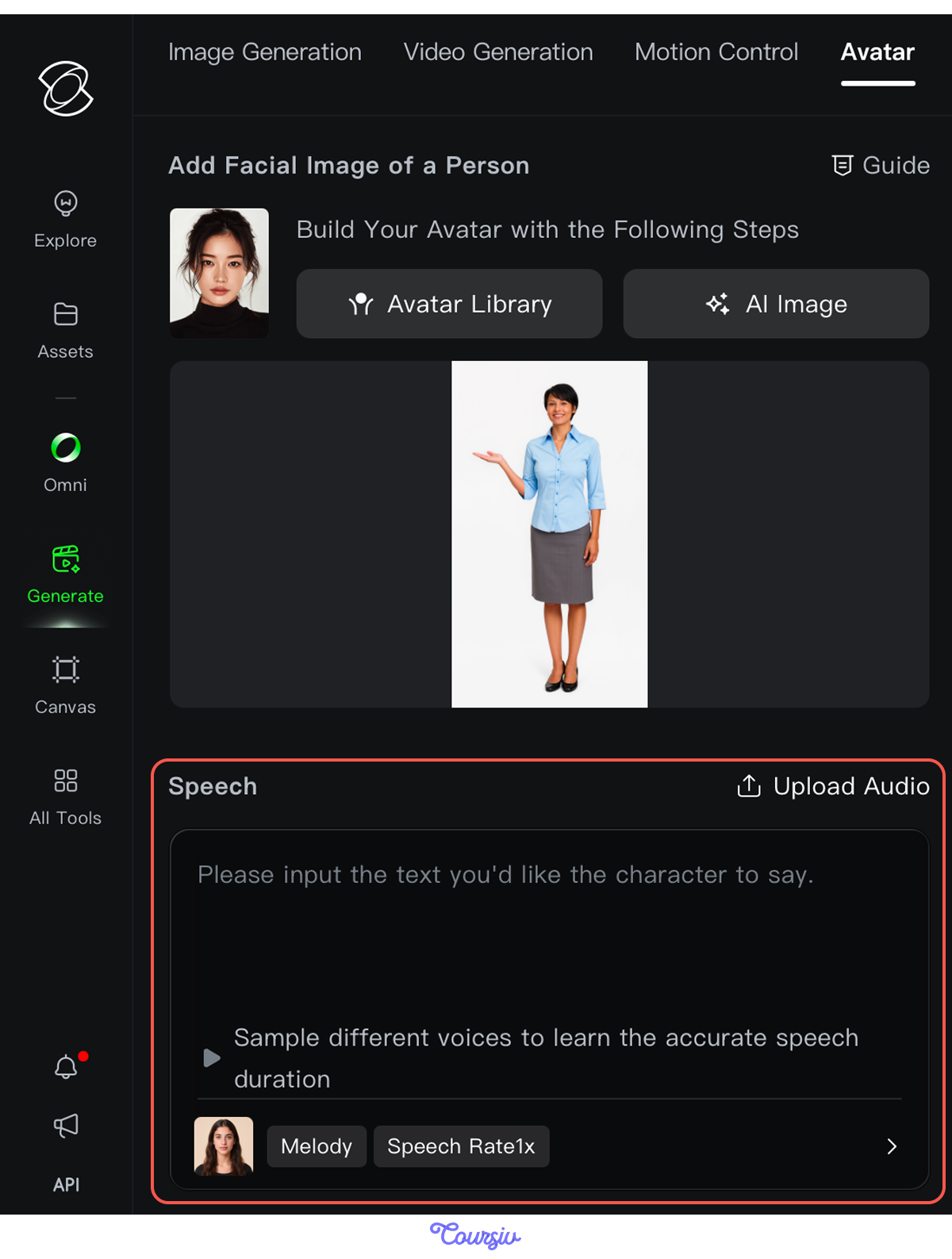
Type a script into the Speech panel and generate a video with a prompt.
practice preview
Interactive practice
Fill in the blank
Assign a training script to your avatar instructor for Module 1.
Great Work!
Module 1 is done, your avatar delivered the script, and no recording studio is needed. Now that you have your instructor ready, bring them into Module 2 and keep the course going.
Multilingual Delivery
You can deliver the same content in another language without rebuilding the character.
Step 3: Produce Multilingual Versions
Kling's native audio supports many languages from the same avatar. Once your module is ready in one language, write a different text in another language in the Speech panel, then regenerate it with natural pronunciation and pacing throughout.

Here is what it looks like when we ask the same avatar to deliver the script in Spanish.
Excellent!
You can type the script in your preferred language, and the avatar delivers it naturally, with the same face and style.
practice preview
Interactive practice
True / False
Decide if this is a good use case for Kling's multilingual audio feature.
With Kling, you built an AI avatar, generated videos in multiple languages, and kept one instructor consistent throughout. Before we wrap up, let's see what you've taken from this lesson.
Select all that apply
Looking back at this lesson, what did Kling specifically make possible in the educator's workflow?
Follow this workflow to build a clear educational model with an avatar:
- Step 1: Create your avatar. Generate a presenter and save it; the same face and voice carry across every module.
- Step 2: Assign the script. Type your training content into the Speech panel; the avatar delivers it in your chosen language.
- Step 3: Go multilingual. Switch the language in Speech and regenerate; the same module is ready for a new market without re-recording.
- Step 4: Stay consistent. Keep the saved avatar identical every time it appears, making a multi-module course reliable from start to finish.
Before you finish the guide, let's do a quick review of everything you've covered.
practice preview
Interactive practice
Match pairs
Tap a left item, then a right item to match.
practice preview
Interactive practice
Put in order
Arrange the steps of a standard video generation workflow from start to finish.
Select all that apply
What do you need to set up before an avatar can deliver a script?
Guide Complete!
You now know how to generate images, animate them, build video sequences, and create avatars — and you've seen how all of it applies across film, marketing, and education.
Where you take it from here is entirely up to you. Try building something great!