AI-Powered Creative Income · Monetize the Work
Creative Project-Management
Project management for AI creators
Managing Your AI Creative Business
Imagine this: You've built the skills and delivered projects. But now the work is piling up, and nothing is organized. Client files live in random folders. You can't find the prompt that produced your best result three weeks ago.
In this lesson, you'll build the project management infrastructure that turns scattered freelance work into a real business.

The Business Layer You Shouldn't Skip
Every previous lesson in this course taught you how to create. This one will focus on how to run what you've built. Without a system, you lose assets, underprice projects, miss deadlines, and burn out. With one, every new client plugs into a repeatable workflow — and your earnings become consistent and predictable.
Your Infrastructure Stack
You'll use Notion AI as your central workspace — it handles project tracking, client databases, content libraries, and AI-assisted writing in one tool.
You'll also use Claude for scoping projects and writing client-facing documents, and ChatGPT for quick organizational tasks, like generating templates and structuring data.

The Project Hub
A project hub is a single Notion workspace where all clients, projects, and assets live. It's like your business operating system.
Instead of starting from scratch each time a client messages you, everything plugs into an existing structure: briefs, deliverables, deadlines, and files all in one place.
Your project hub needs three core databases:
- Client directory: who you work with
- Project tracker: what you're delivering
- Prompt library: your reusable creative tools
Let's build the first one.

practice preview
Interactive practice
Fill in the blank
Ask Notion AI to generate a client database structure that captures everything you need to manage ongoing relationships.
Database 2: Your Project Tracker
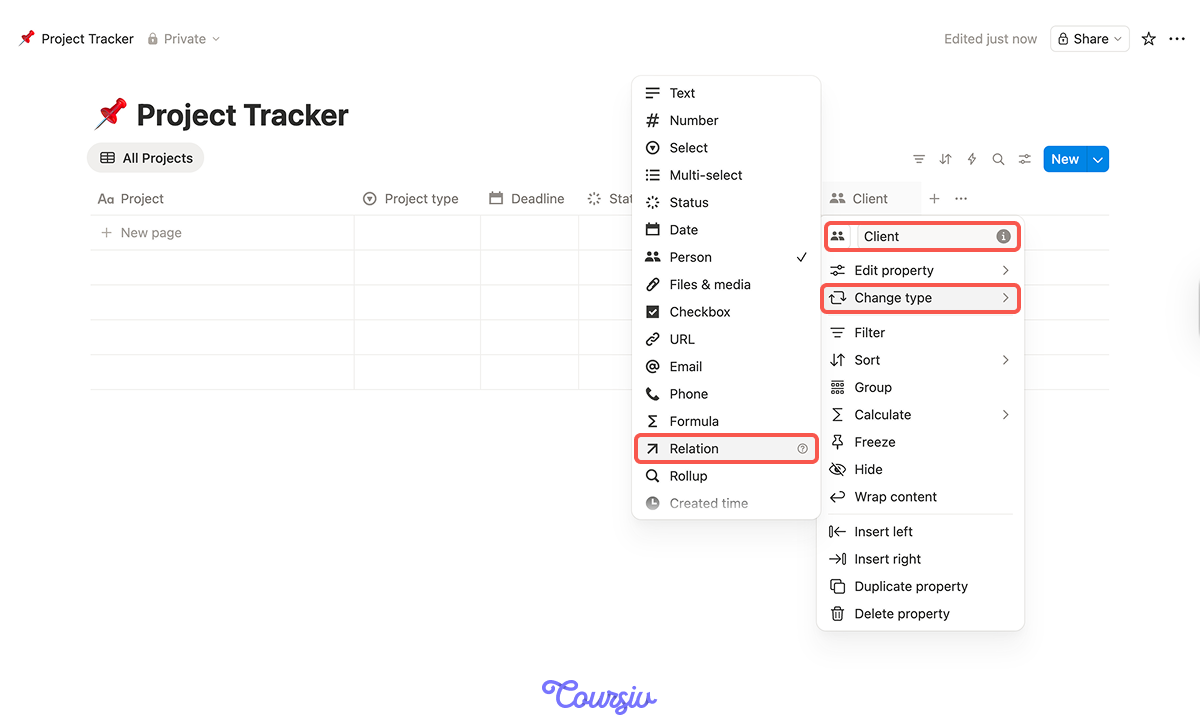
In Notion, create a second database called Project Tracker and connect it to your Client Directory using a relation property. Now every project automatically links back to its client — and every client page shows their full project history. Add properties for project type, deadline, status, and deliverable count.
Database 3: Your Prompt Library
Every lesson in this course produced prompts that generated strong results. You can store them. A prompt library is a Notion database where you store your best-performing prompts — tagged by tool, use case, style, and output quality — so you can reuse and adapt them instantly.
Structure your prompt library with these properties:
- Tool: Stable Diffusion, Claude, ChatGPT, Canva AI, MidJourney, etc.
- Category: product shot, social visual, eBook chapter, voiceover script, etc.
- Prompt text: the successful prompt itself
- Example output: attach or link the result
- Quality rating: how do you rank the output quality

Scoping and Pricing With AI
Your prompt library saves creative time. Now let's protect your financial time.
Most freelance AI creators lose money not because their work is bad, but because they price projects emotionally. A pricing framework removes the guessing. You'll use Claude to build one based on your actual costs: time per deliverable, tool subscriptions, and the value the client receives.
practice preview
Interactive practice
Fill in the blank
Ask Claude to help you create a pricing structure based on your actual production costs and the market you serve.
Choose one
Why is setting a minimum project fee important for a freelance AI creator?
Client Communication Templates
You'll write the same types of messages repeatedly — project confirmations, revision requests, delivery emails, follow-up for new work. Instead of writing each one from scratch, use Claude to generate reusable templates that you store in your Notion workspace and customize per client.
practice preview
Interactive practice
Fill in the blank
Ask Claude to write a project proposal template you can reuse and customize for any new client.
Templates That Save Time
Store your proposal template, onboarding questionnaire, delivery message, and follow-up email all in a single Notion page called Client Templates.
Link it in your Client Directory so it's always one-click away.

Your Weekly Operating Rhythm
Infrastructure only works if you use it consistently. Set a weekly operating rhythm — a simple recurring checklist that keeps your business running without constant mental overhead. Let's have Claude generate one tailored to your workflow.
practice preview
Interactive practice
Fill in the blank
Ask Claude to create a weekly operating checklist.
Syncing Deadlines to Your Calendar
A weekly checklist keeps you disciplined and won't let you forget about important deadlines. Notion Calendar is a free app that syncs directly with any Notion database that has a date property.
Connect your Project Tracker, and every deadline automatically appears on your calendar alongside your meetings and personal schedule. Changes sync both ways. This means you never need to manually transfer deadlines between your project system and your schedule.
Select all that apply
During your Friday client check-in, you notice a past client hasn't responded to your delivery from two weeks ago. Which of these actions are worth taking?
Putting It All Together
Your complete infrastructure now has connected pieces:
- Client directory for relationships
- Project tracker for active work
- Prompt library for creative tools
- Client templates for communication
- Weekly rhythm for maintenance
This infrastructure is also what makes your work scalable. Right now, you might handle three clients. With this system, you can handle 8 without working more hours — because the admin overhead per project drops dramatically.
And if you ever want to bring on a collaborator or subcontractor, your Notion workspace becomes the onboarding tool. The system grows with you.
- The difference between freelancing and running a business is infrastructure — a system that makes every new project faster and more profitable than the last.
- Your Notion workspace needs four core databases: Client Directory, Project Tracker, Prompt Library, and Asset Archive — all linked together.
- Pricing frameworks built on real production costs and market rates prevent the most common freelancer mistake: chronic undercharging.
- Reusable templates for proposals, onboarding, delivery, and follow-ups cut communication time and increase your close rate.
- A weekly operating rhythm of three fifteen-minute check-ins keeps your entire business running without constant mental overhead.
Next Up — Communicating With Clients
Your business infrastructure is ready. In the final lesson, you'll learn how to maintain effective communication with clients — and where to find them. The system you just built becomes the backbone; now you'll learn to sell from it.
Let's keep going!