AI-Powered Creative Income · Create Profitable Content
Product Images
Create sellable AI product images
Monetize Your Creativity
Imagine this: You've been creating and experimenting with AI tools, but none of it has turned into income yet. After implementing a working system, the game changes.
This course follows one path: create content that people pay for. You'll learn how to monetize your creativity — from producing assets with AI to managing your projects and communicating with clients. Let's get started!

From Random Output to Real Income
You'll start by learning how to turn ideas into focused assets. Then you'll expand to producing work that meets market need. In Unit 2, you'll create your monetization path.
The system is simple — create with a buyer in mind, refine until it's sellable, and build a repeatable workflow.
Product Images
Every small business, seller, and solo founder needs product photography and content. If you can generate professional-looking product shots and on-brand social visuals with AI, you have a service that sells on repeat.
From Brief to Image
For image generation, you need a clear brief: lighting, surface, composition, and mood.
These four elements are what separate a generic image from one that looks like a great product photo. Stable Diffusion gives you precise control over all of them if you know how to ask.
Why Stable Diffusion for Commercial Work
Stable Diffusion is an open-source image-generation model that you can run locally or through web platforms such as OpenArt. Its strength for commercial work is control: you can fine-tune models for specific styles, use negative prompts to eliminate unwanted elements, and reliably generate consistent sets.
Select all that apply
You're preparing to generate product images for a small ceramics studio that sells handmade mugs online. Before writing any prompt, which of these should you define first?
Product Image Prompts
A good Stable Diffusion prompt for product photography reads like a photographer's shot brief: subject first, then surface, lighting, composition, and style. Each element should be specific.
You can also use a negative prompt to exclude common AI artifacts: text, distortions, and unrealistic textures.
Let's start with a hero product shot for our ceramics studio — a handmade stoneware mug. The client wants a warm, editorial look for their listing. Your brief says: earthy tones, natural textures, soft directional light.
practice preview
Interactive practice
Fill in the blank
Write a Stable Diffusion prompt for a ceramics product photo. Start simple and see what comes back.
Choose one
The generated image looks like a basic stock photo — clean but generic. What's the core problem with this prompt?
practice preview
Interactive practice
Fill in the blank
Rewrite the prompt with specific visual direction for every element.
If you want clearer output, use the negative prompt feature in the "Settings". Simply type all the unwanted details to ensure the AI excludes them from the output.
Excellent!
Now you see the difference in the outputs driven by the detailed prompting technique. Let's walk through the full Stable Diffusion workflow to refine and finalize this product shot.
The Full Product Image Workflow
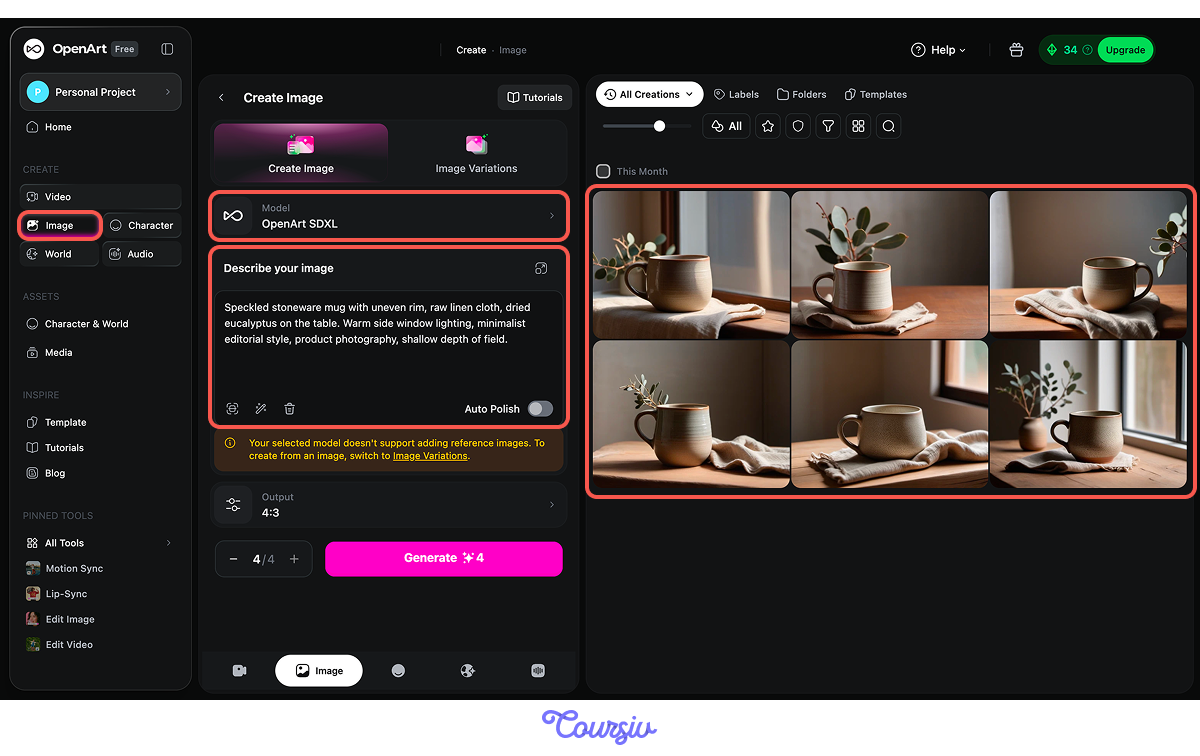
If you work in OpenArt, choose image generation and pick a Stable Diffusion model. It is called OpenArt SDXL.
Start by generating several variations using your refined prompt. In most Stable Diffusion interfaces, you can set the batch count and generate multiple options in a single run. Don't pick a winner immediately: look for the best image for your purpose.
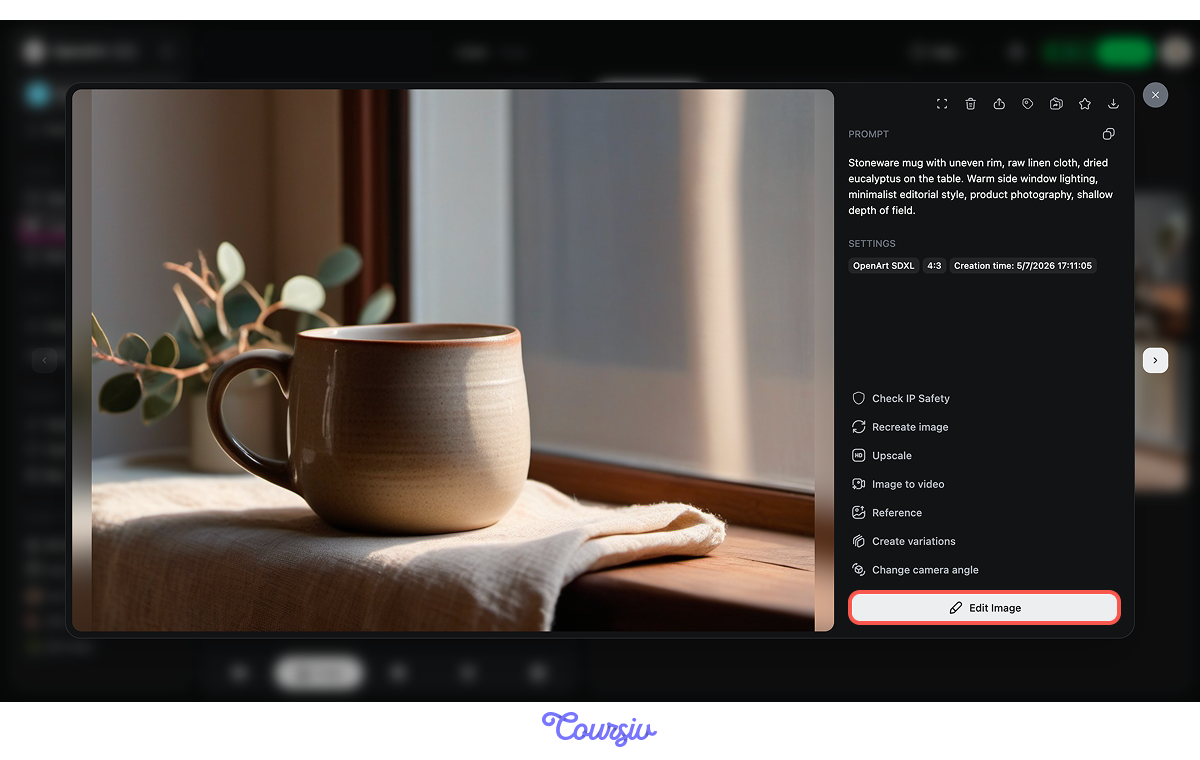
Once you've selected your strongest output, use Edit Image to fix small issues: a slightly warped rim, an unnatural shadow edge, or a background element that distracts from the product.
Not All Product Images Look the Same
The studio-style hero shot is just one type of product image. A lifestyle scene — the mug in someone's hands on a rainy morning — sells a feeling instead of just an object.
Each style serves a different purpose:
- Hero shots drive purchases on listings.
- Detail shots build trust in quality.
- Styled sets show range.
- Lifestyle images stop the scroll on social media.
The strongest image sets include all four. And the best part — you can take a single product shot and repurpose it into a social-ready visual without generating from scratch. Let's do that next.
practice preview
Interactive practice
Fill in the blank
Write a Stable Diffusion prompt for an Instagram lifestyle image featuring the same ceramics brand.
Great Work!
Notice the shift: now the image tells a story, whereas the previous shot presented a purchase. Both are sellable, but to different buyers for different purposes. A client selling ceramics needs both, and now you can deliver both from a single brief.
Choose one
A coffee roastery asks you to deliver two images: one for their website product page and one for an Instagram post. You've generated both. Which image will be the best fit for an Instagram post?
practice preview
Interactive practice
Put in order
Arrange these steps in the correct order to go from brief to finished image set.
That's the full workflow — brief to prompt to batch to refinement to set. Each step narrows the gap between "AI-generated image" and "professional visual asset." This sequence works whether you're building your own portfolio or delivering to a client.
Turning Image Skills Into Income
You now know how to produce product shots and social visuals. The question is how to get paid for it. AI image generation opens several monetization paths — and the one you choose depends on whether you want to sell assets, sell services, or build a recurring workflow.

Selling image packs on creative marketplaces is the most passive route. A set of 10-20 product mockups for a specific niche can sell repeatedly without additional work after the initial creation. Price these based on the niche's willingness to pay.
Offering image generation as a service for clients is faster money with higher margins. Small businesses need 5-10 product images and a set of social visuals every month. Package this as a flat-rate monthly deliverable.
Whichever path you choose, your portfolio is the sales tool. Show the before (a vague product idea) and the after (a polished, consistent image set). Describe who the images were made for and what business problem they solve.

- Sellable AI images start with four visual decisions: Subject detail, surface, lighting direction, and mood, all driven by the brief.
- Specific prompts produce commercially usable output: Add enough specific details and be precise.
- Product shots and social visuals serve different purposes: Listings need clarity, social needs emotion, and a professional delivers both.
Next Up — Creating Client Designs
In the next lesson, you'll apply these skills to the client design workflow — learning how to turn messy client requests into structured design briefs and use Canva AI to deliver branded, polished assets ready to hand off.
Let's keep going!