AI-Powered Creative Income · Create Profitable Content
Video Workflows
Generate professional video clips
Video Workflows With AI
Imagine this: A client asks, "Can you make a short video for our Instagram Reel?" You've never produced videos before. A year ago, that question would've ended the conversation. Today, AI video tools generate broadcast-quality clips from a text prompt rapidly.
Let's get started!

Why Short-Form Video Is the Next Revenue Layer
Videos are valuable. Short-form video drives the highest reach and discovery on Instagram and TikTok. Brands that need product photos almost always need video too — and the creator who offers both wins the full budget.
Step 1: The Shot Plan
Video adds a new layer: motion. You need to define not just what's in the frame, like in the case of an image generation, but what moves, how the camera behaves, and what the viewer hears.
A shot plan is a one-line description per clip that covers subject, action, camera movement, and audio.

For a coffee brand product video, a shot plan might look like this: "Close-up of coffee beans pouring into a ceramic bowl, camera slowly pulling back to reveal a steaming cup, warm ambient café sounds." That single sentence contains:
- Subject: beans, bowl, cup
- Action: pouring, steam rising
- Camera: slow pull-back
- Audio: café ambience
Your Main Tool
Omni (Gemini) conversationally generates up to 10-second clips with native audio — dialogue, sound effects, and ambient sound generated alongside the video.
It supports reference images for character and product consistency, and scene extension for building longer sequences.
Step 2: Generating in Omni
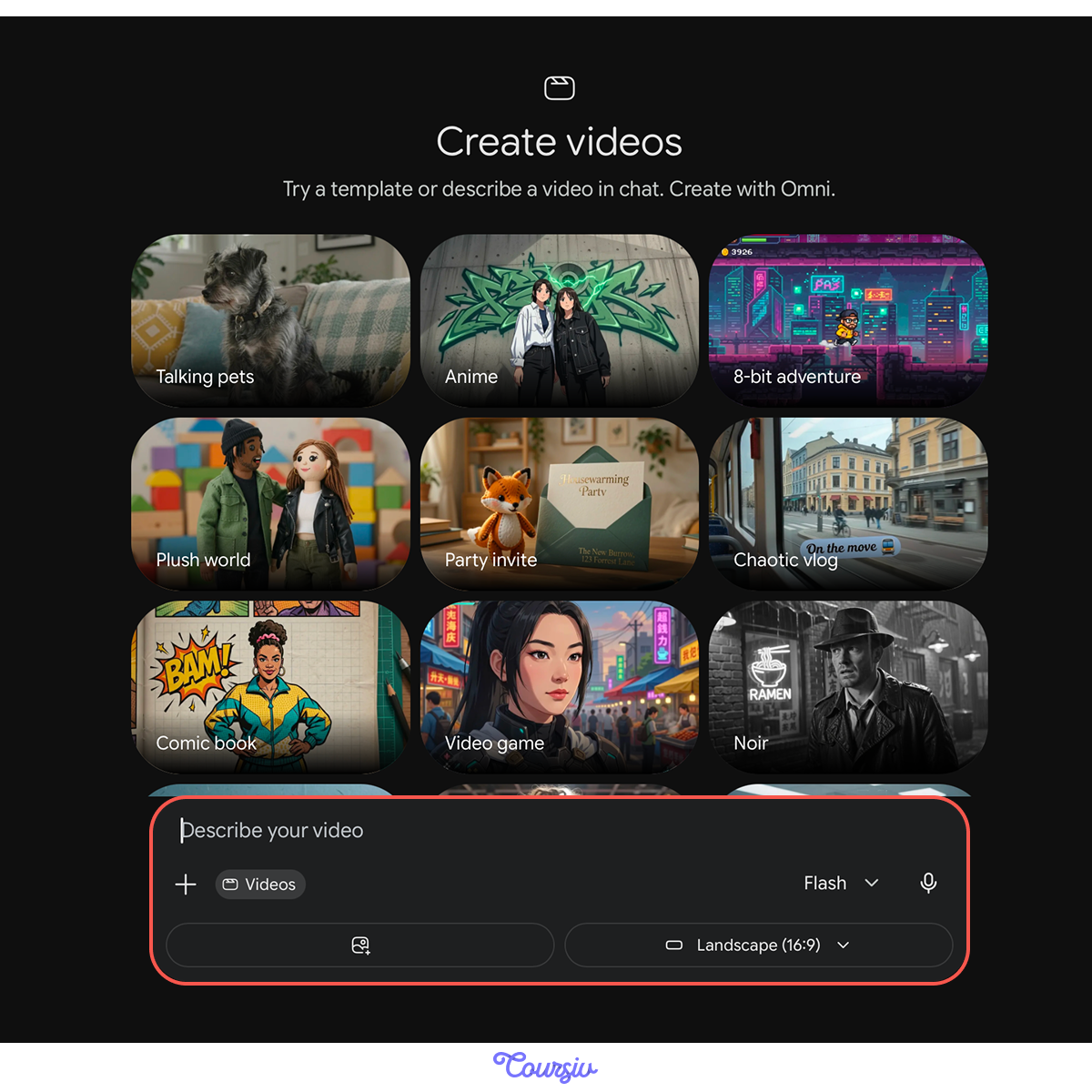
You can generate videos with Omni directly in Gemini. Click on "+" and select "Create video."
Prompt your shot plan. Set aspect ratio to 9:16 for Reels/TikTok or 16:9 for YouTube/web. Omni will generate a 10-second clip with synchronized audio in one pass.
Step 3: Creating Fast Variations
Before trying to create polished clips right away, test your ideas quickly. Let's create a first draft for a local candle studio.
practice preview
Interactive practice
Fill in the blank
Generate a quick concept variation of the candle teaser to test a mood.
The Next Iteration
The video is here, but the mood doesn't match the soft craft-candle vibes. Let's generate another version: more detailed and with a different mood.
practice preview
Interactive practice
Fill in the blank
You've tested your ideas. Create a short product teaser for a handmade candle brand. Write a shot plan for the hero clip.
If you're generating multiple clips for the same brand, use Omni's reference images feature.
Upload up to three images of the product. The model uses them to maintain consistent packaging, colors, and branding across every clip. This is what turns a collection of random generations into a cohesive video set.
Step 4: Building a Multi-Clip Sequence
Most short-form content that performs well is 15-30 seconds — three to four clips edited together. Your shot plan should cover the full sequence. A simple product video structure:
- Opening hook: 1-3 seconds, eye-catching detail
- Product reveal: 3-5 seconds, full product in context
- Use moment: 3-5 seconds, product being used or enjoyed
- CTA frame: 2-3 seconds, brand name or call to action
This is how it looks!
To build a 30-60 second sequence, you can generate individual clips for each shot in your plan — hook, reveal, use moment, CTA — using the same reference images for visual consistency. Then assemble them in CapCut, where you can trim, reorder, add transitions, and adjust audio levels.
practice preview
Interactive practice
Put in order
Arrange these steps in the correct order to produce a finished short-form video from a creative brief.
Where Video Earns Money
AI video opens three distinct revenue streams:
- Client services: Adding video to existing image and design packages increases your project value by 40-60%.
- Content licensing: Short product clips, lifestyle loops, and ambient videos sell on stock platforms like Artgrid and Shutterstock.
- Platform monetization: TikTok's Creator Fund, YouTube Shorts revenue sharing, and Instagram bonuses all pay creators based on views.
Platform Monetization Quick Guide
If you're building your own content rather than serving clients, short-form video platforms pay directly.
TikTok Creator Rewards requires 10K followers, 100K views in the last 30 days, and videos must be original and at least one minute long. It's available in the US, UK, Germany, France, Japan, South Korea, Mexico, and Brazil.
YouTube Shorts shares ad revenue once you hit 1000 subscribers, plus either 10M Shorts views in 90 days or 4000 watch hours on long-form content. A lower tier at 500 subscribers unlocks fan funding features such as Super Thanks, Super Chat, and Super Stickers, along with other creator tools.
Instagram Reels offers bonuses through invitation-based programs that are not open to self-enrollment. This program varies by region.
The same short clip can be adapted across all three platforms.
Pricing Video Into Your Services
Whether you're earning from platforms or from clients, video increases your income. But the fastest return comes from adding video to the client packages you already offer.
Let's calculate what that looks like.

practice preview
Interactive practice
Fill in the blank
Use Claude to help you calculate a fair price increase for adding video to an existing client package.
That's the Math
Less than 8 hours of additional work nearly doubled the package value. Video is the high-leverage upsell among your services — and now you know how to price it.
- Video prompts need four elements: subject, action, camera movement, and audio direction. A shot plan defines all four before you generate.
- Use Omni for fast concept testing and polished production — sketch before you paint.
- A sellable video isn't one clip — it's a 3-4 clip sequence with a hook, reveal, use moment, and CTA.
- Adding video to existing client packages increases project value by 40-60% without proportionally increasing your workload.
- Platform monetization (TikTok, YouTube Shorts, Instagram Reels) lets you earn from your own content while building a portfolio that attracts clients.
Next Up — Audio Workflows
You can now produce images, designs, and videos from a creative brief.
In the next lesson, you'll add the layer that makes all of it feel finished — audio. You'll learn to generate voiceovers, narration, music, and sound design, turning flat content into polished work that sounds as professional as it looks.