Claude · Claude Essentials
Working With Projects
Organize long-term thinking
Working With Projects
Have you ever started a new chat to continue working on something, only to realize that AI doesn't remember what you discussed before?
You end up re-explaining your goals, repeating constraints, and rebuilding context from scratch. The more complex the task, the more frustrating this gets.
Claude's Projects is a feature designed to solve exactly this. Let's see how it works!

Scenario: Planning a Renovation
Imagine you're planning a home renovation. You want to:
- Estimate a rough budget
- Think through the order of work
- Compare materials
- Revisit decisions as new constraints appear
You open Claude and start asking questions.

Choose one
What's most likely to happen if you plan a multi-step renovation entirely in separate, one-off chats?
Feeling the Friction
You ask about flooring, then about plumbing and lighting.
Each answer is helpful on its own — but none of them "remember" the bigger picture you're building. Earlier constraints fade unless you restate them.
The problem isn't Claude's reasoning. It's the lack of a stable frame.
A Different Approach
This is where Projects come in. It is a dedicated workspace where you set up your context once, and Claude carries it across every conversation inside it.
To create a project, go to Projects → New Project, give it a name and a short description of what it's for.
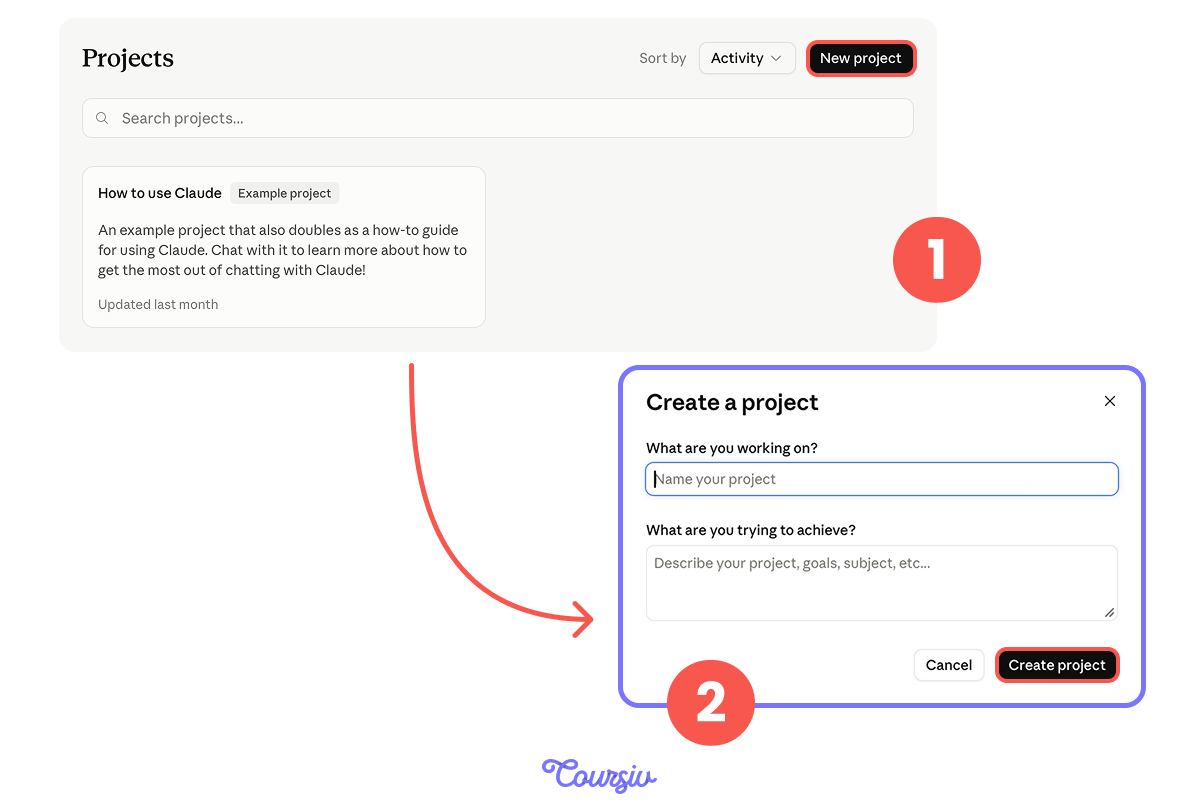
Then, there are two spaces to fill:
- Instructions: your goals, constraints, and preferences in plain language.
- Files, where you can attach any documents related to your work.
On higher-tier plans, a Project also has a "Memory" block, where Claude can hold onto details it learns as you work — and that Memory stays scoped to just this Project. If you don't see it, don't worry: your instructions and files already carry the context that matters most.
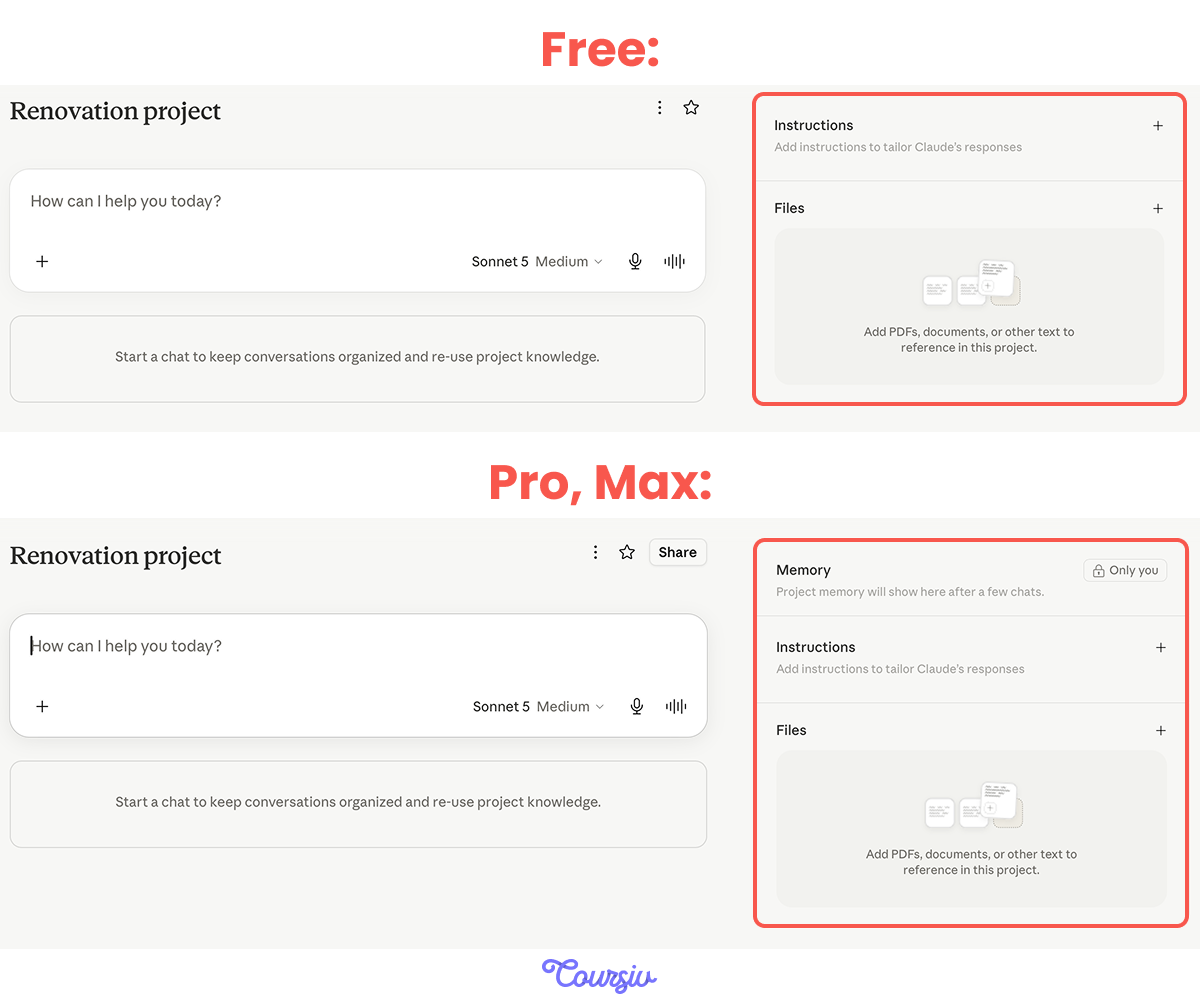
As a result, every time you start a new chat inside the Project, Claude will automatically see those instructions and files. You don't paste them again — they're just there.
It's like giving Claude a briefing before every conversation, without actually having to brief it every time.
In the context of renovation planning, this approach will make Claude keep and always see:
- The overall goal
- Previous decisions
- Constraints you've already discussed

Setting Up a Project
To set up a Project, start by describing context in the "Instructions" block.
For example:
- The size of the apartment
- Your rough budget range
- The rooms involved
- What matters most (cost, speed, quality, or style)
It will become the foundation that everything else builds on.
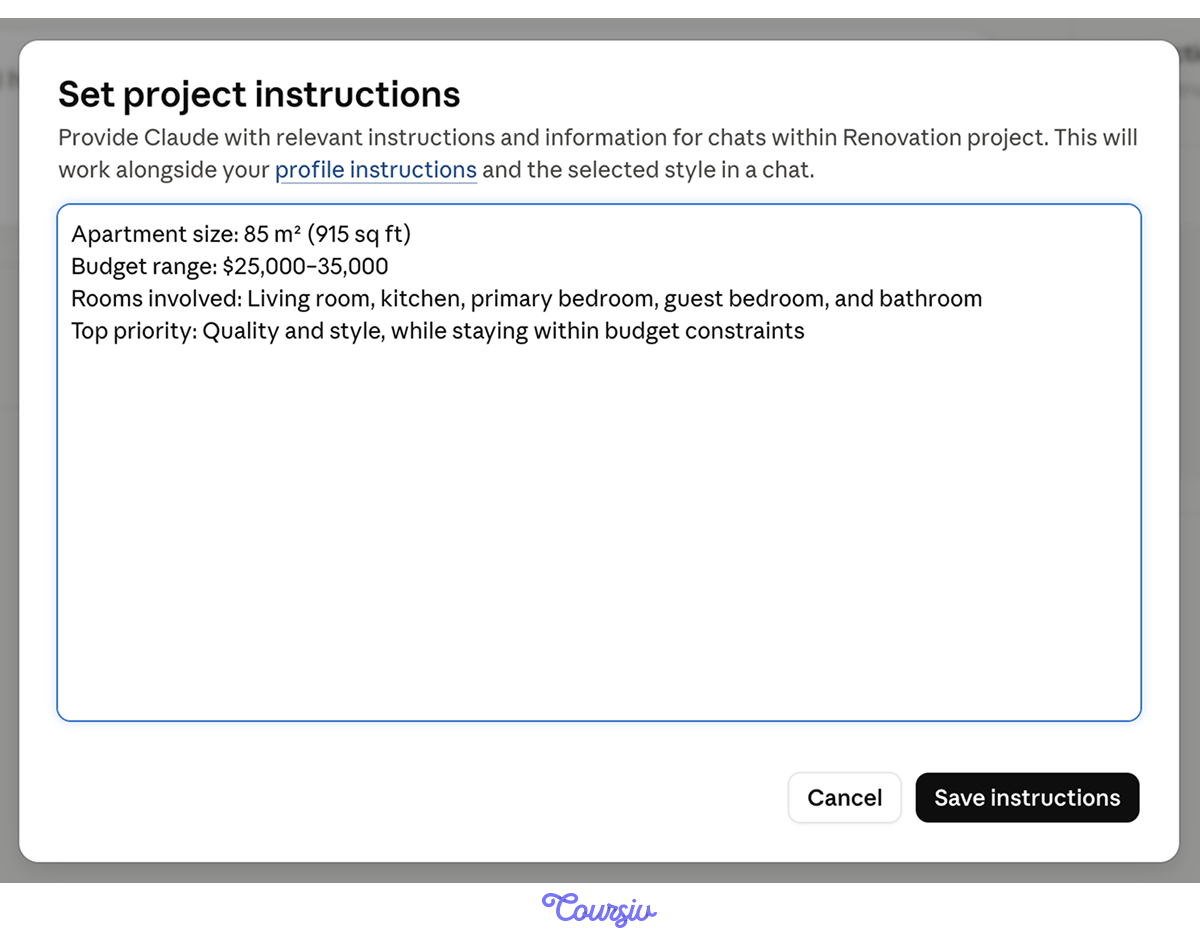
In addition, you can also break the plan into phases and instruct Claude on:
- What should happen first
- Which steps depend on others
- Where decisions can wait
This will help Claude memorize the overall plan and respond effectively in every chat inside the Project.
To make this clearer, imagine you want to discuss flooring and lighting separately without mixing everything into one long chat.
With a Project set up, you can simply open a new chat inside it for each phase:
- One for flooring
- Another for lighting
- A third one for plumbing
Each chat stays focused, but Claude will still know your overall budget, priorities, and earlier decisions.
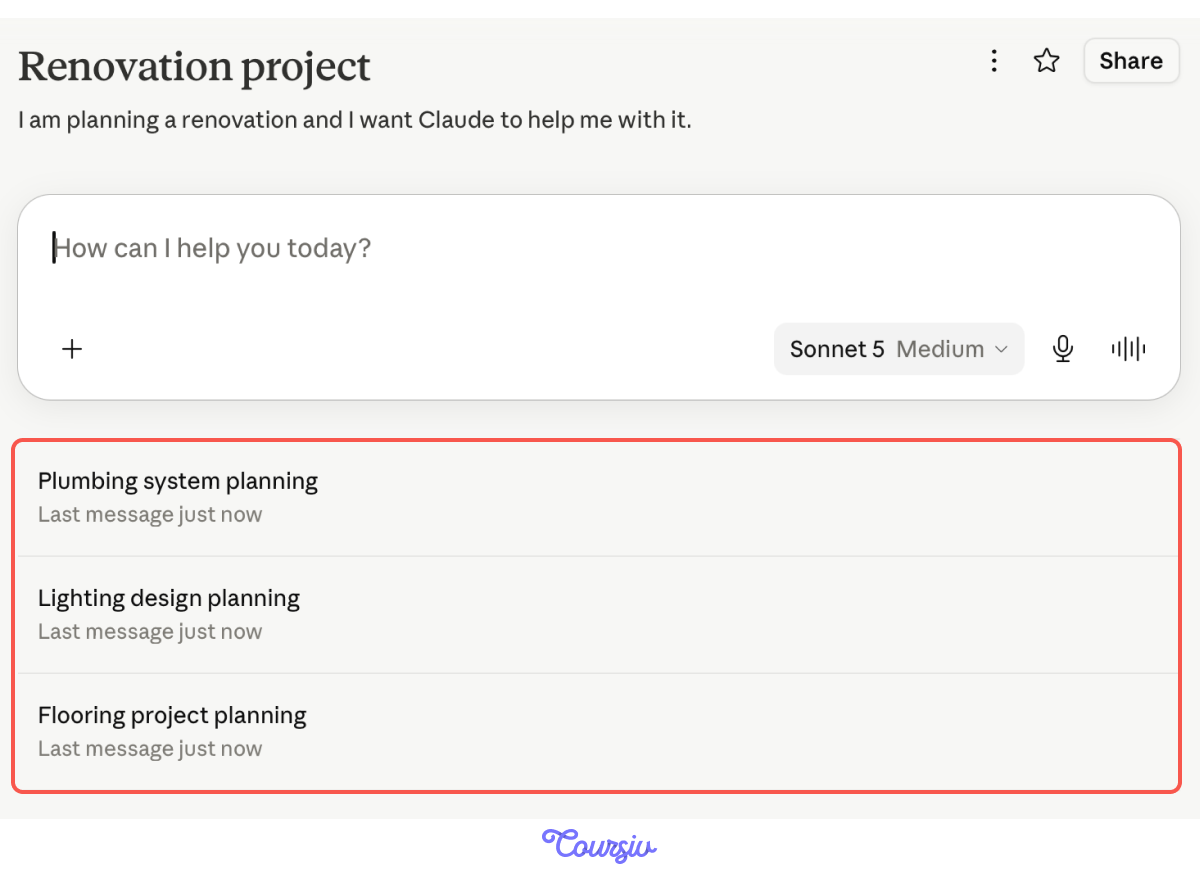
This gives you two things at once:
- You're no longer re-explaining your full situation every time you ask a question — Claude already has the context.
- You keep everything organized, with each phase in its own conversation instead of buried in one endless thread.
Revising Without Resetting
Now, imagine that a week later, you get new contractor quotes — the budget changes. Does it mean that you should start it all over again?
Before Projects, this would've indeed been an issue. But with this feature, not at all!
Choose one
A week later, you receive new contractor quotes and your budget changes. What do you think is the best way to handle this in Projects?
Choose one
You update the Project instructions: the budget drops from $30k to $15k. In your next chat about flooring, what should you expect from Claude?
That's the core idea behind Projects: they're not a one-time setup you need to get perfect — they're a living workspace where context builds up gradually, and priorities can shift.
Claude keeps up without losing the thread.
A simple pattern that works well:
- Set the direction.
- Explore options.
- Revisit decisions.
- Adjust constraints.
- Refine the plan.
Projects Aren't the Same Everywhere
You may have seen a Projects feature in other tools like ChatGPT. The basics rhyme — group conversations, add instructions and files — but Claude leans hard on continuity: earlier decisions in a Project actively shape later suggestions, so the work compounds rather than just staying organized.
Where Claude's Projects Shine
Claude's Projects feel strongest when the work itself is evolving. They're especially useful for:
- Planning that requires revisiting assumptions
- Long-form writing with a consistent direction
- Learning complex topics over time
- Comparing options and tradeoffs repeatedly
In these cases, continuity isn't just convenient — it actively improves the quality of thinking.
practice preview
Interactive practice
True / False
Decide whether the task is worth setting up a Project for.
practice preview
Interactive practice
True / False
Decide whether the task is worth setting up a Project for.
practice preview
Interactive practice
True / False
Decide whether the task is worth setting up a Project for.
Wrapping Up
You've seen how Projects keep your work connected: instructions and files you set once and separate chats that all share the same context. This way every conversation starts informed instead of blank.
In this lesson, we used renovation as an example, but this feature applies to anything that involves ongoing, multi-stage work:
- Marketing plans
- Business strategies
- Research
- Content development
- Event planning
Any time decisions build on each other over days or weeks, Projects will keep everything connected.
What's Next?
In the next lesson, you'll go one step further by working with Artifacts — a powerful feature that lets you build, revise, and refine something tangible.
That's where your creativity starts to take real shape. See you there!