AI Essentials for Project Managers · AI Project Management
From Goals to Plans in Minutes
Create trackable project plans in minutes
The Two-Week Deadline
Your boss just dropped this: "We need to launch the new website in two weeks. Can you put together a plan?"
Two weeks. A whole website launch. Where do you even start?

The Blank Planning Document
You open a fresh doc to start planning. The cursor blinks. Your mind races through dozens of tasks, but nothing's organized yet.
Pretty stressful situation, isn't it?

In these circumstances, you would probably:
- Spend an hour brainstorming every possible task
- Copy a plan from a previous project (that might not fit)
- Google "website launch checklist" and adapt it
- Schedule a meeting to figure it out somehow
All of these take time you don't always have. So, let's try something faster.
practice preview
Interactive practice
Fill in the blank
Ask ChatGPT about your website launch in the simplest way.
Choose one
Is this plan helpful for your two-week deadline?
See the problem? Generic prompts get generic results. You need to be specific about what you want: timeline, milestones, and daily tasks.
Let's try again with more detail.

practice preview
Interactive practice
Fill in the blank
Complete the prompt that asks ChatGPT to turn your deadline into an actionable plan.
Choose one
Was it more useful than the first attempt?
The first prompt was vague, so ChatGPT gave an ambiguous answer. With the second prompt, ChatGPT used details to turn a vague goal ("launch a website") into concrete milestones and daily tasks. You didn't have to think through every step — AI generated the structure, and you can now refine it based on your specific needs.
This way, you have a solid AI-built plan! The strategy is clear, the phases make sense, and you can see the path to launch day.

The Tracking Problem
You've got your plan. But now what? Let's be honest about what happens next.
Choose one
Think about managing this 2-week plan as a text document. Can you easily see who's doing what, when it's due, and what's blocking progress — just by reading the text plan?
What happens next with your text plan: you paste it into a doc or email. Day 1 goes great — everyone knows their role. But:
- By Day 5, someone asks: "Wait, who's handling the SEO tests?"
- By Day 9, deadlines have shifted, but the doc hasn't been updated.
- By Day 12, nobody's sure what's actually done and what's still pending.
Text plans are great for thinking. Terrible for tracking.

ChatGPT is excellent at creating plans — but plans need to become trackable workflows, and that requires a visual tool.
This is where Asana comes in.
Meet Asana
Asana is a project management tool that turns text plans into visual, trackable timelines.
It's like a bridge between "here's the plan" and "here's how we're actually doing."
But while there are many project tools out there, why Asana?
Three reasons:
- It lets you visualize your timeline, no complex setup needed.
- It's easy to adopt.
- It works perfectly with ChatGPT, thanks to Asana's structure (tasks, owners, dates).
The bottom line: Asana strikes a balance between power and simplicity — robust enough for complex projects, yet simple enough to set up in 10 minutes.
What Asana Does
- Turns tasks into cards you can move and update
- Shows who owns each task and when it's due
- Displays everything on a timeline so you see the full picture
- Updates automatically when things change
- Keeps the whole team synced without endless status meetings
You get your ChatGPT plan, then bring it to life in Asana, where everyone can view and take action on it.
Now, let's see how you can turn your website launch plan into an Asana project.
Step 1: Create and Populate the Project
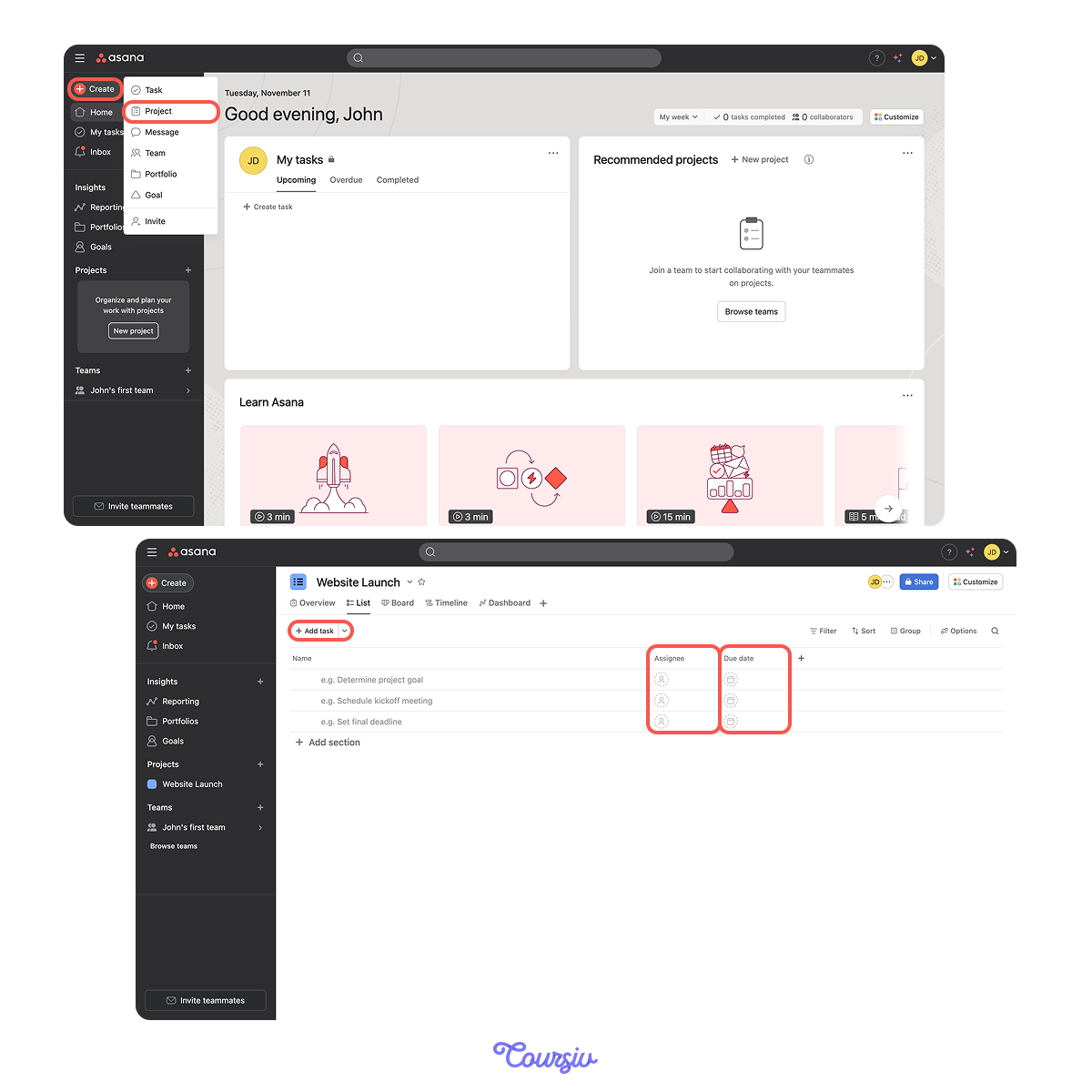
- Click the Create button → Project → Blank project.
- Name it "Website Launch" → Create project.
- Click Add task and enter each task from your ChatGPT plan.
- For each task, click to assign an owner and set a due date.
Your project now has all tasks with owners and deadlines.
Step 2: Switch to Timeline View
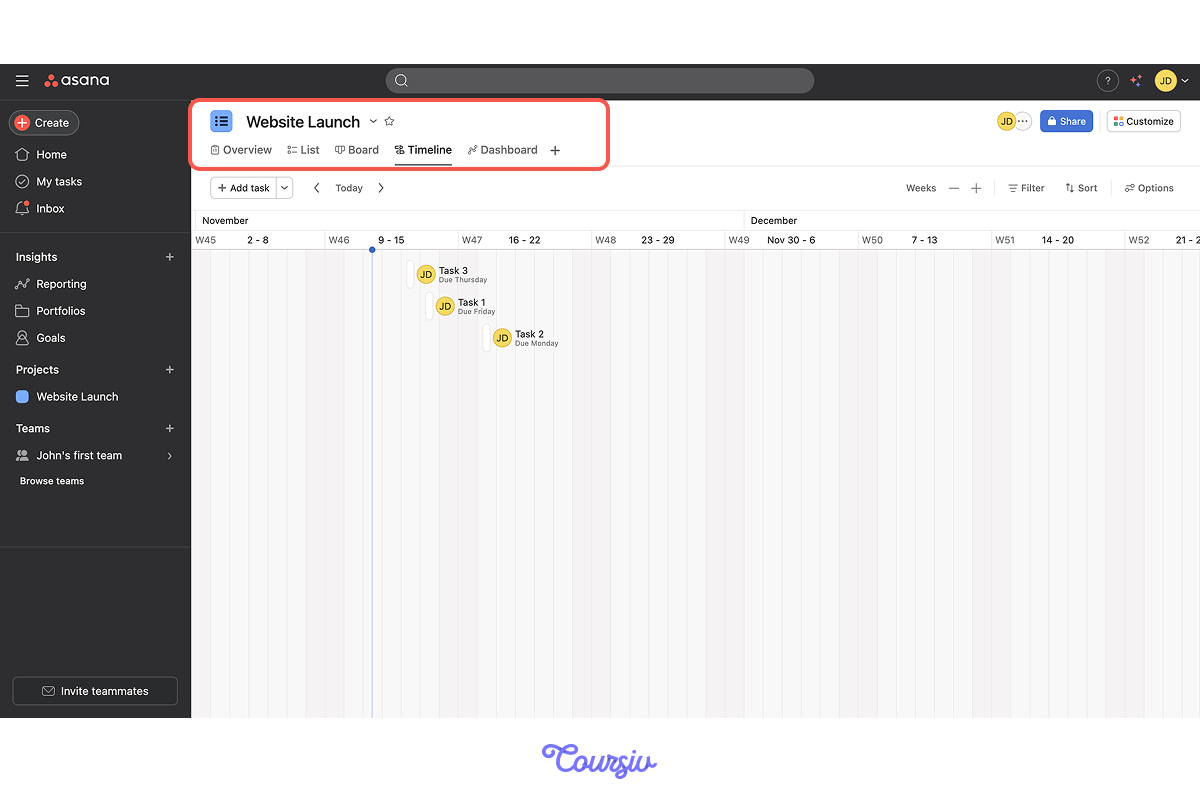
- Click Timeline at the top of your project.
- Your tasks now appear as bars across a calendar.
- Drag any bar to adjust dates.
After that, your 2-week plan will be interactive and you'll be able to see everything on it.
ChatGPT + Asana Together
Now let's see how these tools work as a team. You've got your plan in Asana, but what if you need to make adjustments to it?
Let's say your stakeholder just added a new requirement: "We need to include a blog section with three initial posts."
What should your next move be?
Choose one
How would you handle this situation when a stakeholder adds a new requirement?
practice preview
Interactive practice
Fill in the blank
Ask ChatGPT to update your plan with the new requirement.
Now you take this revised plan back to Asana:
- Add the new tasks ("Write 3 blog posts," "Set up blog section")
- Adjust dates based on ChatGPT's timeline impact
- Reassign tasks if needed
- Timeline view shows the updated schedule instantly
ChatGPT thinks, Asana tracks. Together, they keep your project flexible.
AI plans + visual tools = flexible project management.
When things change (and they always do), you don't start over. You adjust in ChatGPT, update in Asana, and keep moving.
practice preview
Interactive practice
Put in order
Now, let's put it all together by arranging these planning steps in the correct order.
Select all that apply
Next, what's the main benefit of combining ChatGPT and Asana?
Good Job!
You can now turn vague goals into visual, trackable plans in minutes.
In the next lesson, you'll learn how to identify when someone's overloaded before it becomes a crisis, keeping your team balanced and your projects on track.

- Natural-language planning with ChatGPT removes the "blank page" problem and saves setup time.
- Visual timelines in Asana show status, ownership, and deadlines at a glance — keeping everyone aligned.
- Result: you can plan projects 2x faster and adjust easily when priorities shift.