AI Essentials for Project Managers · AI Project Management
Create Trust with Responsible AI Use
Protect privacy, verify outputs, stay accountable
The Trust Problem
Your team starts using AI for project updates. Stakeholders love the efficiency. Then someone asks: "Wait, did you write this report or did AI?"
Suddenly, there's doubt. Are decisions actually yours? Is sensitive data safe? Who's accountable if something goes wrong?
You need answers.

The Invisible Risk
AI tools are powerful, but using them without guidelines creates problems you don't see coming.

Select all that apply
What could go wrong when teams use AI without guidelines?
Choose one
Given these risks, what do you think your AI policy needs to cover?
Choose one
Now, your teammate wants to use ChatGPT to summarize client meeting notes that include their revenue numbers and strategic plans. What's the issue here?
Now that you know why guidelines matter and what they need to address, let's actually look at how they are created.
What to Include in Your AI Policy
- Data privacy: what information you can/can't share with AI
- Human review: which outputs need verification before use
- Transparency: when to disclose that AI was used
- Accountability: who's responsible if AI makes a mistake
- Appropriate use: what tasks fit AI vs. require human judgment
These five areas prevent the most common AI risks.
Choose one
Given that, which of these tasks should require human review before sharing externally?
Now you know what to cover. Let's write your AI usage policy!
To create the first customizable draft, you can use ChatGPT.
practice preview
Interactive practice
Fill in the blank
Ask ChatGPT to create an AI usage policy.
Choose one
Do you think this is a good draft policy?
The first draft is generic. For example, "Be careful with sensitive data" doesn't tell people what counts as sensitive or what "careful" means.
How to improve the prompt: add "with specific examples" and "include clear do's and don'ts for each area."
practice preview
Interactive practice
Fill in the blank
Ask ChatGPT to create a detailed, actionable AI usage policy.
Choose one
What do you think helped make this second draft better than the first?
Choose one
Now your team knows exactly what's safe to automate and what needs human oversight. What should be your next move?
Storing Your Policy in Notion
Let's make your AI policy accessible to everyone who needs it.
- Open Notion and create a new page titled "AI Usage Guidelines."
- Paste your ChatGPT policy into the page.
- Add a "Table of Contents" block at the top (type /toc) for easy navigation.
- Use "Toggle" blocks (type /toggle) for each section so people can expand what they need.
- Add it to your team's workspace sidebar for quick access.
- Share the page link in your team Slack channel.
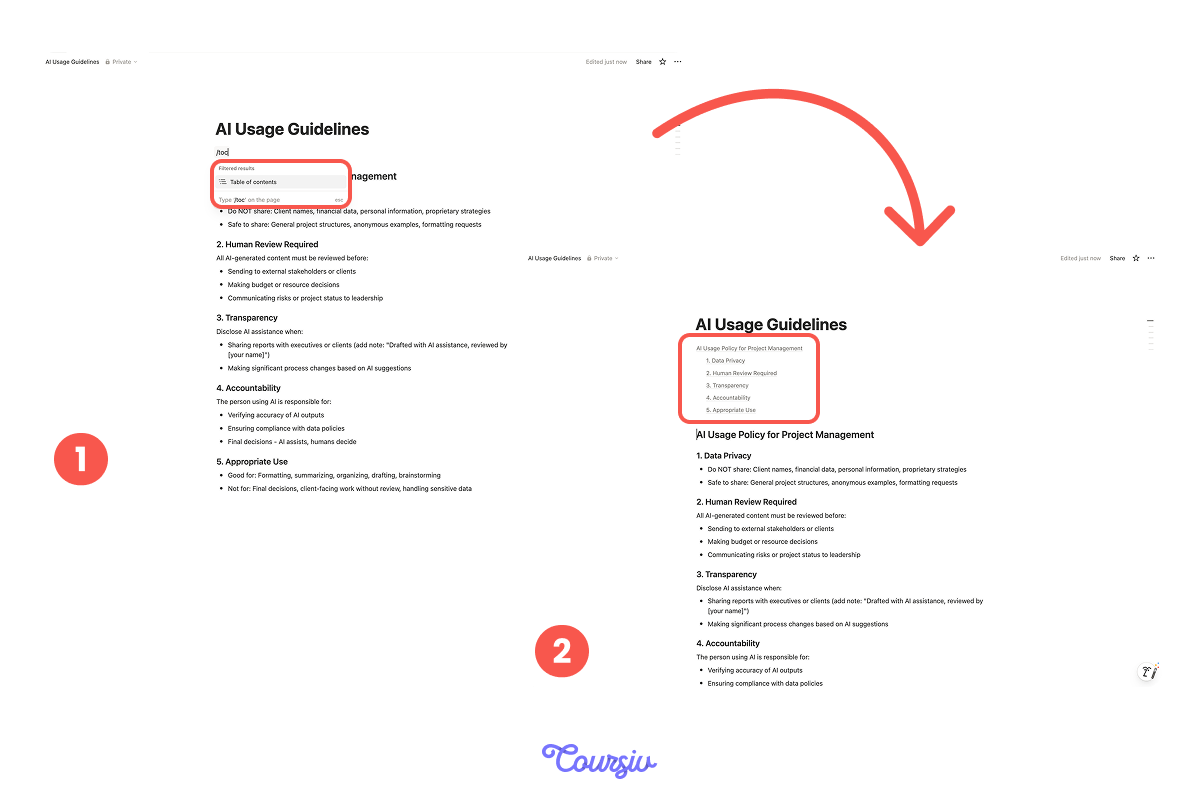
Now your policy is:
- Accessible 24/7 in your shared workspace
- Searchable (team can instantly find answer to their questions like "Can I share client data?")
- Easy to update as tools and needs evolve
Real-World Application
Policies sound good on paper, but it's time to practice with real scenarios now!
Select all that apply
Think about this: your teammate wants to use ChatGPT to draft an email to a potential client about pricing options. According to your policy, how should they handle this situation?
Select all that apply
Another scenario: you need to analyze budget variance for your executive report. What should you do now?
When to Update Your Policy
AI tools evolve. Your policy should too.
Review your AI policy quarterly and update when:
- New AI tools join your workflow (e.g., adding Notion AI)
- Team members ask questions not covered in the current policy
- You discover a gap (someone made a mistake because the guidelines were unclear)
- Industry best practices change (new data privacy regulations)
To update, edit your Notion page, announce the changes in Slack, and explain why the update is essential.
Now that you've built your policy, stored it in Notion, and practiced with real scenarios, let's solidify your understanding of the complete workflow in action!
practice preview
Interactive practice
Put in order
Arrange these steps in the correct order for implementing AI guidelines.
You've Built Something Important!
You're now able to create a system that most teams never think about until it's too late — and that puts you ahead.
Your team will now always have clear, actionable guidelines that prevent data leaks, ensure quality, and foster stakeholder trust. That's not just good practice — it's what sets professional PM teams apart from the rest!

Up next: the final step. You'll create your complete AI project management hub, uniting everything you’ve learned into one streamlined system.
- AI policies cover 5 key areas: data privacy, human review, transparency, accountability, and appropriate use.
- ChatGPT drafts guidelines, Notion makes them accessible and searchable.
- High-stakes decisions and external communication always need human review.
- Update policies quarterly as tools and team needs evolve.