Turbocharge Your Productivity with AI · AI-Powered Productivity
Write Emails and Reports Much Faster
Turn hours of writing into minutes
Draft in Minutes, Not Hours
Writing consumes hours of your week — emails, reports, messages, documentation. What if you could cut drafting time by 70% while improving quality?
In this lesson, you'll master AI-assisted writing that's faster and better, learn when to draft versus edit, and discover how ChatGPT and Grammarly work together. Let's write smarter!

Choose one
First, what's the best use of AI for professional writing?
AI Writing Advantage
Thus, AI doesn't just make writing faster — it makes it better by removing the blank page problem.
Think about what the traditional writing process takes:
- Stare at a blank page (10 minutes)
- Write rough draft (30 minutes)
- Revise multiple times (20 minutes)
Total: 60 minutes
In turn, here's the process with AI assistance:
- Give AI context and requirements (2 minutes)
- Review and personalize draft (8 minutes)
- Polish with Grammarly (5 minutes)
Total: 15 minutes.
Same quality, 75% less time!
Drafting Professional Emails
Emails are usually one of your highest-volume writing tasks. So, let's try applying the above principles with them first!

practice preview
Interactive practice
Fill in the blank
Complete this prompt to create a professional email.
See how AI captured all requirements while maintaining a professional tone? Now you just personalize details, and it's ready.
Cool thing: you can add this prompt to your Notion library!
Writing Reports and Documents
Longer documents benefit even more from AI assistance — structure, flow, and clarity improve when AI handles the first draft.
practice preview
Interactive practice
Fill in the blank
Complete this prompt to outline a professional report.
Perfect structure in 2 minutes. Now you can use this as a template to fill in your specific details and add any relevant context.
This is where AI shines — handling structure so you focus on substance!

Adjusting Tone and Style
The same content needs different tones for different audiences. AI handles these variations effortlessly.
Common tone adjustments:
- Formal → Casual: "I am writing to inform you..." → "Quick update..."
- Long → Concise: 3 paragraphs → 3 bullet points
- Technical → Accessible: "API endpoint latency" → "the system response time"
- Passive → Active: "The decision was made..." → "We decided..."
Tell AI your target audience and watch it adapt.
practice preview
Interactive practice
True / False
Now, given what you covered, decide if this is a good use of AI drafting.
Polish with Grammarly
While ChatGPT drafts the content, you can useGrammarly to ensure your text is polished and professional.
What Grammarly catches that you might miss:
Grammar & Mechanics
- Subject-verb agreement errors
- Comma splices and run-ons
- Inconsistent tense usage
Clarity Issues
- Passive voice overuse
- Wordy phrases
- Unclear pronoun references
Tone & Engagement
- Whether you sound confident or uncertain
- Formality level for your audience
- Readability score
It's your final quality check before sending!
To start using Grammarly:
- Sign up at grammarly.com (a free account works for basics).
- Add browser extension: Chrome, Safari, Edge, or Firefox.
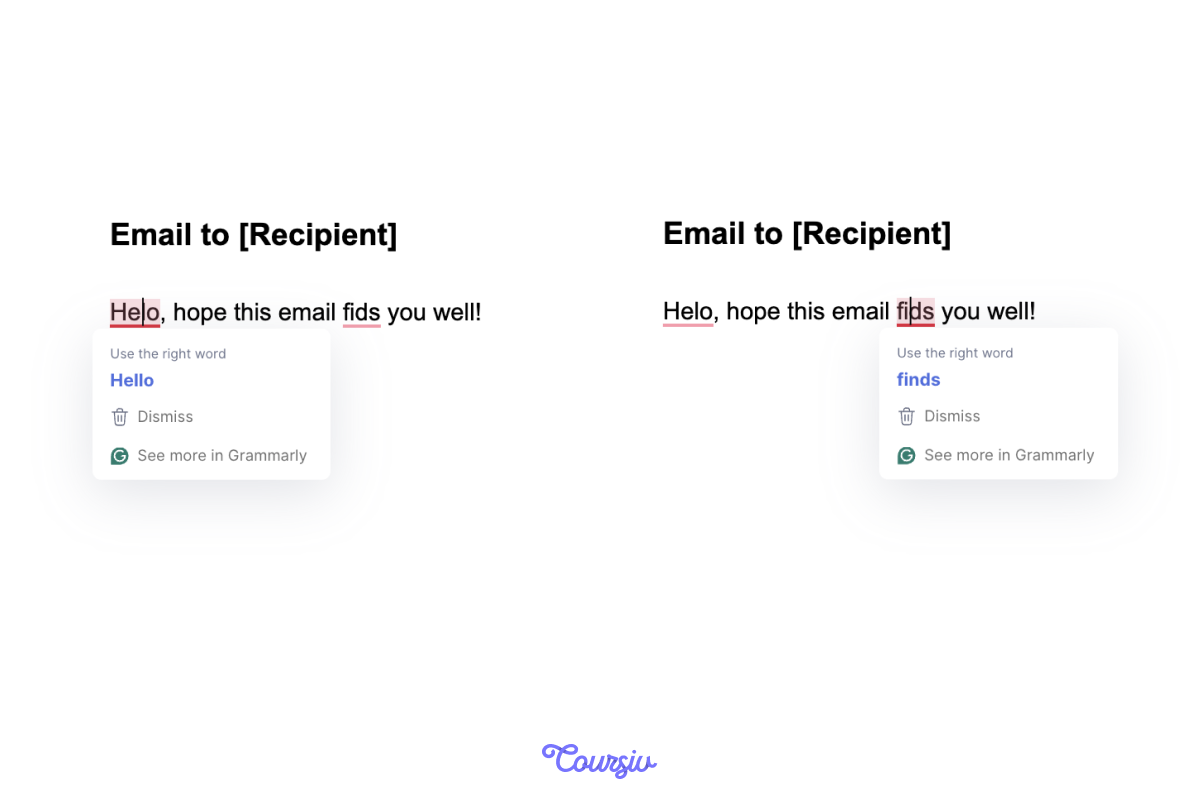
- Start writing anywhere — Grammarly automatically underlines suggestions.
- Click the underlined text to see corrections and apply with one click.
The extension works in Gmail, Google Docs, Notion, and most web-based writing tools.
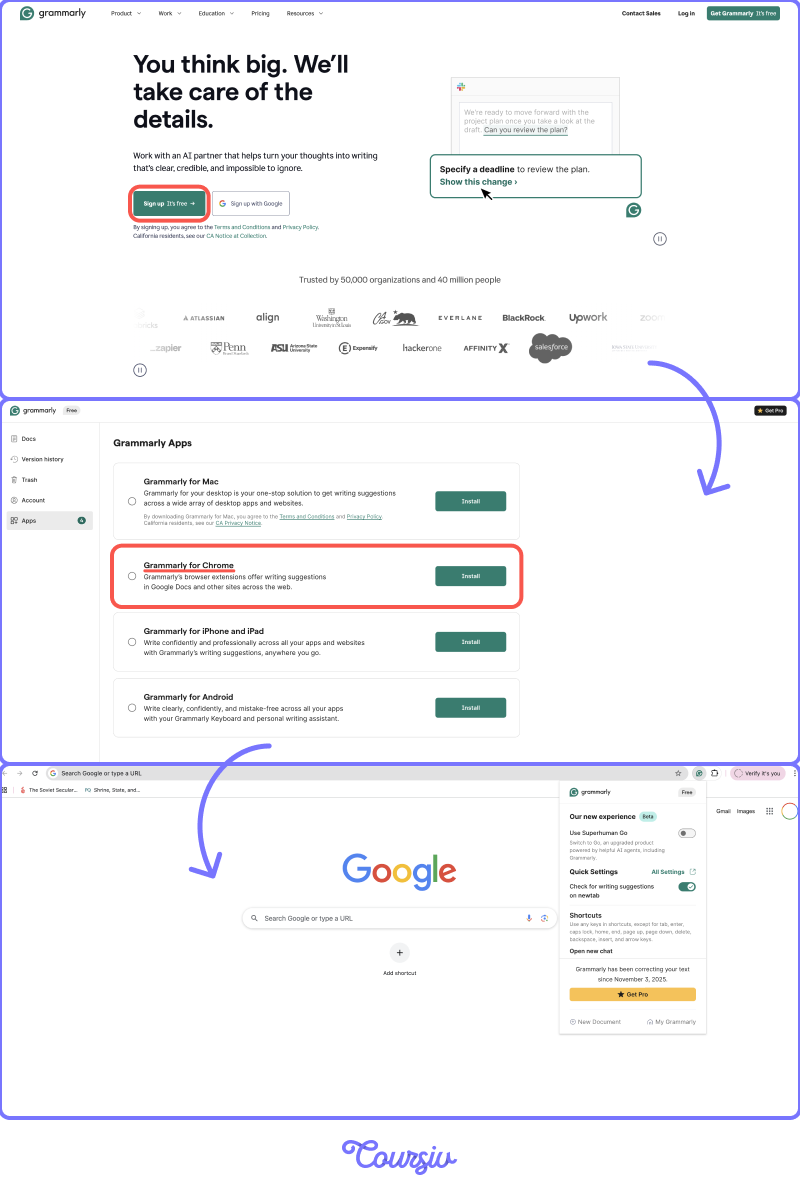
Thus, regardless of where you're working (writing an email or working in Docs), Grammarly will help you with polishing your writing.
practice preview
Interactive practice
Put in order
Now, arrange these steps for AI-assisted writing.
Perfect! This workflow balances between AI speed and human judgment — fast but never careless.
Tip: Most people skip step 3 (personalization) — don't be one of them.
Select all that apply
Once again, what should you always do when using AI for professional writing?
Good, you can now write emails and reports 70% faster!
In the following lesson, you'll learn how to turn scattered ideas into structured documents and presentations — the next level of AI-assisted creation!
- AI-assisted writing cuts drafting time by 70% while improving clarity and structure.
- Always personalize AI drafts with specific context and details only you know.
- Use ChatGPT for drafting and structure, Grammarly for final polish.
- Save your effective writing prompts in Notion for instant reuse.