Boost Your Sales with AI · From Busy to Productive: AI for Sales
Let a Chatbot Answer Questions
Never lose leads to after-hours traffic
Handling the Midnight Prospects
Leads visit your website at 9 PM. They have questions. You're not available. They leave and buy from a competitor who responded.
Now, imagine a chatbot answering their questions instantly and capturing their information for you… Let's make you available 24/7 with AI!
The After-Hours Problem
Let's identify the main problem first.
Choose one
When do most people research products and services online?
Here's the brutal reality: from about 35% to 60% of website traffic happens outside business hours. If you're not available to engage visitors, they're finding someone who is.
A chatbot makes you available 24/7 without you having to work 24/7.

What Chatbots Actually Do
Chatbots aren't trying to replace you. They're buying you time by handling the simple stuff.
What a Sales Chatbot Does
- Answers common questions: pricing, services, availability, process
- Qualifies leads — asks what they need, identifies fit
- Captures contact info — gets name, email, phone before they leave
- Schedules next steps — books calls or sends resources automatically
- Notifies you — alerts you when a hot lead engages
You wake up to qualified leads who already got their basic questions answered.
Imagine a visitor asking "Do you offer payment plans?" at 11 PM gets an instant answer from your bot, shares their email, and schedules a call for Tuesday morning.
Without the bot? They leave, forget about you, and buy elsewhere.
Identifying Your Top FAQs
Before building your bot, you need to know what questions it should answer. Let's figure out your most common ones.

Where to Find Your FAQs
- Your inbox: what do people ask via email most often?
- Sales calls: what questions come up in every discovery call?
- Your team: what does your staff explain repeatedly?
- Competitors: what's on their FAQ pages?
Most businesses have 5-10 questions that cover 80% of inquiries.
Service businesses:
- "What's your pricing?"
- "How long does it take?"
- "Do you offer payment plans?"
- "Do you integrate with [tool]?"
- "What's included in each plan?"
- "Is there a free trial?"
- "What's your return policy?"
- "Do you ship internationally?"
- "Are there bulk discounts?"
Writing Chatbot Responses
Your bot needs to sound helpful, not robotic. Let's use ChatGPT to write responses that feel human.

practice preview
Interactive practice
Fill in the blank
Complete this prompt to write a helpful chatbot answer.
See how the response answers the question but also moves toward a conversation? This approach works because it:
- Answers the question directly
- Provides context (most teams, ROI timeline)
- Natural transition to capturing contact info
Now let's build more responses.
practice preview
Interactive practice
Fill in the blank
Complete this prompt to create a response that qualifies leads.
Perfect! Your bot is now both helpful and strategic — answering questions while qualifying leads. This works because it:
- Confirms you serve them
- Starts qualifying (pain point, team size)
- Feels conversational, not interrogative
Now let's deploy it.
Meet Tidio
Tidio is your chatbot platform. It lives on your website and handles conversations when you're unavailable.
What Tidio Does
- Lives on your site — a small chat widget in the corner
- Responds instantly — answers FAQs 24/7
- Captures leads — collects contact info before visitors leave
- Notifies you — emails/texts when someone engages
- Hands off to you — you can jump in and take over any conversation
Setup takes 10 minutes. Then it runs forever.
Setting Up Your First Chatbot
Let's walk through creating a simple FAQ bot in Tidio.
Tidio Setup Steps
- Sign up at Tidio.com — a free account covers basics.
- Go to "Flows" — add support flow.
- Choose the flow option that you need.
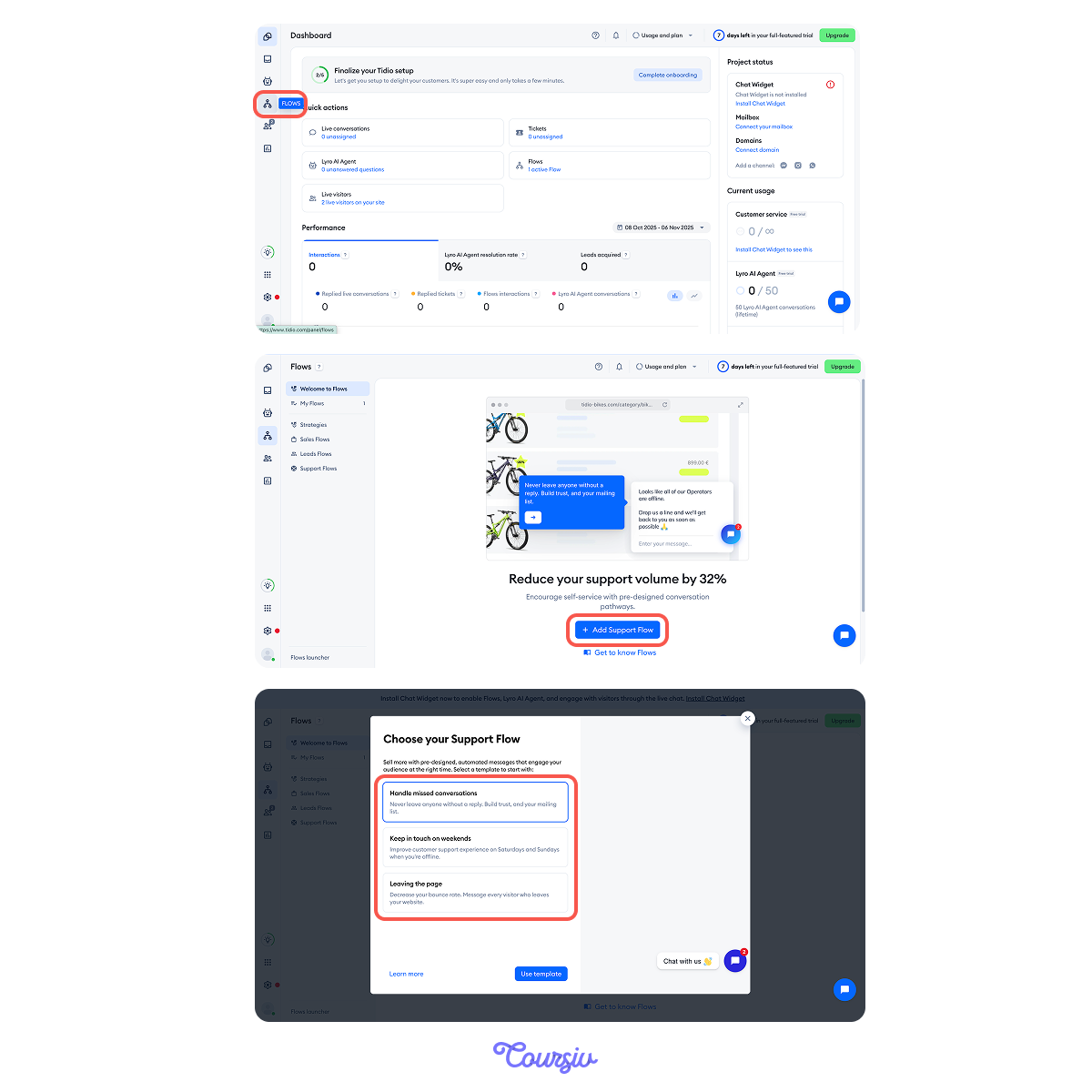
Then, follow these steps:
- Pick "Advanced editing."
- Add your FAQs: paste your ChatGPT responses for each question.
- Set triggers: when the visitor asks X, the bot responds with Y.
- Add lead capture: after answering questions, the bot asks for an email.
- Test it: visit your site in incognito mode and chat with your bot.
- Activate: turn it on and monitor.
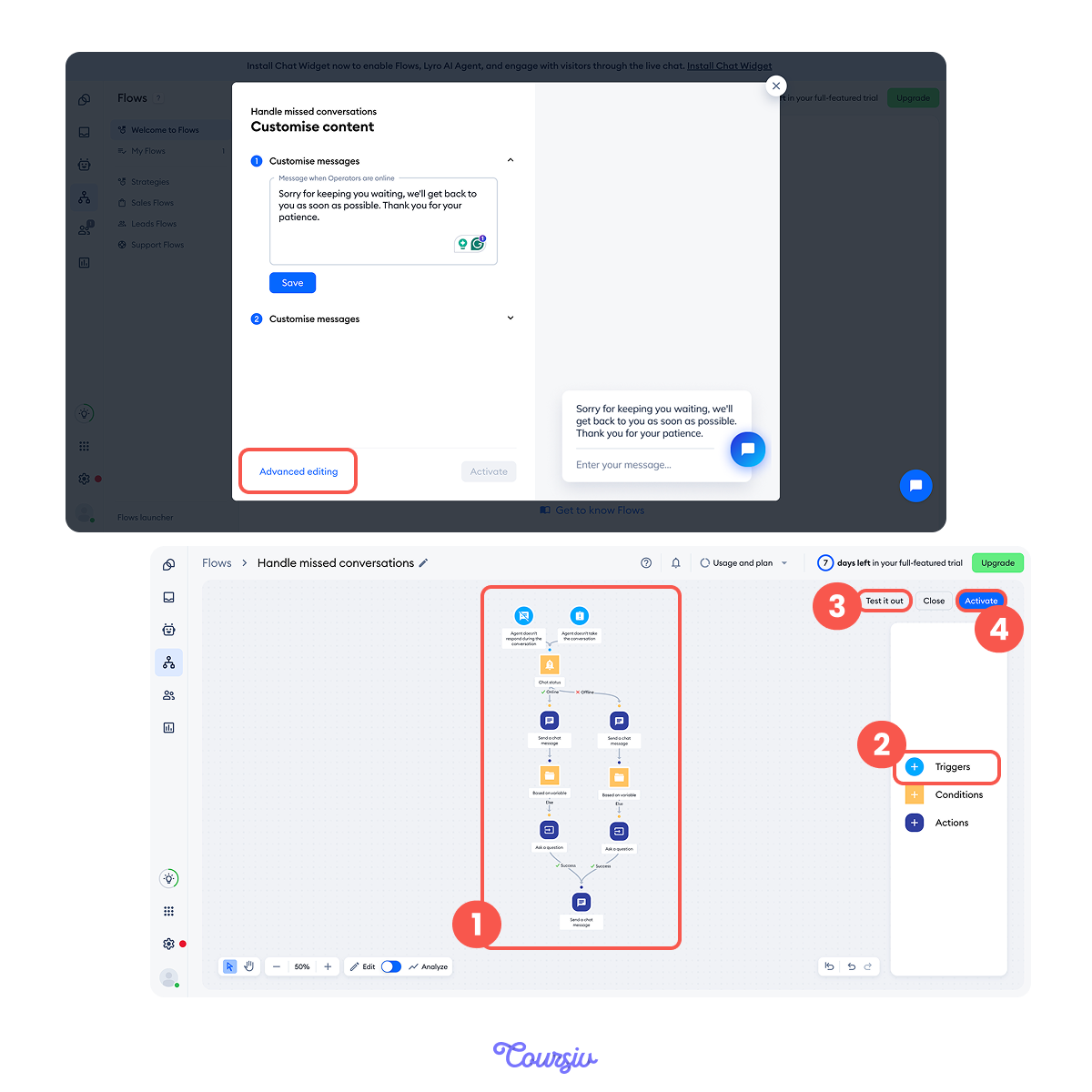
Once active, your bot greets visitors, answers questions, and captures leads while you sleep.
You check your dashboard each morning to see who engaged overnight.
practice preview
Interactive practice
True / False
Decide if this is the right approach.
When Bot Talks vs. When You Talk
Chatbots excel at repetitive tasks — you excel at nuance and closing.
Know when to hand off.
Let the bot handle:
- Basic FAQs: pricing, services, process, availability
- Initial qualification: company size, budget range, timeline
- After-hours inquiries — anything outside your working hours
- Lead capture: name, email, phone number collection
When you take over:
- Qualified leads — bot identifies them, you close them
- Complex questions: technical details, custom solutions
- Negotiation: pricing discussions, contract terms
- Relationship building: personal connection, trust building
The bot gets them to you. You get them to buy.
practice preview
Interactive practice
Put in order
Arrange these steps for launching your sales chatbot.
Perfect! This workflow gets you from zero to 24/7 lead capture in under 2 hours.
Most businesses see their first bot-generated lead within 48 hours of activation.

Select all that apply
Now, what's the main benefit of having a chatbot?
Keep Going!
You're now available 24/7 without working 24/7.
In the next lesson, you'll learn how to analyze your sales calls with AI — finding patterns that help you close more deals!

- 35-60% of website traffic happens outside business hours — chatbots capture those leads.
- Start simple: answer 5 FAQs, collect contact info, offer to schedule calls.
- ChatGPT writes the responses, Tidio deploys them on your site.
- Bots handle repetition and qualification — you handle the sales conversations.